
- Joined
- Dec 12, 2014
- Messages
- 20
- Reaction score
- 29
- Points
- 1
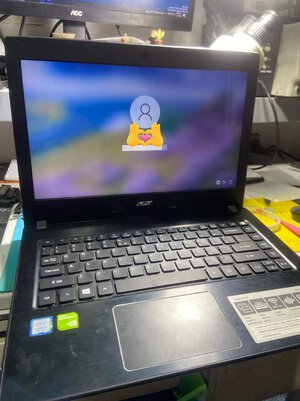
ACER E5-476G Power On After 3 Seconds Automatically Turn Off
My First Step of Troubleshooting is Visual Checking muna upon checking sobrang linis ng Motherboard walang kabakas bakas ng water damages or burn components
2nd Steps is DIODE Mode ako agad sa mga COIL all Coil ay may Normal value which is no posible shorted on Motherboard
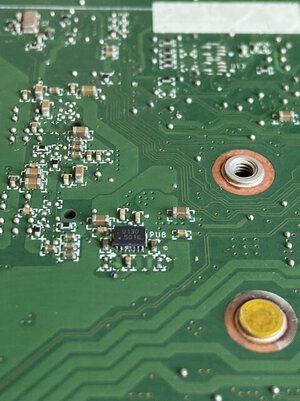
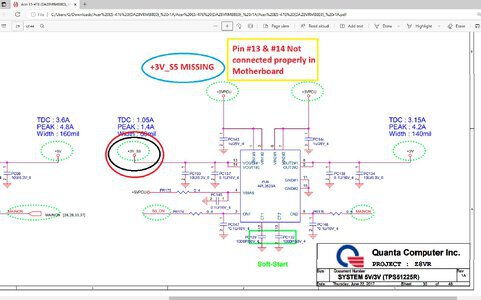
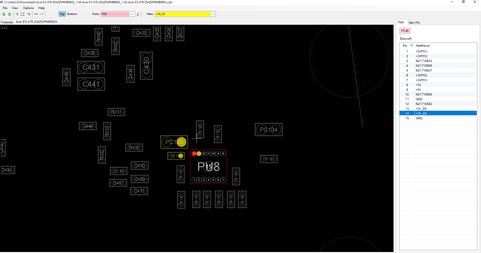
3rd Steps Voltage Checking the Main Voltage Rail is Ok also the Standby Voltage so napa isip nako kung ano posible na issue muli akong nag Visual Checking for the second time and this is what i got Kung hindi itatagilid ang Motherboard hindi makikita na meron na palang Corrosion sa IC na (PU8 ) Pin #13 & #14 is the output of +3V_S5 kaso diko na nakuhanan ng Picture sa kabilang side na ung pads na yun is dina connected properly sa Motherboard.
Solution: Remove (PU8) and check DIODE Mode in Pin #13 & #14 na posible may shorted sa linya which is Normal naman ang reading via Diode Mode and i restore the the missing pad and put again the PU8 IC and BOOM the Laptop Turns On Properly.
TakeNote: Napakahalaga ng Visual Checking sa Pagrerepair dun tayo magkaka idea kung saan tayo mag Start magtroubleshooting pangalawang Tips wag natin basta basta papalitan ung IC na binunot natin kung sa tingin natin ay Ok pa sya at mukang wala naman damages para tipid din sa time of Repairing,And I Thank You
My First Step of Troubleshooting is Visual Checking muna upon checking sobrang linis ng Motherboard walang kabakas bakas ng water damages or burn components
2nd Steps is DIODE Mode ako agad sa mga COIL all Coil ay may Normal value which is no posible shorted on Motherboard
3rd Steps Voltage Checking the Main Voltage Rail is Ok also the Standby Voltage so napa isip nako kung ano posible na issue muli akong nag Visual Checking for the second time and this is what i got Kung hindi itatagilid ang Motherboard hindi makikita na meron na palang Corrosion sa IC na (PU8 ) Pin #13 & #14 is the output of +3V_S5 kaso diko na nakuhanan ng Picture sa kabilang side na ung pads na yun is dina connected properly sa Motherboard.
Solution: Remove (PU8) and check DIODE Mode in Pin #13 & #14 na posible may shorted sa linya which is Normal naman ang reading via Diode Mode and i restore the the missing pad and put again the PU8 IC and BOOM the Laptop Turns On Properly.
TakeNote: Napakahalaga ng Visual Checking sa Pagrerepair dun tayo magkaka idea kung saan tayo mag Start magtroubleshooting pangalawang Tips wag natin basta basta papalitan ung IC na binunot natin kung sa tingin natin ay Ok pa sya at mukang wala naman damages para tipid din sa time of Repairing,And I Thank You
Last edited by a moderator:

