
- Joined
- Feb 8, 2019
- Messages
- 291
- Reaction score
- 233
- Points
- 1
- Location
- Surigao Del Norte. Surigao City
ALL MTK ChinaPhone Remove PASSWORD/PATTERN AND FRP
1.power Off your phone before your start.
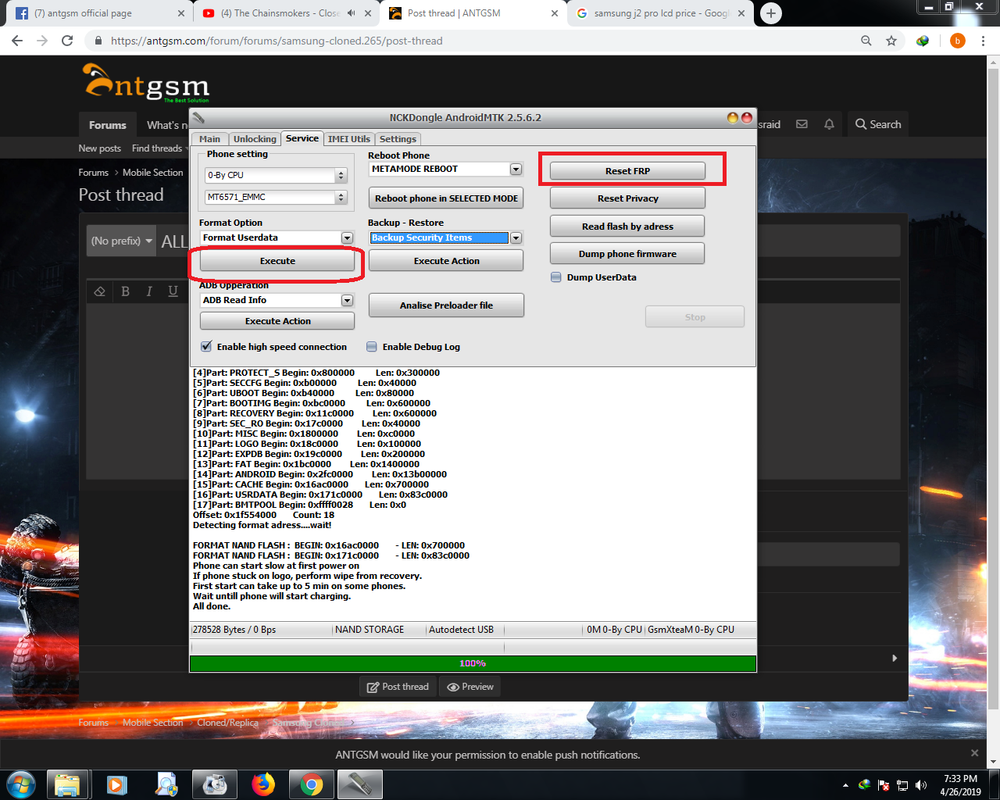
1.Para sa Remove password at PATTERN/PIN/ PINDUTIN ang [FORMAT USERDATA] then insert USB cable to ur PC
2.para sa FRP. Remove Battery then insert again . Click RESET FRP. then conenct PC. boom SUCCSES.
NOTE- para Lang sa MTK
1.power Off your phone before your start.
1.Para sa Remove password at PATTERN/PIN/ PINDUTIN ang [FORMAT USERDATA] then insert USB cable to ur PC
2.para sa FRP. Remove Battery then insert again . Click RESET FRP. then conenct PC. boom SUCCSES.
NOTE- para Lang sa MTK
Last edited:

