C3-00 SuperDongle Key Invalid, Dcc Corrupted, Security Test Failed DONE!!![Reference]
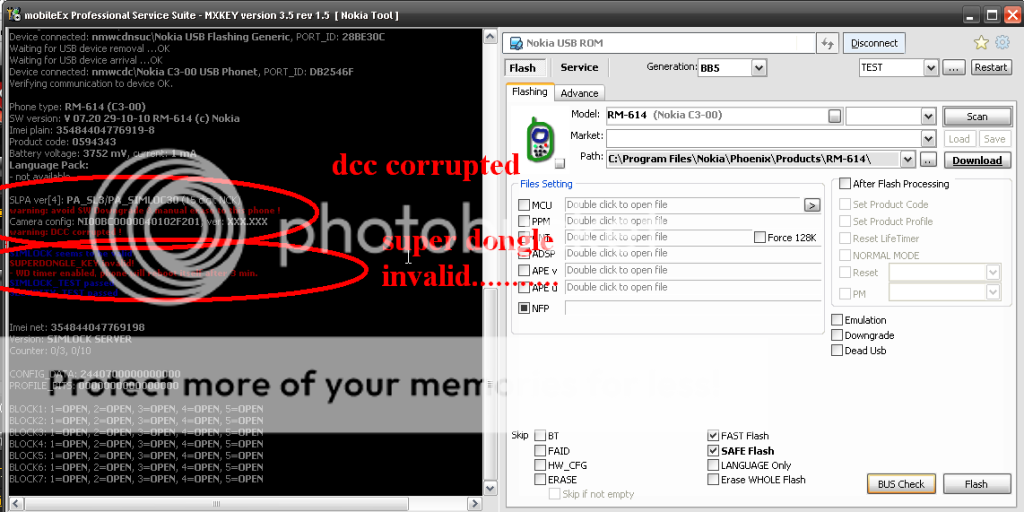
First Step: (Reading muna Tayo)

open mxbox (ito ginamit ko para makita if my error)
connect to Nokia Usb Rom (use cable ca-101 usb)
choose model
attach mcu only
click buscheck (connect phone w/ battery)
then press shortly power button
wait until show the logs
sabi na nga ba eh my error!

Click here to view the original image of 769x385px.
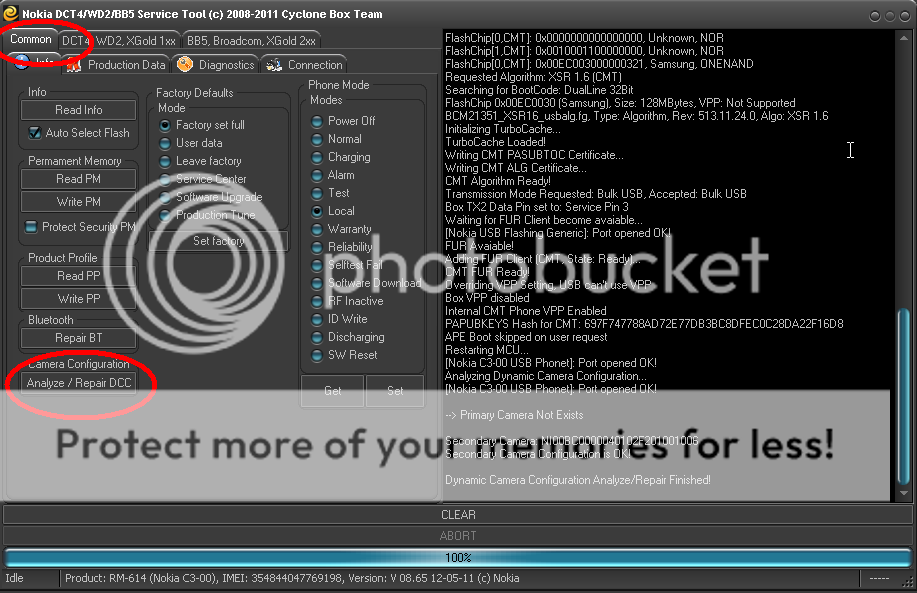
Second Step: (Repair DCC Corrupted)

Open Cyclone (ito ang malupit walang kasing lupit)

Open Nokia Tool
Tick BB5,Broadcom,XGold 2xx
Click Check Flashing Bus
Connect Phone w/ battery (Press shortly power button)
Then goto Common
Click Analyze/Repair Dcc
Wait until Repair Finished
(Close Software)
Click here to view the original image of 769x497px.
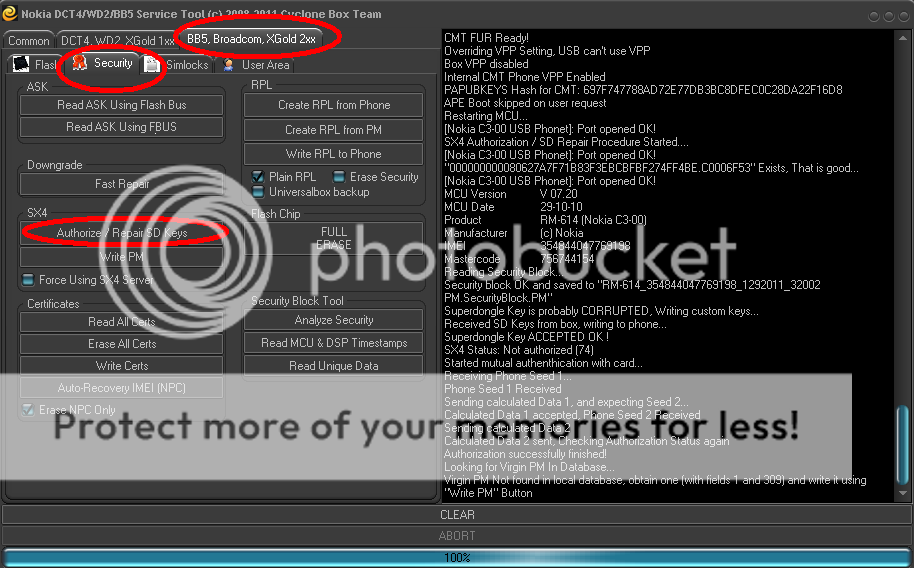
Third Step: (Repair SuperDongle Key Invalid)

Open Cyclone
Open Nokia Tool
Tick BB5,Broadcom,XGold 2xx
Click Check Flashing Bus
Goto Security
click Authorize/Repair SD Keys
Wait Until Authorization Successfully Finished
(Close Software)
Click here to view the original image of 769x478px.
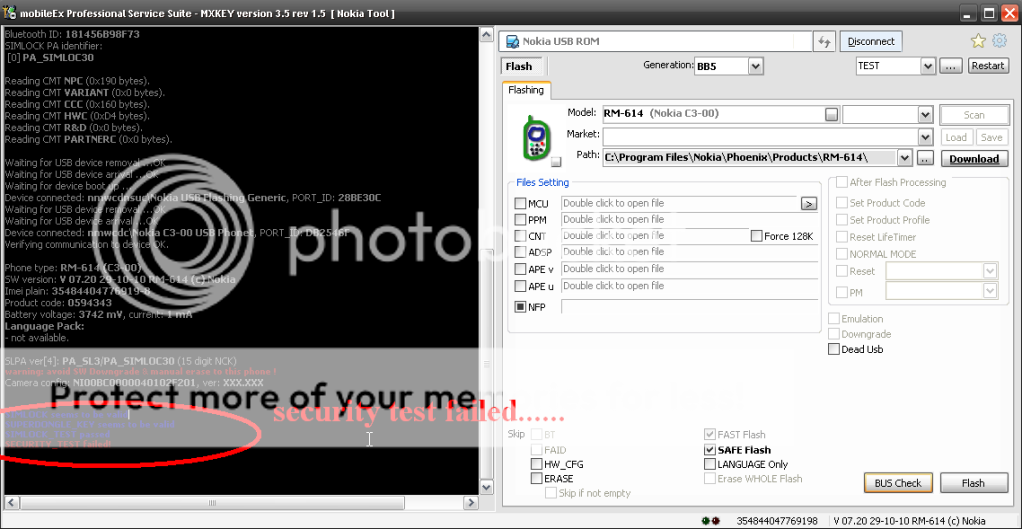
Back To Reading na naman mga ka breads
open mxbox & buscheck
ayos wala na dcc corrupted at SD Key Invalid
ang problem is Security Test Failed naman......
open ko ang unit at CS na......... Paktay!

Click here to view the original image of 769x398px.
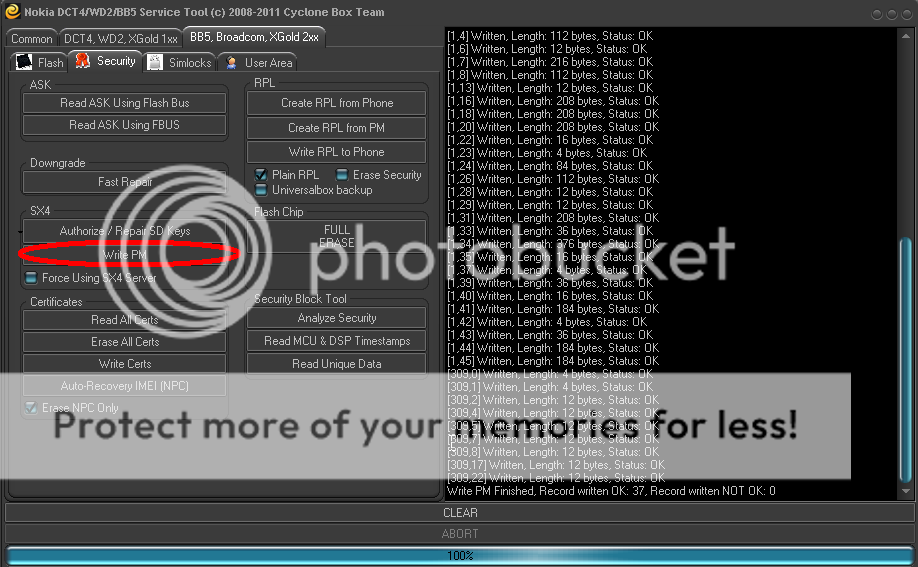
Fourth Step: (Repair Security Test Failed)

Again Open Cyclone
Open Nokia Tool
Tick BB5,Broadcom,XGold 2xx
Click Check Flashing Bus
Goto Security
Click Write PM (ito ginamit ko na PM http://www.4shared.com/file/heUiGznj/1_309.html)
Wait Until Write PM Finished
Click here to view the original image of 769x475px.
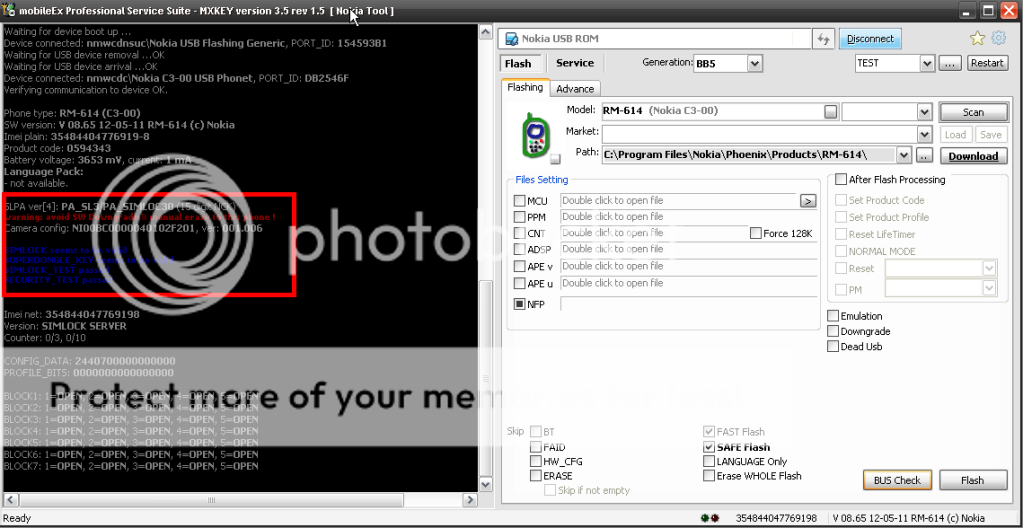
Last Step: (Reading Again)

open mxbox & buscheck (ayos wala ng error)


Click here to view the original image of 769x397px.
Finished Product
Click here to view the original image of 769x577px.

First Step: (Reading muna Tayo)
open mxbox (ito ginamit ko para makita if my error)
connect to Nokia Usb Rom (use cable ca-101 usb)
choose model
attach mcu only
click buscheck (connect phone w/ battery)
then press shortly power button
wait until show the logs
sabi na nga ba eh my error!
Click here to view the original image of 769x385px.
Second Step: (Repair DCC Corrupted)
Open Cyclone (ito ang malupit walang kasing lupit)
Open Nokia Tool
Tick BB5,Broadcom,XGold 2xx
Click Check Flashing Bus
Connect Phone w/ battery (Press shortly power button)
Then goto Common
Click Analyze/Repair Dcc
Wait until Repair Finished
(Close Software)
Click here to view the original image of 769x497px.
Third Step: (Repair SuperDongle Key Invalid)
Open Cyclone
Open Nokia Tool
Tick BB5,Broadcom,XGold 2xx
Click Check Flashing Bus
Goto Security
click Authorize/Repair SD Keys
Wait Until Authorization Successfully Finished
(Close Software)
Click here to view the original image of 769x478px.
Back To Reading na naman mga ka breads
open mxbox & buscheck
ayos wala na dcc corrupted at SD Key Invalid
ang problem is Security Test Failed naman......
open ko ang unit at CS na......... Paktay!
Click here to view the original image of 769x398px.
Fourth Step: (Repair Security Test Failed)
Again Open Cyclone
Open Nokia Tool
Tick BB5,Broadcom,XGold 2xx
Click Check Flashing Bus
Goto Security
Click Write PM (ito ginamit ko na PM http://www.4shared.com/file/heUiGznj/1_309.html)
Wait Until Write PM Finished
Click here to view the original image of 769x475px.
Last Step: (Reading Again)
open mxbox & buscheck (ayos wala ng error)
Click here to view the original image of 769x397px.
Finished Product
Click here to view the original image of 769x577px.