
- Joined
- Nov 9, 2016
- Messages
- 960
- Reaction score
- 74
- Points
- 281
Cherry Mobile Flare J1s C Frp 100% Done By Rhainheartz619
Problem: Frp
Definition Applied
1. Power Off Phone , Remove Battery, Insert Battery Back
2. Please Hold BootKey(UP and DOWN),Insert USB cable
3. Use Miracle Boot Key In cases Boot key not Find
4. Battery Should be Charged more then 50%
Scanning USB Serial port...
SU2Serial Port: COM29
Connecting to Phone,Wait..
Done.
Infor: SPRD3
Initialize boot32...
Being analyzed DATA...
id:Cherry_H540_PH_FlareJ1s_08172017_V11
version:6.0
model:H540
brand:CherryMobile
manufacturer:Cherry Mobile
hardware:SP7731C_V1.0.0
Done.
Definition Applied
1. Power Off Phone , Remove Battery, Insert Battery Back
2. Please Hold BootKey(UP and DOWN),Insert USB cable
3. Use Miracle Boot Key In cases Boot key not Find
4. Battery Should be Charged more then 50%
Scanning USB Serial port...
SU2Serial Port: COM29
Connecting to Phone,Wait..
Done.
Infor: SPRD3
Initialize boot32...
Reset Frp...
>>Done.
Prof...

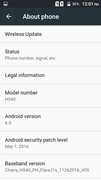
Problem: Frp
Definition Applied
1. Power Off Phone , Remove Battery, Insert Battery Back
2. Please Hold BootKey(UP and DOWN),Insert USB cable
3. Use Miracle Boot Key In cases Boot key not Find
4. Battery Should be Charged more then 50%
Scanning USB Serial port...
SU2Serial Port: COM29
Connecting to Phone,Wait..
Done.
Infor: SPRD3
Initialize boot32...
Being analyzed DATA...
id:Cherry_H540_PH_FlareJ1s_08172017_V11
version:6.0
model:H540
brand:CherryMobile
manufacturer:Cherry Mobile
hardware:SP7731C_V1.0.0
Done.
Definition Applied
1. Power Off Phone , Remove Battery, Insert Battery Back
2. Please Hold BootKey(UP and DOWN),Insert USB cable
3. Use Miracle Boot Key In cases Boot key not Find
4. Battery Should be Charged more then 50%
Scanning USB Serial port...
SU2Serial Port: COM29
Connecting to Phone,Wait..
Done.
Infor: SPRD3
Initialize boot32...
Reset Frp...
>>Done.
Prof...