
- Joined
- Jun 12, 2014
- Messages
- 24
- Reaction score
- 4
- Points
- 1
Cherry Mobile FLARE S100 DEADBOOT Success Flash Restore Boot By ATF Jtag
TOOLS
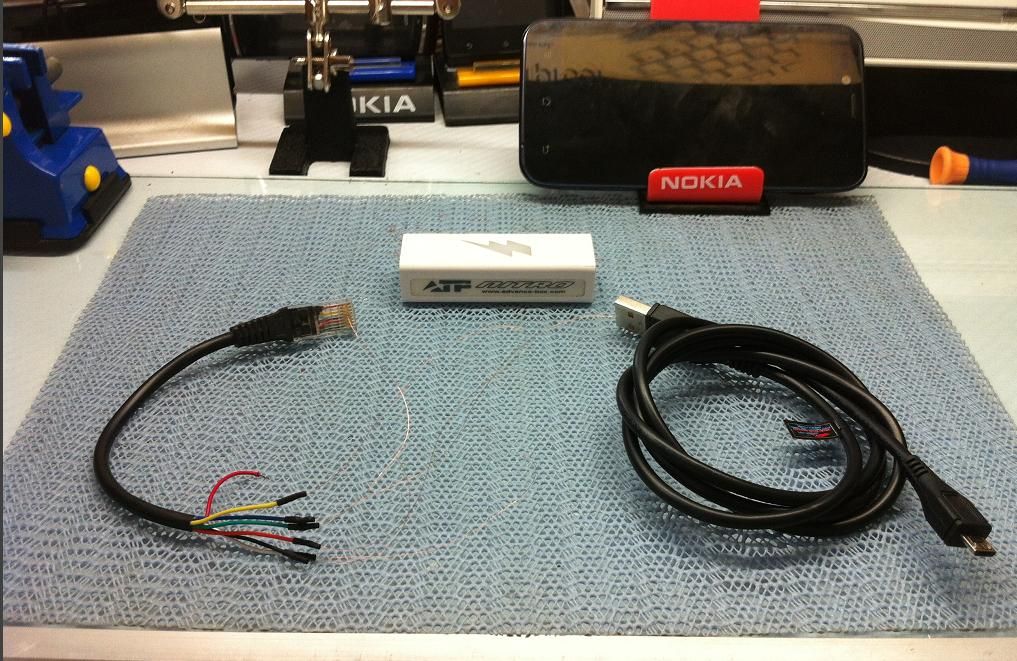
- ATF NITRO or ATF BOX (JTAG ACTIVATED)
- Modified RJ45 Fbus Cable ( Don't use LAN cable use Old Nokia Fbus Cable )
- CA-101 usb cable (for phone power supply)
FILES NEEDED:
Download here:
CHERRY_MOBILE_FLARE_S100_FACTORY.afp
PROCEDURE:
- disassemble phone first
- soldered the pinout with MODIFIED RJ45 Fbus cable to Phone board

PINOUT:

- after soldered pinout connect Phone to Box using modified rj45 Fbus cable
- then connect phone also to PC using CA-101 usb cable that server as your power supply
- run ATF JTAG software
- Click SELECT PHONE and browse the file CHERRY_MOBILE_FLAME_20_FACTORY.afp

- click RESET JTAG to check the phone connections to Box

- now click RESTORE BOOT for flashing or restoring the phone
( patience is Needed Flashing will take 40 minutes to finish )

FINISH FLASHING

- after Flashing do format the phone by pressing and holding VOLUME UP and
POWER BUTTON until phone screen become RED SCREEN DISPLAY.
- select WIPE DATA / FACTORY RESET then press power button
- then YES - - DELETE ALL USER DATA then press power button
- select REBOOT SYSTEM NOW then press power button
After Format wipe data Phone is now OK.
IMEI is still intact no need rebuild IMEI in my case and in my procedure

Phone info after flashing

FINISH PRODUCT

Br,
Xeven2nd

TOOLS
- ATF NITRO or ATF BOX (JTAG ACTIVATED)
- Modified RJ45 Fbus Cable ( Don't use LAN cable use Old Nokia Fbus Cable )
- CA-101 usb cable (for phone power supply)
FILES NEEDED:
Download here:
CHERRY_MOBILE_FLARE_S100_FACTORY.afp
PROCEDURE:
- disassemble phone first
- soldered the pinout with MODIFIED RJ45 Fbus cable to Phone board
PINOUT:
- after soldered pinout connect Phone to Box using modified rj45 Fbus cable
- then connect phone also to PC using CA-101 usb cable that server as your power supply
- run ATF JTAG software
- Click SELECT PHONE and browse the file CHERRY_MOBILE_FLAME_20_FACTORY.afp
- click RESET JTAG to check the phone connections to Box
- now click RESTORE BOOT for flashing or restoring the phone
( patience is Needed Flashing will take 40 minutes to finish )
FINISH FLASHING
- after Flashing do format the phone by pressing and holding VOLUME UP and
POWER BUTTON until phone screen become RED SCREEN DISPLAY.
- select WIPE DATA / FACTORY RESET then press power button
- then YES - - DELETE ALL USER DATA then press power button
- select REBOOT SYSTEM NOW then press power button
After Format wipe data Phone is now OK.
IMEI is still intact no need rebuild IMEI in my case and in my procedure
Phone info after flashing
FINISH PRODUCT
Br,
Xeven2nd


