
firmware copied from working phone
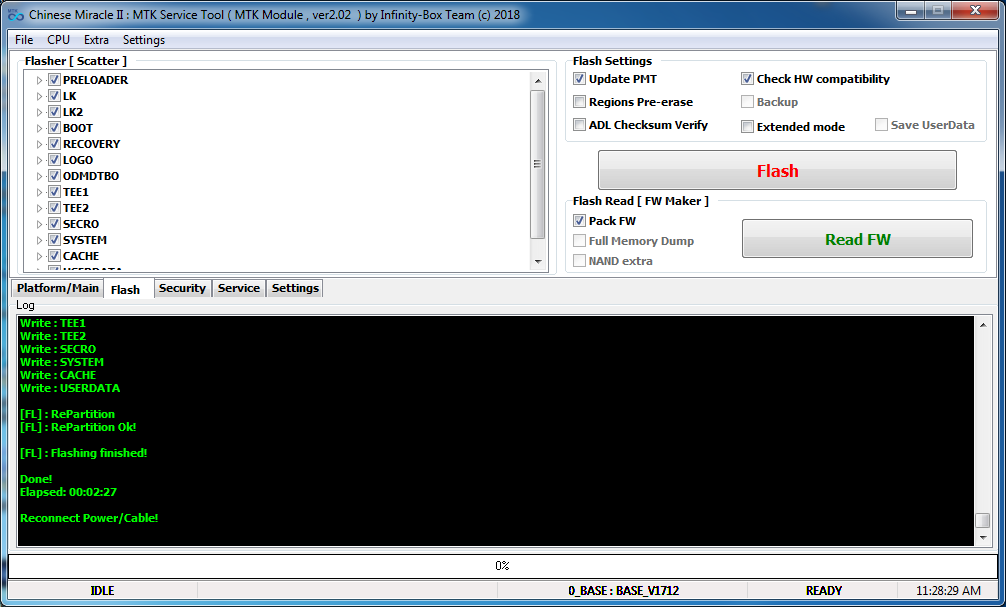
open cm2mt2
select flash
bring the mouse arrow to flasher/scatter window - right click, open scatter, load the scatter from firmware folder
press Flash
wait for the instruction to connect phone to pc
- now start flashing - wait until done
after flashing - power on phone it will ask for password -
hard reset the phone - vol up plus power button, select recovery, then press vol down to accept
phone display in No command - press vol up plus power button then it will display the option, select wipe data
done =
open cm2mt2
select flash
bring the mouse arrow to flasher/scatter window - right click, open scatter, load the scatter from firmware folder
press Flash
wait for the instruction to connect phone to pc
- now start flashing - wait until done
after flashing - power on phone it will ask for password -
hard reset the phone - vol up plus power button, select recovery, then press vol down to accept
phone display in No command - press vol up plus power button then it will display the option, select wipe data
done =
