

Download Freetel FTU18A00 Plus One Firmware
Stock ROM File Name: Freetel_FTU18A00_Plus_One_MSM8909_20180126_7.1.2_QFIL.zip
Stock ROM File Size: 2 GB
Android OS Version: 7.1.2
How To Flash Stock ROM Firmware On Freetel FTU18A00 Plus One
Before getting started with this flashing process, take a complete backup of personal data in your smartphone using appropriate apps as flashing Stock firmware will wipe them out.
Step 1: Download the stock ROM firmware for your device from the link given above. Once done, extract the downloaded zip file to get the Freetel FTU18A00 Plus One USB driver, QFIL tool and stock ROM (.mbn) file.
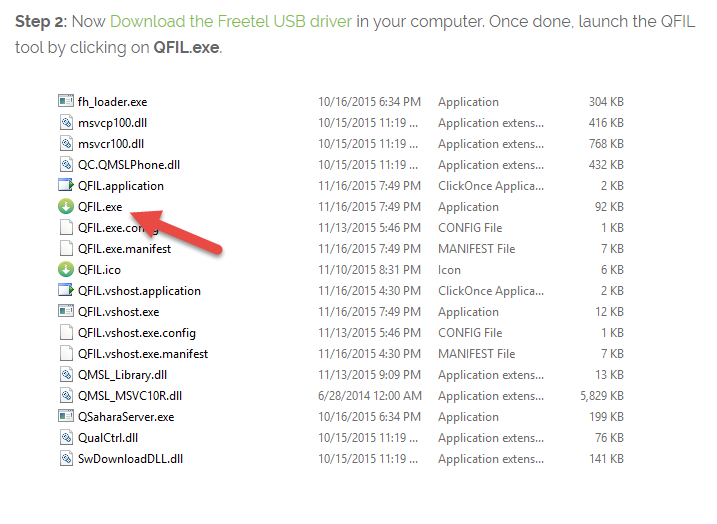
Step 2: Now Download the Freetel USB driver in your computer. Once done, launch the QFIL tool by clicking on QFIL.exe.
QFIL Tool
Step 3: Next, switch off your Freetel FTU18A00 Plus One device. Once done, connect your device to the computer (using original USB data cable) while pressing and holding the Volume UP button.
Power Off Android Device
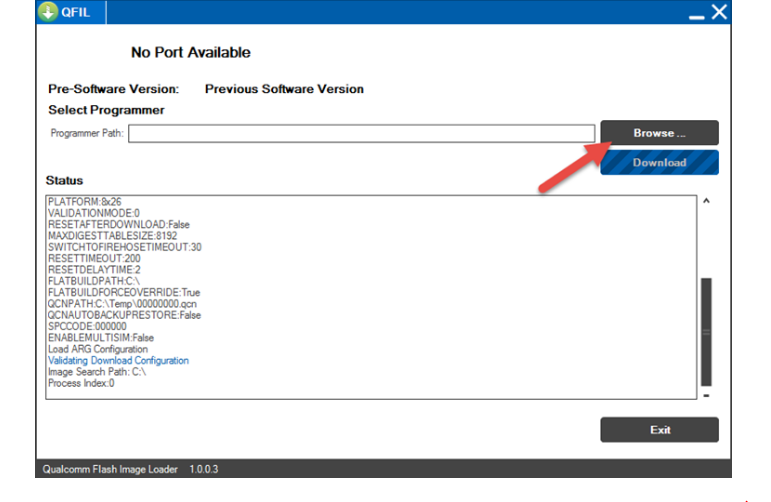
Step 4: Once your device is successfully connected with the computer, go to the QFIL window and click on the “Browse” button.
QFIL Browse Button
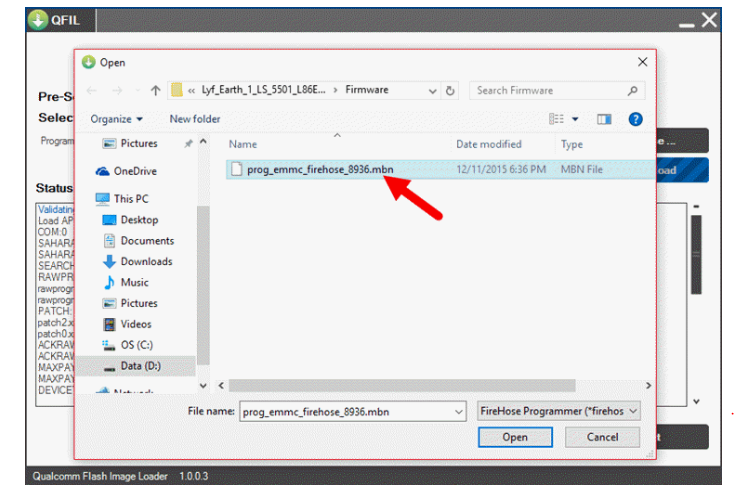
Step 5: Now choose the Stock ROM firmware file (.mbn) from Step 1. Once you have selected the .mbn file, Qualcomm Flash Image Loader will load the remaining files required for flashing.
Choose Firmware File QFIL
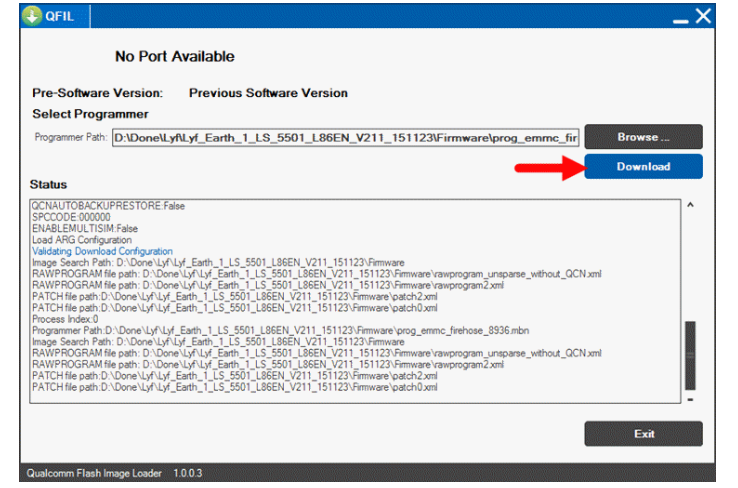
Step 6: Next, click on the “Download” button as shown in the screenshot below to launch the flashing process.
Download Firmware QFIL
Step 7: It will take a minimum of 10-15 minutes for the flashing process to get completed and once it does, you will get a “Success” message.
That’s it. Now you have successfully flashed Stock ROM firmware on your Freetel FTU18A00 Plus One device.
Stock ROM File Name: Freetel_FTU18A00_Plus_One_MSM8909_20180126_7.1.2_QFIL.zip
Stock ROM File Size: 2 GB
Android OS Version: 7.1.2
How To Flash Stock ROM Firmware On Freetel FTU18A00 Plus One
Before getting started with this flashing process, take a complete backup of personal data in your smartphone using appropriate apps as flashing Stock firmware will wipe them out.
Step 1: Download the stock ROM firmware for your device from the link given above. Once done, extract the downloaded zip file to get the Freetel FTU18A00 Plus One USB driver, QFIL tool and stock ROM (.mbn) file.
Step 2: Now Download the Freetel USB driver in your computer. Once done, launch the QFIL tool by clicking on QFIL.exe.
QFIL Tool
Step 3: Next, switch off your Freetel FTU18A00 Plus One device. Once done, connect your device to the computer (using original USB data cable) while pressing and holding the Volume UP button.
Power Off Android Device
Step 4: Once your device is successfully connected with the computer, go to the QFIL window and click on the “Browse” button.
QFIL Browse Button
Step 5: Now choose the Stock ROM firmware file (.mbn) from Step 1. Once you have selected the .mbn file, Qualcomm Flash Image Loader will load the remaining files required for flashing.
Choose Firmware File QFIL
Step 6: Next, click on the “Download” button as shown in the screenshot below to launch the flashing process.
Download Firmware QFIL
Step 7: It will take a minimum of 10-15 minutes for the flashing process to get completed and once it does, you will get a “Success” message.
That’s it. Now you have successfully flashed Stock ROM firmware on your Freetel FTU18A00 Plus One device.
/CENTER]