
- Joined
- Feb 23, 2015
- Messages
- 1,961
- Reaction score
- 6
- Points
- 181
GT-S5830i [UNLOCK DONE]
How to root Galaxy Ace s5830i.
1.Put update.zip in your main directory in the SD card.
2.Turn off your phone.
3.Boot in Recovery by pressingOWER+VOLUME UP+HOME buttons.
4.In Recovery select Install zip from sd
5.Choose update.zip
6.Reboot your phone and it's ready.There must be a Superuser icon in your Apps menu.
update.zip only for GT-S5830i rooting
SET to USB DEBUGGING
setting/application/development/check usb debugging
Z3X BOX activated
Samsung Tool ver 12.7
micro usb cable
select model -S5830i
Z3X BOX serial port
check unlock
then tick unlock tab
done
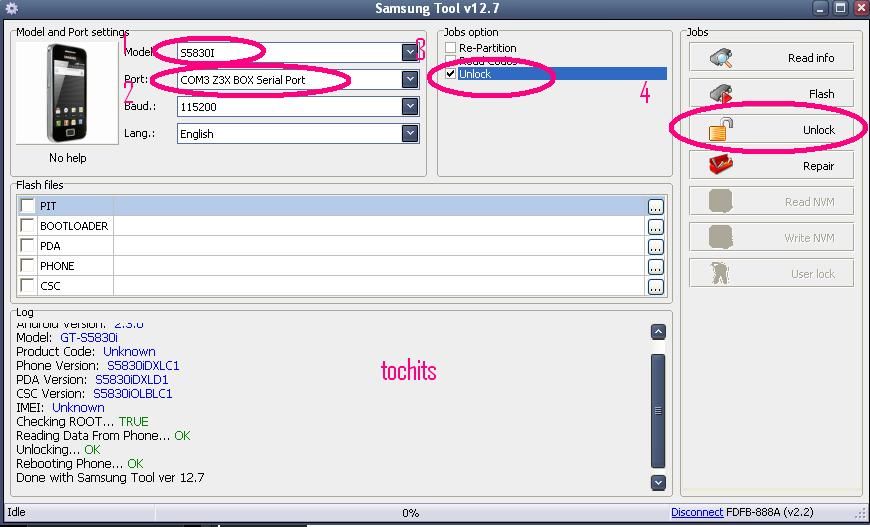
Count supported models - 319
Android Version: 2.3.6
Model: GT-S5830i
Product Code: Unknown
Phone Version: S5830iDXLC1
PDA Version: S5830iDXLD1
CSC Version: S5830iOLBLC1
IMEI: Unknown
Checking ROOT... TRUE
Reading Data From Phone... OK
Unlocking... OK
Rebooting Phone... OK
Done with Samsung Tool ver 12.7
How to root Galaxy Ace s5830i.
1.Put update.zip in your main directory in the SD card.
2.Turn off your phone.
3.Boot in Recovery by pressingOWER+VOLUME UP+HOME buttons.
4.In Recovery select Install zip from sd
5.Choose update.zip
6.Reboot your phone and it's ready.There must be a Superuser icon in your Apps menu.
update.zip only for GT-S5830i rooting
SET to USB DEBUGGING
setting/application/development/check usb debugging
Z3X BOX activated
Samsung Tool ver 12.7
micro usb cable
select model -S5830i
Z3X BOX serial port
check unlock
then tick unlock tab
done
Count supported models - 319
Android Version: 2.3.6
Model: GT-S5830i
Product Code: Unknown
Phone Version: S5830iDXLC1
PDA Version: S5830iDXLD1
CSC Version: S5830iOLBLC1
IMEI: Unknown
Checking ROOT... TRUE
Reading Data From Phone... OK
Unlocking... OK
Rebooting Phone... OK
Done with Samsung Tool ver 12.7