How To Sloved NO Service Problem In China Andoried Phone..... <hr style="color:#000000; background-color:#000000" size="1"> <ins data-adsbygoogle-status="done" class="adsbygoogle" style="display: inline-block; width: 0px; height: 0px;" data-ad-client="ca-pub-5961390059513097" data-ad-slot="9514536109"><ins id="aswift_1_expand" style="display: inline-table; border: medium none; height: 0px; margin: 0px; padding: 0px; position: relative; visibility: visible; width: 0px; background-color: transparent;"><ins id="aswift_1_anchor" style="display: block; border: medium none; height: 0px; margin: 0px; padding: 0px; position: relative; visibility: visible; width: 0px; background-color: transparent; overflow: hidden; transition: opacity 1s cubic-bezier(0.4, 0, 1, 1) 0s, width 0.2s cubic-bezier(0.4, 0, 1, 1) 0s, height 0.3s cubic-bezier(0.4, 0, 1, 1) 0.2s, margin-left 0.2s cubic-bezier(0.4, 0, 1, 1) 0s, margin-right 0.2s cubic-bezier(0.4, 0, 1, 1) 0s, padding-left 0.2s cubic-bezier(0.4, 0, 1, 1) 0s, padding-right 0.2s cubic-bezier(0.4, 0, 1, 1) 0s, border-left-width 0.2s cubic-bezier(0.4, 0, 1, 1) 0s, border-right-width 0.2s cubic-bezier(0.4, 0, 1, 1) 0s, margin-top 0.3s cubic-bezier(0.4, 0, 1, 1) 0.2s, margin-bottom 0.3s cubic-bezier(0.4, 0, 1, 1) 0.2s, padding-top 0.3s cubic-bezier(0.4, 0, 1, 1) 0.2s, padding-bottom 0.3s cubic-bezier(0.4, 0, 1, 1) 0.2s, border-top-width 0.3s cubic-bezier(0.4, 0, 1, 1) 0.2s, border-bottom-width 0.3s cubic-bezier(0.4, 0, 1, 1) 0.2s; opacity: 0;"></ins></ins></ins>
Andoried China Phone No Service Soluation like Micromax Lava Iball Lenova etc...
So Many Time After Write Wrong Fimware We Lost Netwrok Coz NV file Currputed.So U No Need Any Box Just Using SPTOOl Your Problem Will B Sloved.
Step Here..............
Open SPTOOL select specified Fimware Any Which You Want Write NV file..
In Our Case lenovo S850
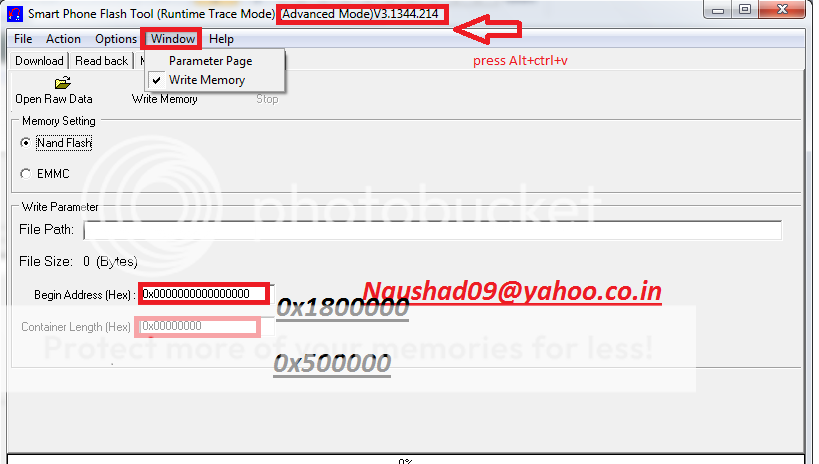
1.Press ALT+CTRL+V For Go Advance Mode.
2.Open Scatter file And Search nv File address.
3.Copy NV Adress And Past On SPTOOL Nv Adress And Write.

Lenova S850 NV naushad09 - Download - 4shared
Here Im Posting Some Stuff I think Many Pepole Don't Know This Soluation And This Soluation May Help Our Fourm Member.....
Andoried China Phone No Service Soluation like Micromax Lava Iball Lenova etc...
So Many Time After Write Wrong Fimware We Lost Netwrok Coz NV file Currputed.So U No Need Any Box Just Using SPTOOl Your Problem Will B Sloved.
Step Here..............
Open SPTOOL select specified Fimware Any Which You Want Write NV file..
In Our Case lenovo S850
1.Press ALT+CTRL+V For Go Advance Mode.
2.Open Scatter file And Search nv File address.
3.Copy NV Adress And Past On SPTOOL Nv Adress And Write.


Lenova S850 NV naushad09 - Download - 4shared