- Joined
- Feb 7, 2016
- Messages
- 2
- Reaction score
- 0
- Points
- 1
HUAWEI P9+ FLASH FILE MT6580 5.1 100% TESTED FIRMWARE
HUAWEI P9+ CLONE FLASH FILE DEAD PHONE,HANG LOGO,LCD BLANK,CAMERA FIX,MONKEY VIRUS CLEAN DONE
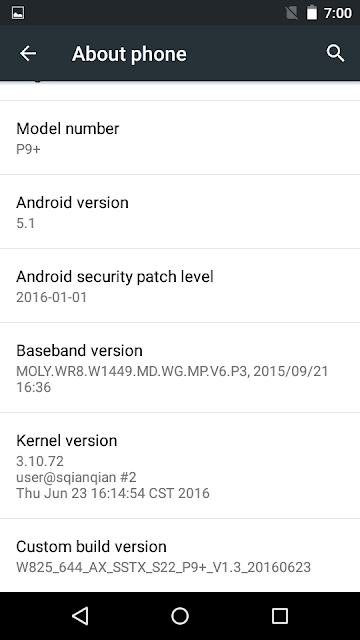
Phone Information
How To Flash Flash / Update?
HUAWEI P9+ CLONE FLASH FILE DEAD PHONE,HANG LOGO,LCD BLANK,CAMERA FIX,MONKEY VIRUS CLEAN DONE
Phone Information
Brand : P9+
ProdName : full_w825_644_ax_sstx_s22
ProdModel : P9+
Device : w825_644_ax_sstx_s22
AndroidVer: 5.1
MTKxCPU : MT6580
MTKxPRJ : W825_644_AX_SSTX_S22_P9+_V1.3
[Read Ok] : preloader_w825_644_ax_sstx_s22.bin
[Read Ok] : lk.bin
[Read Ok] : boot.img
[Read Ok] : recovery.img
[Read Ok] : logo.bin
[Read Ok] : secro.img
[Read Ok] : system.img
[Read Ok] : cache.img
[Read Ok] : userdata.img
[ScatCFG] : MT6580 / V1.1.2 / w825_644_ax_sstx_s22 / EMMC
Android Info saved
MAUI Meta DB saved
HWConfig Info saved
FW Size : 1335 MiB
Scatter saved to : D:\Users\Mostakim\Desktop\Clone File\MT6580__P9+__P9+__w825_644_ax_sstx_s22__5.1__W825_644_AX_SSTX_S22_P9+_V1.3\
All done!
ProdName : full_w825_644_ax_sstx_s22
ProdModel : P9+
Device : w825_644_ax_sstx_s22
AndroidVer: 5.1
MTKxCPU : MT6580
MTKxPRJ : W825_644_AX_SSTX_S22_P9+_V1.3
[Read Ok] : preloader_w825_644_ax_sstx_s22.bin
[Read Ok] : lk.bin
[Read Ok] : boot.img
[Read Ok] : recovery.img
[Read Ok] : logo.bin
[Read Ok] : secro.img
[Read Ok] : system.img
[Read Ok] : cache.img
[Read Ok] : userdata.img
[ScatCFG] : MT6580 / V1.1.2 / w825_644_ax_sstx_s22 / EMMC
Android Info saved
MAUI Meta DB saved
HWConfig Info saved
FW Size : 1335 MiB
Scatter saved to : D:\Users\Mostakim\Desktop\Clone File\MT6580__P9+__P9+__w825_644_ax_sstx_s22__5.1__W825_644_AX_SSTX_S22_P9+_V1.3\
All done!
How To Flash Flash / Update?
1/If you unzip the file first flash Keep your computers.
2/After you install the driver to android.If you cancel before the day installed
3/Open flash tool, flashing box or boxes Crack.
4/MTK scatter load the firmware.
5/Press the Start button or download button.
6/Apply button boots USB interface.
7/Green bar actually complete your flash.
8/Then reconnect the battery and press the power button.
9/Your mobile Flash / Update Complete.
2/After you install the driver to android.If you cancel before the day installed
3/Open flash tool, flashing box or boxes Crack.
4/MTK scatter load the firmware.
5/Press the Start button or download button.
6/Apply button boots USB interface.
7/Green bar actually complete your flash.
8/Then reconnect the battery and press the power button.
9/Your mobile Flash / Update Complete.
FIRMWARE
Last edited by a moderator: