
Procedure:
1. Turn off your unit
2. Enter recovery mode by holding vol up and the power button, when the logo's appear release the power button and keep holding vol up until the recovery mode appears in the screen.
3. Clear cache
4. Wipe data factory reset
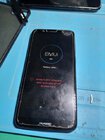
5. Then wait until the unit boot's up.
6. When the screen boot's up go to emergency call, then dial 112 after mapindot yung dial icon pindotin ng mabilis/madami yung number 4 hanggang sa lumabas yung calendar na app.
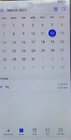
8. Pindutin yung add sa baba or +
9. Add ka ng tittle kahit ano tapos punta ka sa description then lagay mo www.google.com/maps then click check sa taas
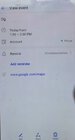
10. Then after that click mo ulit yung tittle na inaad mo or ginawa mo kanina then pindutin mo yung www.google.com/maps
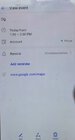
11. Then mareredirect na yan sa google maps
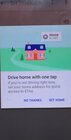
12. Click SET HOME then OK then click ulit SET HOME
13. After that click mo yung tatlong line sa bandang taas sa katabi ng search here.
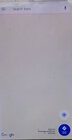
12. Then after that pindotin mo START DRIVING
13. Pindotin yung lalabas na GOT IT then pindutin mo yung MIC ICON bandang itaas din
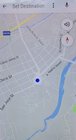
14. After that sabihin mo OPEN SETTINGS
15. Then ireredirect ka niyan sa SETTINGS
16. Pag andun kana sa settings pindutin mo yung RESET tapos under reset pindutin yung RESET SETTINGS
17. THEN gawin mo yung RESET SETTINGS TWICE
18. After that go to DISPLAY then under display pindutin yung HOMESCREEN STYLE
19. Then under home screen style piliin mo yung DRAWER
20. Then yown wait mo lang saglit then mapupunta na yan sa HOME SCREEN.
21. Tapos pag andiyan kana sa home screen punta ka ulit sa SETTINGS then punta ka sa reset tapos pindutin mo yung FACTORY DATA RESET tapos UNCHECK mo yung ERASE INTERNAL STORAGE
22. Then go for the RESET. Wait until mag boot up. Then yown! Done!! Eto yung finish product ko HEHEH
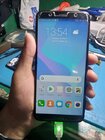
Thank you sa time sa pag view. Sana makatulong po itong munting kaalaman kahit papano kahit manual bypass lang to HEHEH
1. Turn off your unit
2. Enter recovery mode by holding vol up and the power button, when the logo's appear release the power button and keep holding vol up until the recovery mode appears in the screen.
3. Clear cache
4. Wipe data factory reset
5. Then wait until the unit boot's up.
6. When the screen boot's up go to emergency call, then dial 112 after mapindot yung dial icon pindotin ng mabilis/madami yung number 4 hanggang sa lumabas yung calendar na app.
8. Pindutin yung add sa baba or +
9. Add ka ng tittle kahit ano tapos punta ka sa description then lagay mo www.google.com/maps then click check sa taas
10. Then after that click mo ulit yung tittle na inaad mo or ginawa mo kanina then pindutin mo yung www.google.com/maps
11. Then mareredirect na yan sa google maps
12. Click SET HOME then OK then click ulit SET HOME
13. After that click mo yung tatlong line sa bandang taas sa katabi ng search here.
12. Then after that pindotin mo START DRIVING
13. Pindotin yung lalabas na GOT IT then pindutin mo yung MIC ICON bandang itaas din
14. After that sabihin mo OPEN SETTINGS
15. Then ireredirect ka niyan sa SETTINGS
16. Pag andun kana sa settings pindutin mo yung RESET tapos under reset pindutin yung RESET SETTINGS
17. THEN gawin mo yung RESET SETTINGS TWICE
18. After that go to DISPLAY then under display pindutin yung HOMESCREEN STYLE
19. Then under home screen style piliin mo yung DRAWER
20. Then yown wait mo lang saglit then mapupunta na yan sa HOME SCREEN.
21. Tapos pag andiyan kana sa home screen punta ka ulit sa SETTINGS then punta ka sa reset tapos pindutin mo yung FACTORY DATA RESET tapos UNCHECK mo yung ERASE INTERNAL STORAGE
22. Then go for the RESET. Wait until mag boot up. Then yown! Done!! Eto yung finish product ko HEHEH
Thank you sa time sa pag view. Sana makatulong po itong munting kaalaman kahit papano kahit manual bypass lang to HEHEH
Last edited: