What's new
PinoyTechnician

This is a sample guest message. Register a free account today to become a member! Once signed in, you'll be able to participate on this site by adding your own topics and posts, as well as connect with other members through your own private inbox!

REFERENCE Iphone 4 icloud bypass solution

EZEKIEL_23

Registered
Joined
Jun 13, 2014
Messages
219
Reaction score
6
Points
1
Location
quezon city
INTINDIHIN LANG MABUTI NG HINDI MAGKAMALI

Download tool from hare

Download

:)):)):)):)):)):)):)):)):)):)):)):)):)):)):)):)):)):)):)):)):)):)):)):))

after install open hacktivate tool
1:run iphone 4 hactivate tool at the top
2:run ssh_RD tool
3out device in dfu mode
at the end you will see
login:root
possword:alpine
4:run:2nd number option ssh connect
you will see mounting dev.desk like this
5:run number 3 option hactivate tool
after this your device will be in recovry mode
6 press on 4 number option exit recovry mode
after all this prosses
click on the apple option you see down


>:D<>:D<>:D<>:D<>:D<>:D<>:D<>:D<>:D<>:D<>:D<>:D<>:D<>:D<
now come on the option thethred jailbreak ios 7.1 for iphone 4

run ssh_rd tool agian
after this run ssh connect 2nd option
after this 3rd option kailbreak deta send
after complete jailbreak
do thethred jailbreak ios 7.1 iphone4 3.2
after all this you can activate your device
you are done
 
iPhone 4 GSM/REV A/CDMA iOS 7.1.1 iCloud Bypass Solution here

Tested in

iPhone 4 GSM
iPhone 4 GSM Rev A
iPhone 4 CDMA


STATUS:

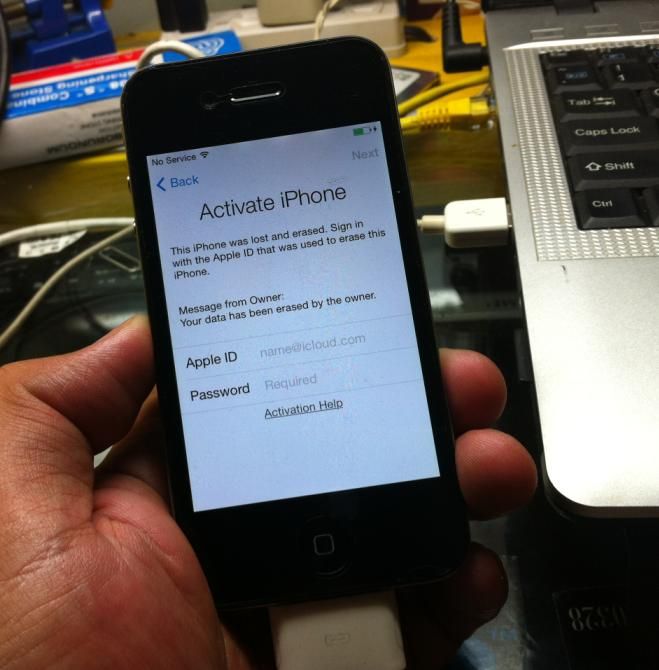
icloud_zpsd6dff8c3.jpg


PROCEDURE:

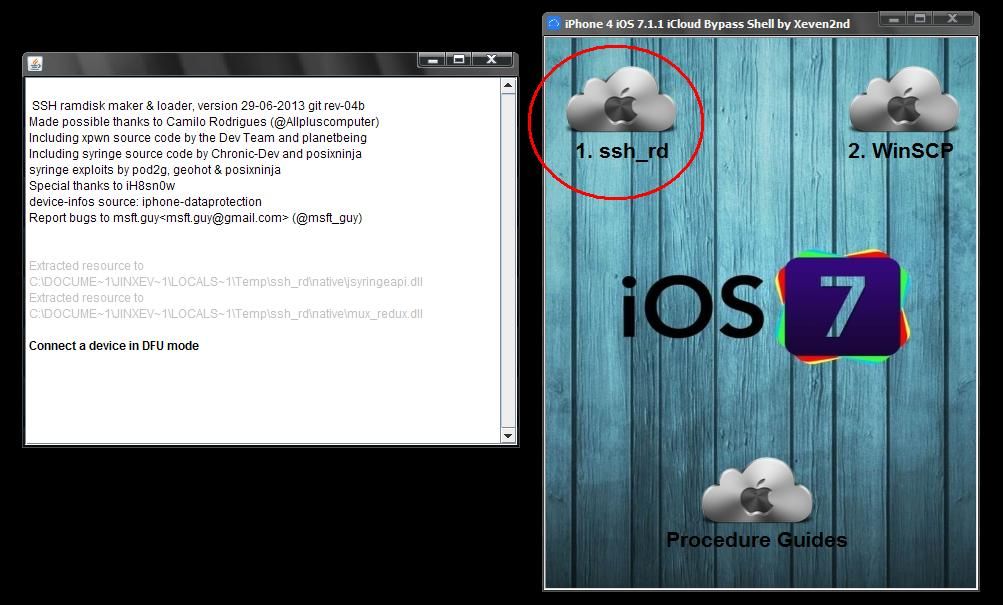
- run iPhone 4 iOS 7.1.1 iCloud Bypass Shell by Xeven2nd

1. click " ssh_rd "

a_zps88c3f339.jpg


2. put apple device in DFU mode then connect to PC

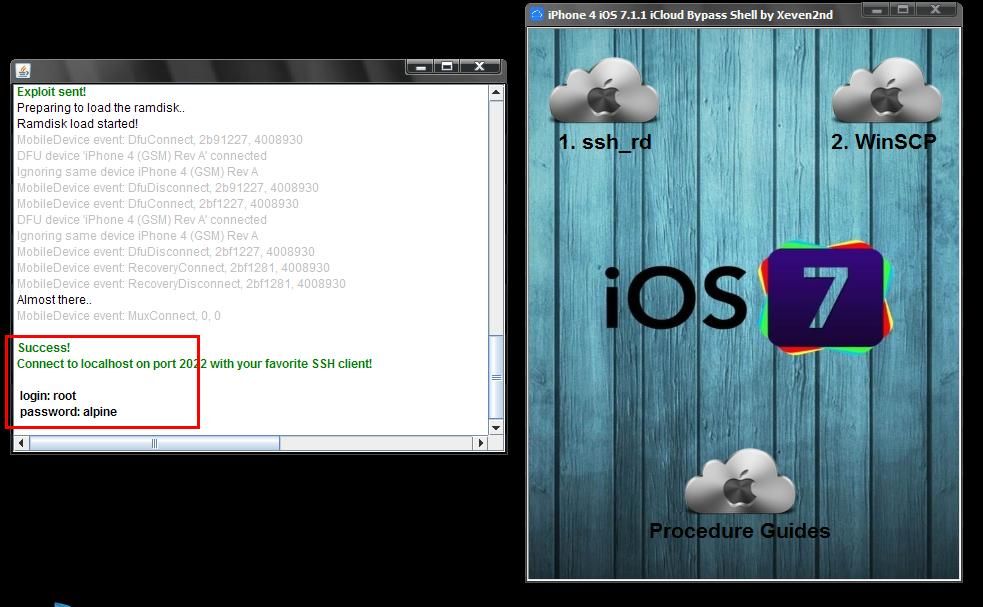
3. and wait until SUCCESS CONNECT TO LOCALHOST ON PORT 2022

b_zps3b830430.jpg


dapat maging ganito status nya after SUCCESS CONNECT TO LOCALHOST ON PORT 2022

status_zpsde1fa5cf.jpg


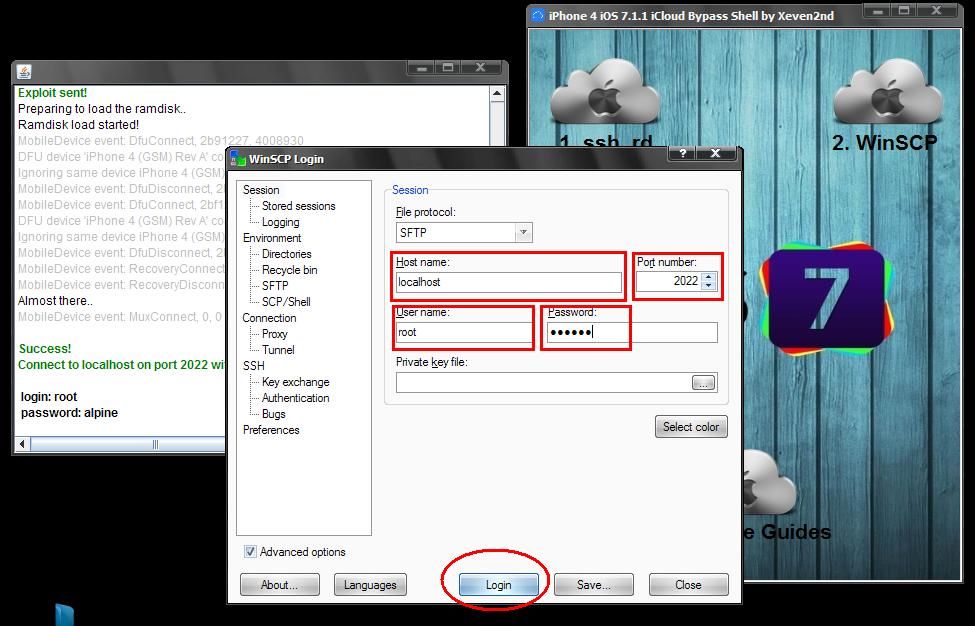
4. now click " WinSCP "

5. Fill up
- host name : localhost
- port number : 2022
- user name : root
- password : alpine
-then click LOGIN

c_zpsc357dc01.jpg


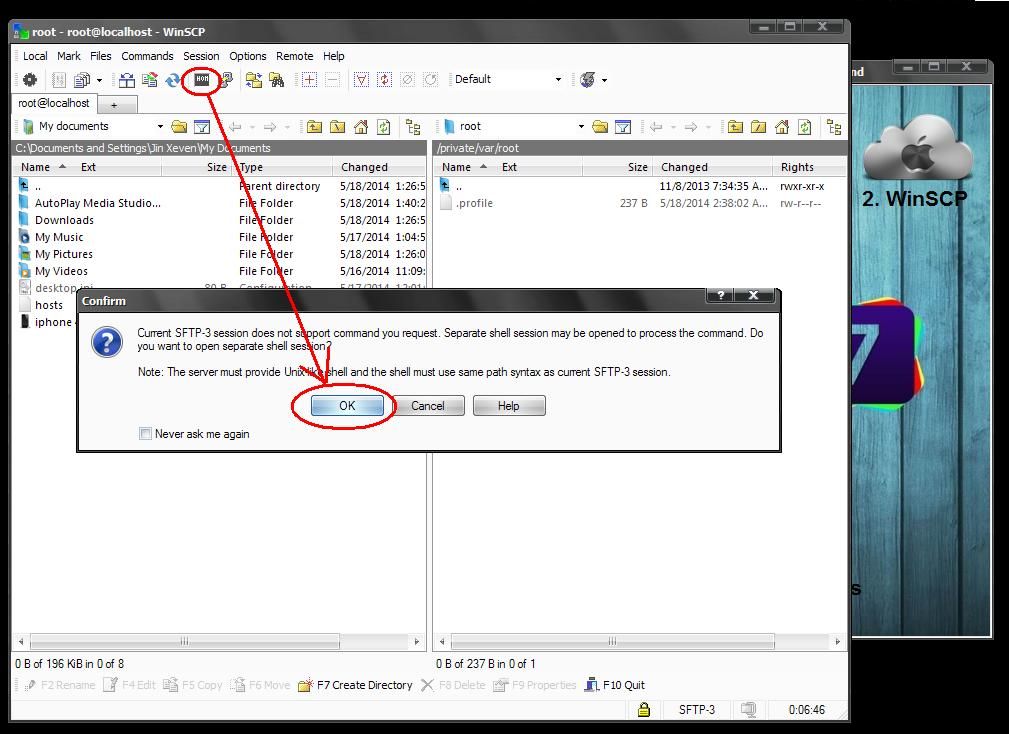
6. click " OPEN TERMINAL " then click " OK "

d_zpsd44c9e4e.jpg


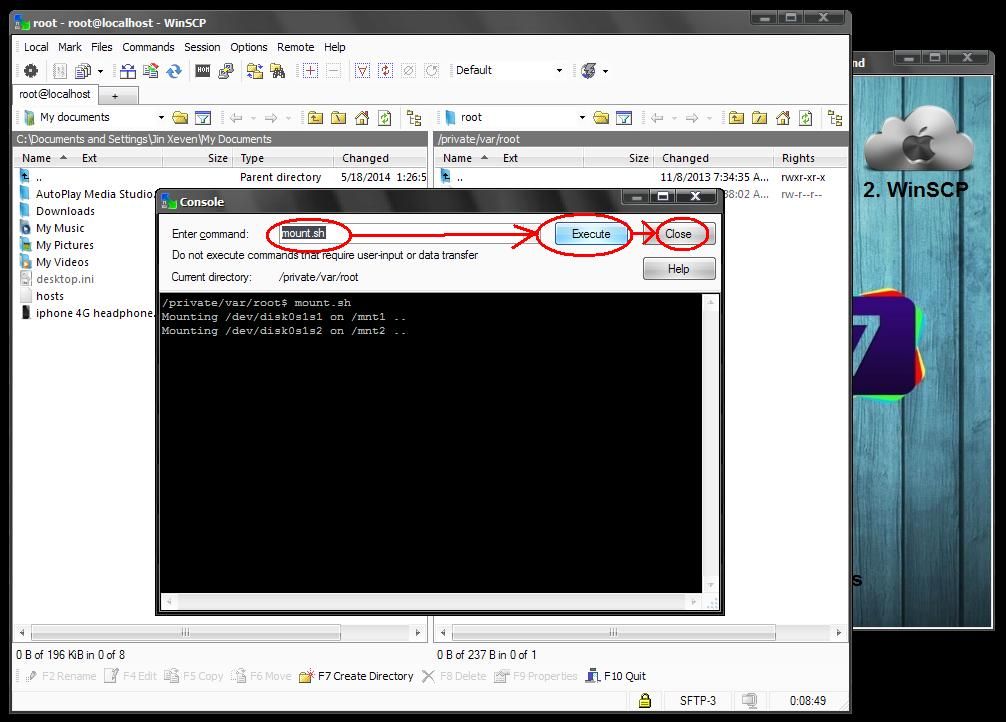
7. type " mount.sh "

8. click " Execute "

9. click " close "

e_zps1ef9d1ee.jpg


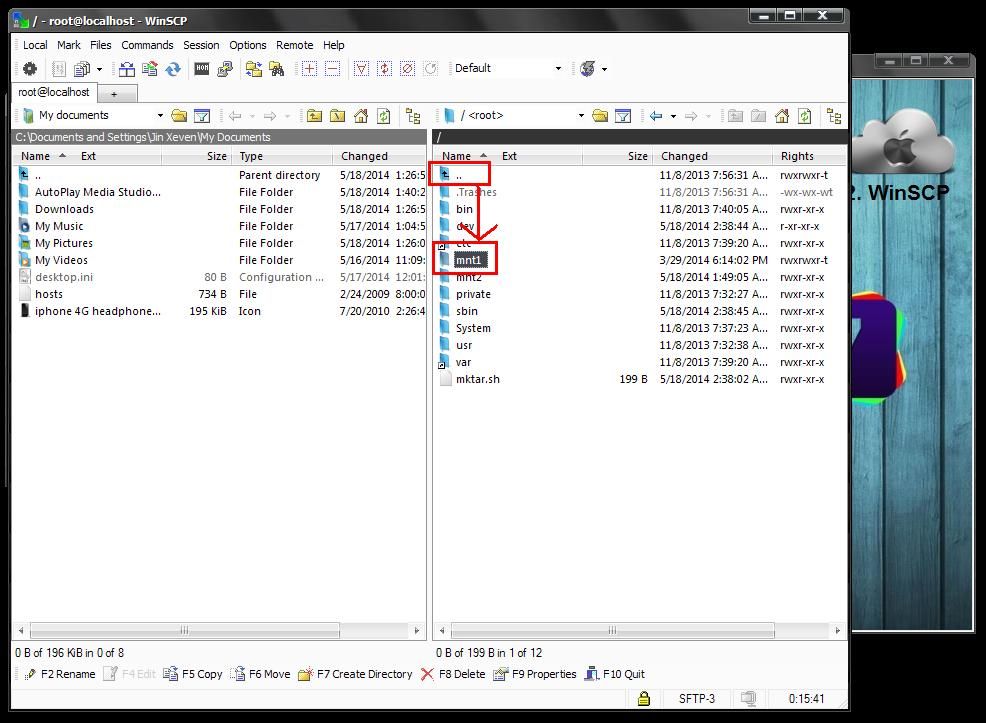
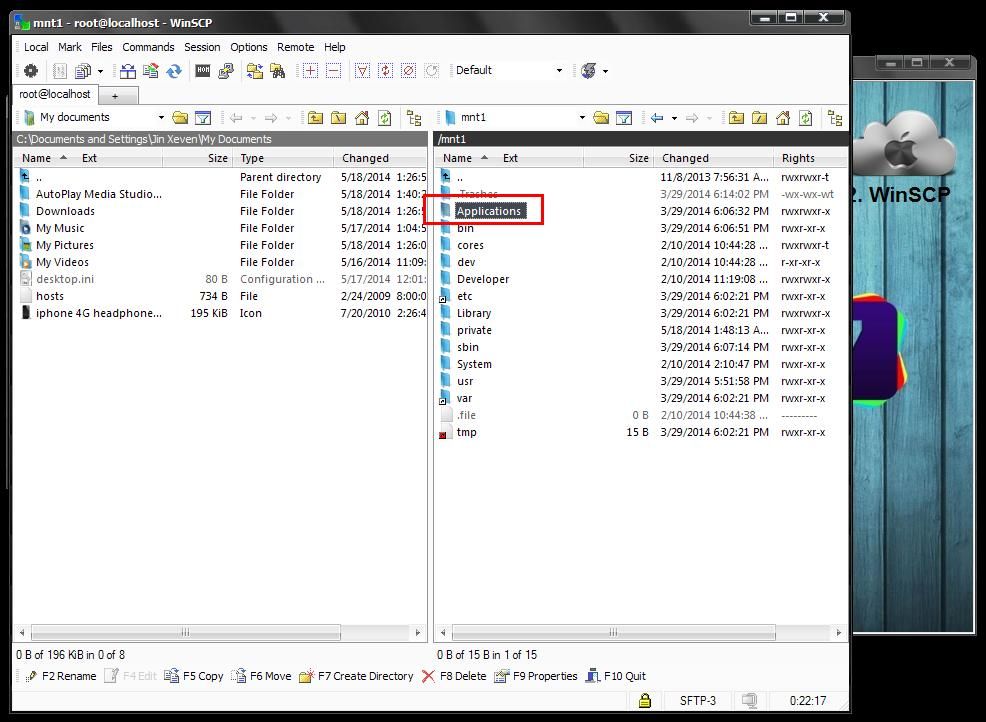
10. browse " mnt1 / Applications "

f_zps9afd88ce.jpg


g_zpsec870d46.jpg


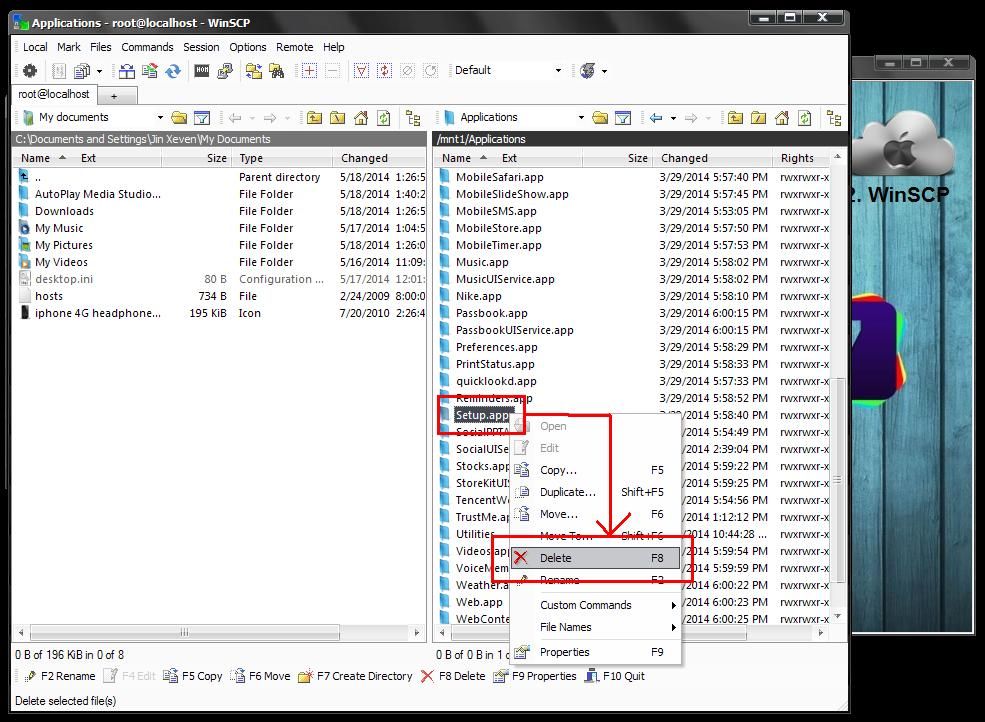
11. then delete " Setup.app " then click " OK "

h_zps71df48e4.jpg


12. and Close " WinSCP " and ssh_rd software.

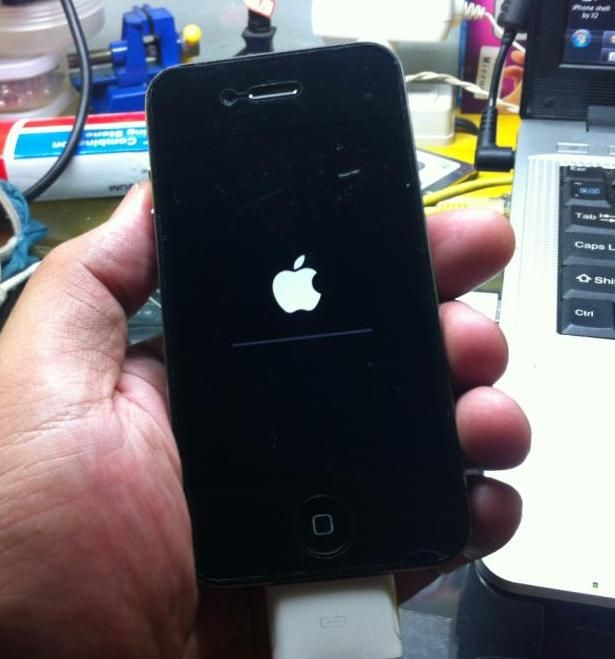
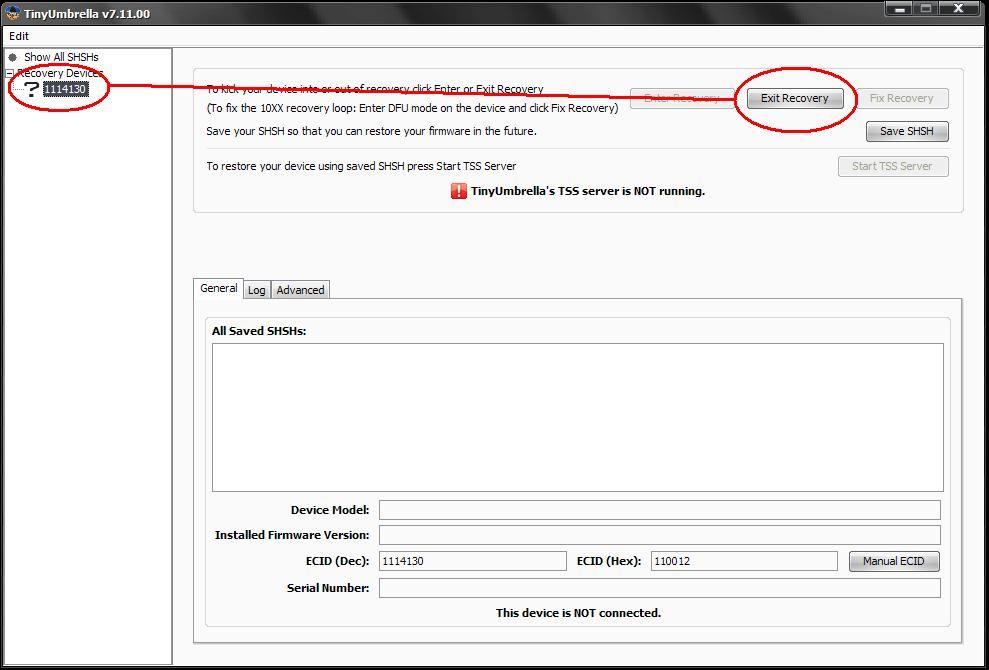
13. then kick your device using tinyumbrella
or any exit recovery software and wait to reboot iphone.

kick_zps5b55c6a5.jpg


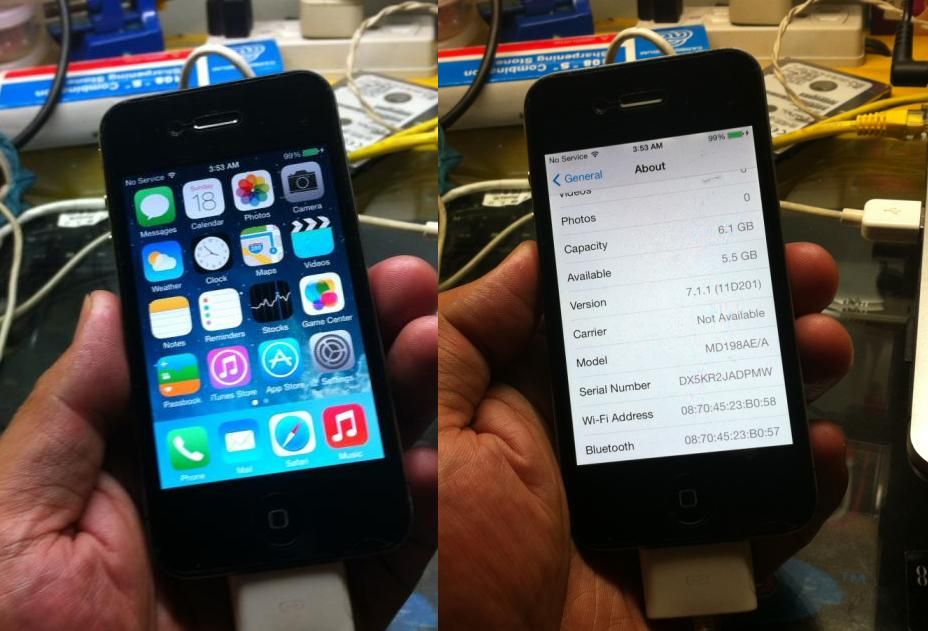
14. finish :)

fin1_zps7088b371.jpg


15. PD time joke :) i mean Pay Day time =))

DOWNLOAD HERE: iPhone 4 iOS 7.1.1 iCloud Bypass Shell by Xeven2nd


Br,
Xeven2nd
 
download nadin idol ,salamat...................
 
ma try nga ito boss hehe anyway thank you sa share ma buhay ang ANT weew
 
Salamat The Master Fullflash. Malaking tulong ito sa hindi kabisado ang iPhone.
 
pag nag download kayo mga paps mas maganda gamitin ito kng bagong format ang lappy at desktop swak na swak at swabe sa pag bypass.. :)


Done and tested {}{}{}{}

mamats master @fullflash
 
ts, matagalan pa ba mag connect sa ssh mga isang oras na ako nag coconnect hang ngayon wla pa rin nangyari nag stuck ako dito mobiledevice event RecoveryConnect, 1688 1281 8930. pls advise mga master.

TIA
 
iPhone 4 GSM/REV A/CDMA iOS 7.1.1 iCloud Bypass Solution here

Tested in

iPhone 4 GSM
iPhone 4 GSM Rev A
iPhone 4 CDMA


STATUS:

icloud_zpsd6dff8c3.jpg


PROCEDURE:

- run iPhone 4 iOS 7.1.1 iCloud Bypass Shell by Xeven2nd

1. click " ssh_rd "

a_zps88c3f339.jpg


2. put apple device in DFU mode then connect to PC

3. and wait until SUCCESS CONNECT TO LOCALHOST ON PORT 2022

b_zps3b830430.jpg


dapat maging ganito status nya after SUCCESS CONNECT TO LOCALHOST ON PORT 2022

status_zpsde1fa5cf.jpg


4. now click " WinSCP "

5. Fill up
- host name : localhost
- port number : 2022
- user name : root
- password : alpine
-then click LOGIN

c_zpsc357dc01.jpg


6. click " OPEN TERMINAL " then click " OK "

d_zpsd44c9e4e.jpg


7. type " mount.sh "

8. click " Execute "

9. click " close "

e_zps1ef9d1ee.jpg


10. browse " mnt1 / Applications "

f_zps9afd88ce.jpg


g_zpsec870d46.jpg


11. then delete " Setup.app " then click " OK "

h_zps71df48e4.jpg


12. and Close " WinSCP " and ssh_rd software.

13. then kick your device using tinyumbrella
or any exit recovery software and wait to reboot iphone.

kick_zps5b55c6a5.jpg


14. finish :)

fin1_zps7088b371.jpg


15. PD time joke :) i mean Pay Day time =))

DOWNLOAD HERE: iPhone 4 iOS 7.1.1 iCloud Bypass Shell by Xeven2nd


Br,
Xeven2nd


sir tanong ko lng po,pwd rin po ba itong sa os 71.2 itong bypass solution mo? bos..tnx..
 
tanung ku lang ung tool na to d na ba kailangan ng driver naniniguro lang
 
NO SERVICE parin po....may nakaactivate na ba ng signal po??pde ba gamitan ng rsim para mag kasignal
 
wow.. masubukan to one time. thanks for sharing.. BOOKMARKED
 
salamat sa pagbahagi
 
iPhone 4 GSM/REV A/CDMA iOS 7.1.1 iCloud Bypass Solution here

Tested in

iPhone 4 GSM
iPhone 4 GSM Rev A
iPhone 4 CDMA


STATUS:

icloud_zpsd6dff8c3.jpg


PROCEDURE:

- run iPhone 4 iOS 7.1.1 iCloud Bypass Shell by Xeven2nd

1. click " ssh_rd "

a_zps88c3f339.jpg


2. put apple device in DFU mode then connect to PC

3. and wait until SUCCESS CONNECT TO LOCALHOST ON PORT 2022

b_zps3b830430.jpg


dapat maging ganito status nya after SUCCESS CONNECT TO LOCALHOST ON PORT 2022

status_zpsde1fa5cf.jpg


4. now click " WinSCP "

5. Fill up
- host name : localhost
- port number : 2022
- user name : root
- password : alpine
-then click LOGIN

c_zpsc357dc01.jpg


6. click " OPEN TERMINAL " then click " OK "

d_zpsd44c9e4e.jpg


7. type " mount.sh "

8. click " Execute "

9. click " close "

e_zps1ef9d1ee.jpg


10. browse " mnt1 / Applications "

f_zps9afd88ce.jpg


g_zpsec870d46.jpg


11. then delete " Setup.app " then click " OK "

h_zps71df48e4.jpg


12. and Close " WinSCP " and ssh_rd software.

13. then kick your device using tinyumbrella
or any exit recovery software and wait to reboot iphone.

kick_zps5b55c6a5.jpg


14. finish :)

fin1_zps7088b371.jpg


15. PD time joke :) i mean Pay Day time =))

DOWNLOAD HERE: iPhone 4 iOS 7.1.1 iCloud Bypass Shell by Xeven2nd


Br,
Xeven2nd

Malaking tulong po ito boss sa amin na hindi maalam sa iphone​
 
Back
Top