Lenovo A1000m

firmware here click our home
antgsm.com
password protected
use triangle for pass
info
Lenovo A1000m s399 20160701 sprd7731 row
install the driver 1st if needed
This is step to flash Android Smartphone Run On Spreadtrum Chipset Using .Pac File,
firmware here click our home
antgsm.com
password protected
use triangle for pass
info
Lenovo A1000m s399 20160701 sprd7731 row
install the driver 1st if needed
This is step to flash Android Smartphone Run On Spreadtrum Chipset Using .Pac File,
- You need a computer with windows OS
- Turn Off your android device.
- Download appropriate Spreadtrum USB Driver for your android devices.(If needed), here
- After you finish download spreadtrum USB driver, now install it on your computer. (you can skip this step if this driver already installed)
- Download latest SPD Upgrade Tool sometimes this tool called with Spreadtrum Flash Tool. (Spreadtrum Upgrade tool R.2.9.2015) or you can find this tool on package. Here
- When download is done. extract this tool on spesified folder on your computer.
- After this tool extracted, you will able to see picture like shown below.<table class="tr-caption-container" style="margin-left: auto; margin-right: auto; text-align: center;" align="center" cellspacing="0" cellpadding="0"><tbody> <tr><td style="text-align: center;">
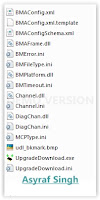 </td></tr> <tr><td class="tr-caption" style="text-align: center;">Spreadtrum upgrade tool</td></tr> </tbody></table>
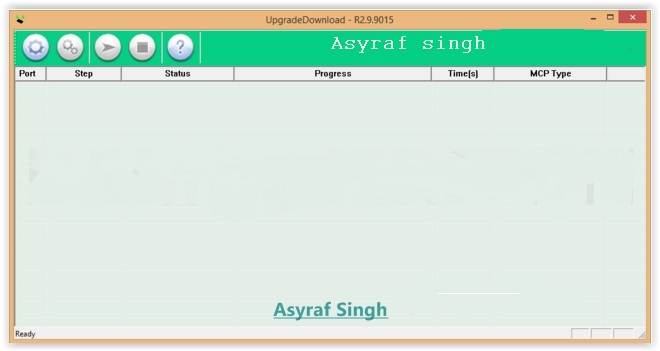
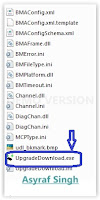
 - Then, Double click on upgradedownload.exe to open Spreadtrum Flash Tool.<table class="tr-caption-container" style="margin-left: auto; margin-right: auto; text-align: center;" align="center" cellspacing="0" cellpadding="0"><tbody> <tr><td style="text-align: center;">
 </td></tr> <tr><td class="tr-caption" style="text-align: center;">Spreadtrum upgrade tool</td></tr> </tbody></table>
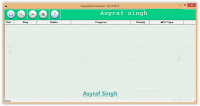
 - When this tool is launched, now connect your android smartphone to your computer .<table class="tr-caption-container" style="margin-left: auto; margin-right: auto; text-align: center;" align="center" cellspacing="0" cellpadding="0"><tbody> <tr><td style="text-align: center;">
 </td></tr> <tr><td class="tr-caption" style="text-align: center;">Spreadtrum upgrade tool</td></tr> </tbody></table>
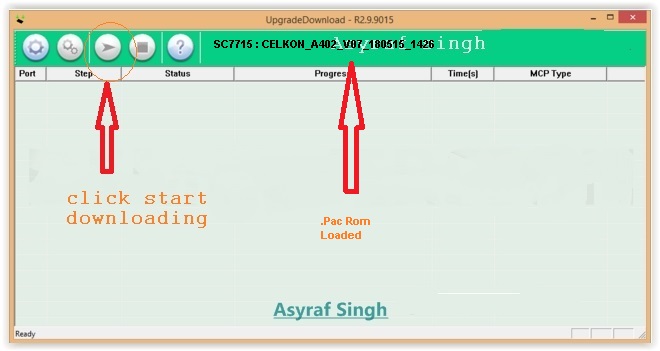
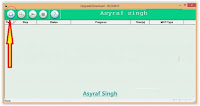
 - Once your android is successfully connected to your computer, Now click load packed button to add .Pac file (this is firmware or stock rom that comes as .pac).<table class="tr-caption-container" style="margin-left: auto; margin-right: auto; text-align: center;" align="center" cellspacing="0" cellpadding="0"><tbody> <tr><td style="text-align: center;">
 </td></tr> <tr><td class="tr-caption" style="text-align: center;">Spreadtrum upgrade tool</td></tr> </tbody></table>
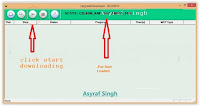
 - When you have successfully added the .Pac file in Spreadtrum Upgrade Tool, click on the Start Downloading button to begin the flashing. <table class="tr-caption-container" style="margin-left: auto; margin-right: auto; text-align: center;" align="center" cellspacing="0" cellpadding="0"><tbody> <tr><td style="text-align: center;">
 </td></tr> <tr><td class="tr-caption" style="text-align: center;">Spreadtrum upgrade tool</td></tr> </tbody></table>
 - During the flashing process your device will restart automatically.<table class="tr-caption-container" style="margin-left: auto; margin-right: auto; text-align: center;" align="center" cellspacing="0" cellpadding="0"><tbody> <tr><td style="text-align: center;">
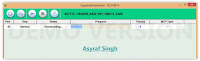 </td></tr> <tr><td class="tr-caption" style="text-align: center;">Spreadtrum upgrade tool</td></tr> </tbody></table>
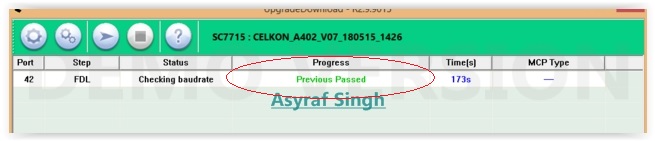
 - Once flashing your android is completed, you will be able to see the Green Passed Message in Spreadtrum Upgrade Tool.<table class="tr-caption-container" style="margin-left: auto; margin-right: auto; text-align: center;" align="center" cellspacing="0" cellpadding="0"><tbody> <tr><td style="text-align: center;">
 </td></tr> <tr><td class="tr-caption" style="text-align: center;">Spreadtrum upgrade tool</td></tr> </tbody></table>
 - Now you have successfully flashed your Android Device using Spreadtrum Upgrade Tool.
- To check your new firmware, you can go to settings -> About Phone ->Check Firmware
- Finish, now you have successfully Flash Rom on Lenovo A1000 using .pac file run on Spreadtrum chipset.