
lg d295 imei null unknown baseband - done by flashing using octoplus lg
1 - download firmware from octoplus support
2 - install lg drivers
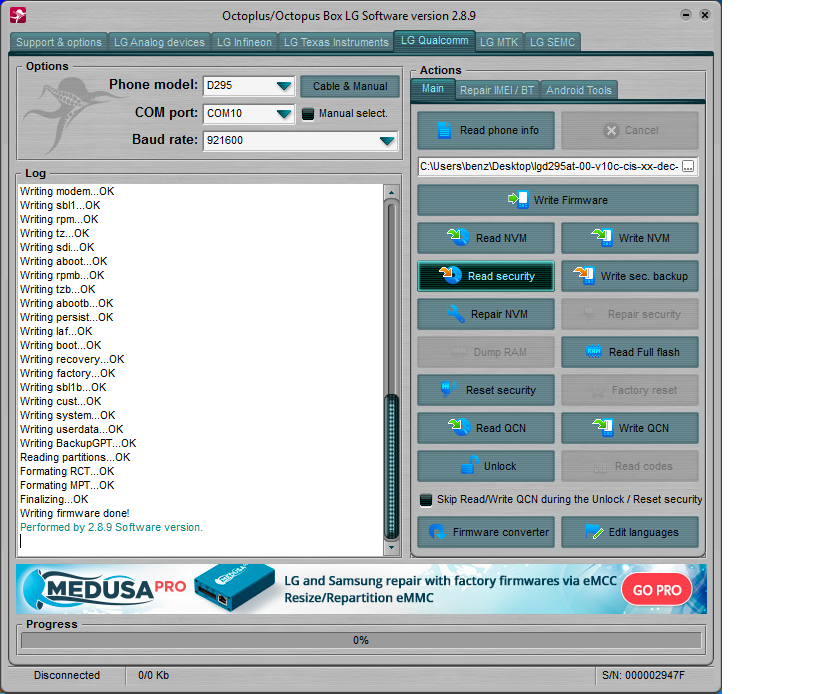
open octoplus lg
load firmware
click comport to check if drivers are installed
put phone in download mode by pressing vol+ connect usb to pc
click write firmware
wait until done
Welcome to Octoplus/Octopus Box LG Software version 2.8.9
--------------------------------------------------------------------------------
Checking data...OK
Platform: LG Qualcomm
Selected port: COM10
Selected model: D295
Reading info...
Mode: Emergency
Initializing flash...OK
Platform: msm8610
SW version: LGD295AT-00-V10a-ESA-XX-AUG-27-2014+0
Android version: 4.4.2
LAF Version: 1.0
Product ID: CT69S140923001561
IMEI: 356274-06-086935-2
Target operator: GLOBAL
Hardware: rev_10
--------------------------------------------------------------------------------
Writing phone firmware without real necessity is at your own risk.
Downgrade may lead to phone damage!
Please, make sure the phone's battery is fully charged.
Disconnect all other devices from the computer (including phones,
modems, etc.) and close all other running programs.
To avoid errors in the flashing process, use a clean PC (without any
installed drivers for other Qualcomm-based devices).
You should not run any other programs or attach new devices to your
computer during the flashing!
--------------------------------------------------------------------------------
Opening "lgd295at-00-v10c-cis-xx-dec-23-2014+0.oct"...OK
Setting options...OK
Reading partitions...OK
Formating USERDATA...OK
Formating ENCRYPT...OK
Writing PrimaryGPT...OK
Writing modem...OK
Writing sbl1...OK
Writing rpm...OK
Writing tz...OK
Writing sdi...OK
Writing aboot...OK
Writing rpmb...OK
Writing tzb...OK
Writing abootb...OK
Writing persist...OK
Writing laf...OK
Writing boot...OK
Writing recovery...OK
Writing factory...OK
Writing sbl1b...OK
Writing cust...OK
Writing system...OK
Writing userdata...OK
Writing BackupGPT...OK
Reading partitions...OK
Formating RCT...OK
Formating MPT...OK
Finalizing...OK
Writing firmware done!
Performed by 2.8.9 Software version.
1 - download firmware from octoplus support
2 - install lg drivers
open octoplus lg
load firmware
click comport to check if drivers are installed
put phone in download mode by pressing vol+ connect usb to pc
click write firmware
wait until done
Welcome to Octoplus/Octopus Box LG Software version 2.8.9
--------------------------------------------------------------------------------
Checking data...OK
Platform: LG Qualcomm
Selected port: COM10
Selected model: D295
Reading info...
Mode: Emergency
Initializing flash...OK
Platform: msm8610
SW version: LGD295AT-00-V10a-ESA-XX-AUG-27-2014+0
Android version: 4.4.2
LAF Version: 1.0
Product ID: CT69S140923001561
IMEI: 356274-06-086935-2
Target operator: GLOBAL
Hardware: rev_10
--------------------------------------------------------------------------------
Writing phone firmware without real necessity is at your own risk.
Downgrade may lead to phone damage!
Please, make sure the phone's battery is fully charged.
Disconnect all other devices from the computer (including phones,
modems, etc.) and close all other running programs.
To avoid errors in the flashing process, use a clean PC (without any
installed drivers for other Qualcomm-based devices).
You should not run any other programs or attach new devices to your
computer during the flashing!
--------------------------------------------------------------------------------
Opening "lgd295at-00-v10c-cis-xx-dec-23-2014+0.oct"...OK
Setting options...OK
Reading partitions...OK
Formating USERDATA...OK
Formating ENCRYPT...OK
Writing PrimaryGPT...OK
Writing modem...OK
Writing sbl1...OK
Writing rpm...OK
Writing tz...OK
Writing sdi...OK
Writing aboot...OK
Writing rpmb...OK
Writing tzb...OK
Writing abootb...OK
Writing persist...OK
Writing laf...OK
Writing boot...OK
Writing recovery...OK
Writing factory...OK
Writing sbl1b...OK
Writing cust...OK
Writing system...OK
Writing userdata...OK
Writing BackupGPT...OK
Reading partitions...OK
Formating RCT...OK
Formating MPT...OK
Finalizing...OK
Writing firmware done!
Performed by 2.8.9 Software version.