
OPPO A54 (CPH2239) Pattern Unlock with SP Flash Tool
link : HERE
Support Models :


How to Remove Frp Lock in Oppo A54 (CPH2239) With SP Flash tool
Oppo A54 (CPH2239) Pattern Unlock File | Oppo A54 (CPH2239) Pattern Unlock Code
libusb win32 devel filter 1.2.6.0
MCT MediaTek Tool
Oppo A54 (CPH2239) USB Driver & SP Flash tool
link : HERE
Support Models :
- CPH2236
- CPH2239
- CPH2241.
- Oppo A54 (CPH2239) with Good battery charged do not try with low battery
- MCT MediaTek USB Driver (libusb win32 devel filter 1.2.6.0)
- Oppo A54 (CPH2239) Pattern Unlock Remove code
- Oppo A54 (CPH2239) Frp Reset code
- Oppo A54 (CPH2239) SP Flash Tool
- Oppo A54 (CPH2239) USB Driver (MediaTek USB Driver)
- Micro USB Cable with Good quality
- Download all are files from the above links if link not working just leave your comment on below comment box
- Install WinRAR software in your computer or laptop for extract downloaded links
- Extract all file and paste to desktop
- First Install libusb win32 devel filter 1.2.6.0 OR MediaTek USB Driver and after that Reboot (Restart) Computer
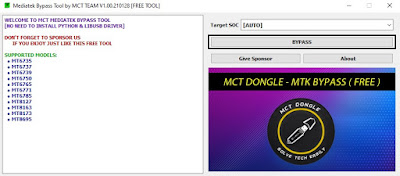
- Open MCT MediaTek USB Driver Tool Click on BYPASS
- Turn OFF Phone Press and hold Volume Up + Down and Insert USB Cable
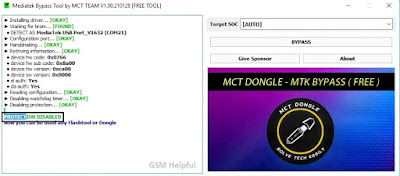
- Wait Until Completed
- When Done Disable Protection You can See like Below image
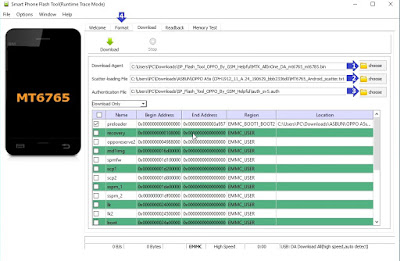
- Open SP flash tool click on Scatter-loading choose button and select MT6765_Android_scatter.txt file
- Click on Download-Agent and Select MTK_AllInOne_DA_mt6765_mt6785.bin File from Flash Tool Folder
- Click on Authentication File and Select auth_sv5.auth File from Flash Tool Folder
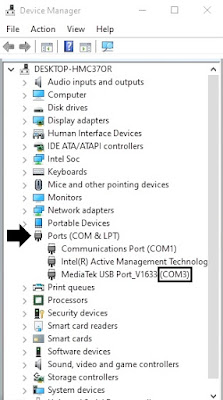
- Go to Option ► Connection and Set Com Port (COM:3) and Baud Rate (921600)
- Now Open Device Manager and Check Your Phone Com Port (Check below Image for more Information)
- Now go to Format Tab and click to Manual Format flash
- Copy 0x263000000 code and paste to Begin Address[HEX]
- Copy 0x300000000 code and paste to Format Length[HEX]
- Click on Start button
- Wait Until Completed
How to Remove Frp Lock in Oppo A54 (CPH2239) With SP Flash tool
- Open SP flash tool click on Scatter-loading choose button and select MT6765_Android_scatter.txt file
- Now go to Format Tab and click to Manual Format flash
- Copy 0x15088000 code and paste to Begin Address[HEX]
- Copy 0x100000 code and paste to Format Length[HEX]
- Connect Again in MCT MediaTek Bypass Tool
- Now click on Start button
- Wait until complete the process
Oppo A54 (CPH2239) Pattern Unlock File | Oppo A54 (CPH2239) Pattern Unlock Code
libusb win32 devel filter 1.2.6.0
MCT MediaTek Tool
Oppo A54 (CPH2239) USB Driver & SP Flash tool

