
share lang po para po sa mga wla pa masyado mga tools na gamit gaya ko
na gsto mag tangal ng password ng oppo A54 cph 2239
OPPO A54 (CPH2239) Pattern Unlock with SP Flash Tool
link : HERE
Support Models :


How to Remove Frp Lock in Oppo A54 (CPH2239) With SP Flash tool
libusb win32 devel filter 1.2.6.0
MCT MediaTek Tool
Oppo A54 (CPH2239) USB Driver & SP Flash tool
khit like nlang wag na love ok na just 4 my efort ... sna mkatulong
na gsto mag tangal ng password ng oppo A54 cph 2239
OPPO A54 (CPH2239) Pattern Unlock with SP Flash Tool
link : HERE
Support Models :
- CPH2236
- CPH2239
- CPH2241.
- Oppo A54 (CPH2239) with Good battery charged do not try with low battery
- MCT MediaTek USB Driver (libusb win32 devel filter 1.2.6.0)
- Oppo A54 (CPH2239) Pattern Unlock Remove code
- Oppo A54 (CPH2239) Frp Reset code
- Oppo A54 (CPH2239) SP Flash Tool
- Oppo A54 (CPH2239) USB Driver (MediaTek USB Driver)
- Micro USB Cable with Good quality
- Download all are files from the above links if link not working just leave your comment on below comment box
- Install WinRAR software in your computer or laptop for extract downloaded links
- Extract all file and paste to desktop
- First Install libusb win32 devel filter 1.2.6.0 OR MediaTek USB Driver and after that Reboot (Restart) Computer
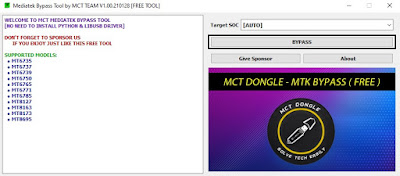
- Open MCT MediaTek USB Driver Tool Click on BYPASS
- Turn OFF Phone Press and hold Volume Up + Down and Insert USB Cable
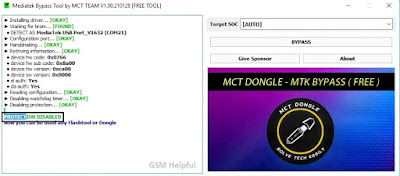
- Wait Until Completed
- When Done Disable Protection You can See like Below image
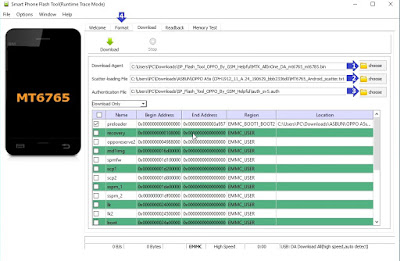
- Open SP flash tool click on Scatter-loading choose button and select MT6765_Android_scatter.txt file
- Click on Download-Agent and Select MTK_AllInOne_DA_mt6765_mt6785.bin File from Flash Tool Folder
- Click on Authentication File and Select auth_sv5.auth File from Flash Tool Folder
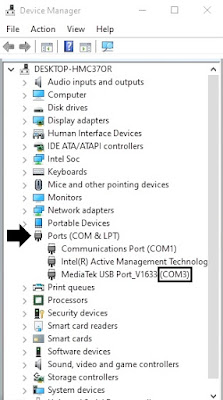
- Go to Option ► Connection and Set Com Port (COM:3) and Baud Rate (921600)
- Now Open Device Manager and Check Your Phone Com Port (Check below Image for more Information)
- Now go to Format Tab and click to Manual Format flash
- Copy 0x263000000 code and paste to Begin Address[HEX]
- Copy 0x300000000 code and paste to Format Length[HEX]
- Click on Start button
- Wait Until Completed
How to Remove Frp Lock in Oppo A54 (CPH2239) With SP Flash tool
- Open SP flash tool click on Scatter-loading choose button and select MT6765_Android_scatter.txt file
- Now go to Format Tab and click to Manual Format flash
- Copy 0x15088000 code and paste to Begin Address[HEX]
- Copy 0x100000 code and paste to Format Length[HEX]
- Connect Again in MCT MediaTek Bypass Tool
- Now click on Start button
- Wait until complete the process
libusb win32 devel filter 1.2.6.0
MCT MediaTek Tool
Oppo A54 (CPH2239) USB Driver & SP Flash tool
khit like nlang wag na love ok na just 4 my efort ... sna mkatulong

