Full credits to ekohasan*
Download the re-setter HERE
Resetter Epson L100 and Procedures:
1.Turn on Epson L100 and make sure that Espon L100 already connected to the computer with driver installed.
2. Then run Resetter Epson L100, by double clicking the file "AdjProg cracked.exe"
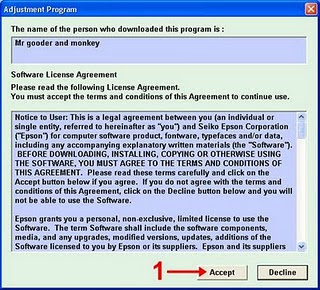
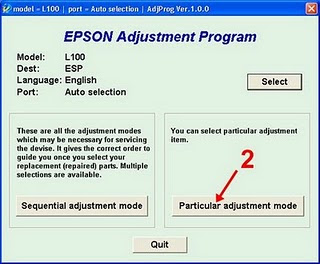
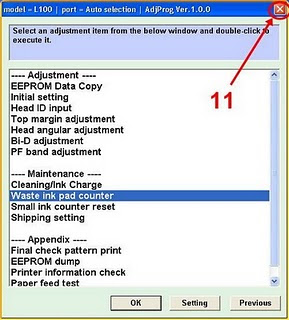
3. Click "accept">> "Particular Adjustment Mode">> Select "Waste ink pad counter reset">> click "Check">> uncheck "play pad counters, FL Boxes counter, tube Ink Counter", then click the "initialization"> > "Finish".


4. The next step,turn off Epson L100 , then disconnect the power.
5. The last step, reattach the power cord and turn on the printer, wait a while until Epson L100 ready.
Enjoy!
Download the re-setter HERE
Resetter Epson L100 and Procedures:
1.Turn on Epson L100 and make sure that Espon L100 already connected to the computer with driver installed.
2. Then run Resetter Epson L100, by double clicking the file "AdjProg cracked.exe"
3. Click "accept">> "Particular Adjustment Mode">> Select "Waste ink pad counter reset">> click "Check">> uncheck "play pad counters, FL Boxes counter, tube Ink Counter", then click the "initialization"> > "Finish".
4. The next step,turn off Epson L100 , then disconnect the power.
5. The last step, reattach the power cord and turn on the printer, wait a while until Epson L100 ready.
Enjoy!