
- Joined
- Feb 23, 2015
- Messages
- 1,961
- Reaction score
- 6
- Points
- 181
Samsung (Galaxy Y ) v. 2.3.6 GLOBE LOCKED

How to root your Samsung Galaxy Y? Below is a step by step procedure:
1. You need to download the file http://www.mediafire.com/?39jc45872cna213
2. Connect your Samsung Galaxy Y to your computer
3. Copy the update.zip to the root of your SD card
Note: If you are accessing this page and downloading the file through your Android phone, then skip step number 2.
4. After you have copied the file update.zip to the root of your SD card, turn off the Galaxy Young.
5. Then turn it ON again, BUT this time go to recovery Mode. Press power, volume up and home button together.
6. Your Galaxy Young will boot into a BIOS like display, choose ///8220;apply update from sdcard///8221;. Use volume up and down to scroll, and home screen as enter.

7. Browse through the files and choose update.zip and hit the home button to begin the rooting.
8. Wait until your Samsung Galaxy Y finishes updating.
9. And your done! Your Samsung Galaxy Y S5360 should now be rooted.
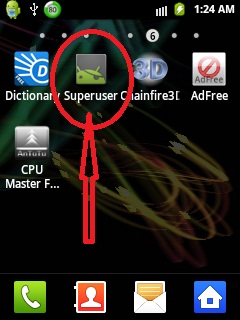
How to know if your Galaxy Young S5360 is already Rooted? You should be able to see the Superuser icon in your Galaxy Y.
Unlock procedure
MAY MAG POP UP NA GANITO PRESS ALLOW
superuser request
allow


Searching Samsung USB Modem... Detected (COM78)
Model: GT-S5360
SW: BCM21553_Modem_SI1220.2_V2.4
IMEI: 351863052464514
Done with Samsung Tool ver 12.5
Android Version: 2.3.6
Model: GT-S5360
Product Code: Unknown
Phone Version: S5360DXLA1
PDA Version: S5360DXLA1
CSC Version: S5360OLBLA1
IMEI: 351863052464514
Checking ROOT... TRUE
Reading Data From Phone... OK
Please Wait, Calculating Codes... OK (time - 00:00:14)
Freeze code: 10808000
NET lock: #7465625*638*60706010#
Sub lock: #7465625*782*00000000#
SP lock: #7465625*77*00000000#
CP lock: #7465625*27*00000000#
Multi lock: #7465625*685*00000000#
For check lock status: *#7465625#
Done with Samsung Tool ver 12.5

How to root your Samsung Galaxy Y? Below is a step by step procedure:
1. You need to download the file http://www.mediafire.com/?39jc45872cna213
2. Connect your Samsung Galaxy Y to your computer
3. Copy the update.zip to the root of your SD card
Note: If you are accessing this page and downloading the file through your Android phone, then skip step number 2.
4. After you have copied the file update.zip to the root of your SD card, turn off the Galaxy Young.
5. Then turn it ON again, BUT this time go to recovery Mode. Press power, volume up and home button together.
6. Your Galaxy Young will boot into a BIOS like display, choose ///8220;apply update from sdcard///8221;. Use volume up and down to scroll, and home screen as enter.
7. Browse through the files and choose update.zip and hit the home button to begin the rooting.
8. Wait until your Samsung Galaxy Y finishes updating.
9. And your done! Your Samsung Galaxy Y S5360 should now be rooted.
How to know if your Galaxy Young S5360 is already Rooted? You should be able to see the Superuser icon in your Galaxy Y.
Unlock procedure
MAY MAG POP UP NA GANITO PRESS ALLOW
superuser request
allow
Searching Samsung USB Modem... Detected (COM78)
Model: GT-S5360
SW: BCM21553_Modem_SI1220.2_V2.4
IMEI: 351863052464514
Done with Samsung Tool ver 12.5
Android Version: 2.3.6
Model: GT-S5360
Product Code: Unknown
Phone Version: S5360DXLA1
PDA Version: S5360DXLA1
CSC Version: S5360OLBLA1
IMEI: 351863052464514
Checking ROOT... TRUE
Reading Data From Phone... OK
Please Wait, Calculating Codes... OK (time - 00:00:14)
Freeze code: 10808000
NET lock: #7465625*638*60706010#
Sub lock: #7465625*782*00000000#
SP lock: #7465625*77*00000000#
CP lock: #7465625*27*00000000#
Multi lock: #7465625*685*00000000#
For check lock status: *#7465625#
Done with Samsung Tool ver 12.5