
- Joined
- Jul 24, 2014
- Messages
- 233
- Reaction score
- 2
- Points
- 1
Press & Hold The “Power/Lock Key†& “T/3†Key Of The Qwerty Keyboard At The Same Time Until The “Android system recovery <3e>†Menu Shows Up.
Use The “Volume Key†To Scroll Down & Select “wipe data/factory resetâ€.
Press The “Home Key†To Proceed To The Next Confirmation Step.
Use The “Volume Key†Again To Scroll Down 7 Times & Select “Yes — delete all user dataâ€.
Press The “Home Key†To Perform Hard Reset. After 2 Or 3 Seconds It Will Show Data wipe Complete.
All User Data Will Be Removed And The Device Will Be Restored To Manufacture Default.
Press The “Home Key†To Reboot System Now.
Just Flow The Image :-
Hold Down ''T'' Button Than Power On After You Get Recovery Option / Just Wipe Data / Factory Reset

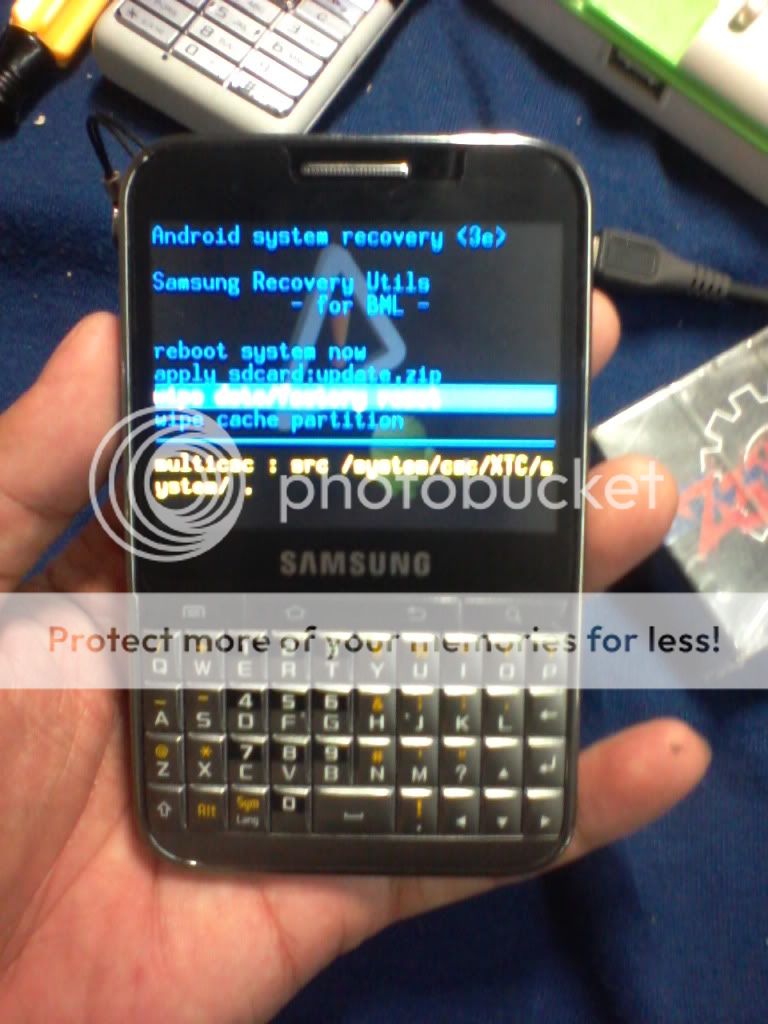
Use The “Volume Key†To Scroll Down & Select “wipe data/factory resetâ€.
Press The “Home Key†To Proceed To The Next Confirmation Step.
Use The “Volume Key†Again To Scroll Down 7 Times & Select “Yes — delete all user dataâ€.
Press The “Home Key†To Perform Hard Reset. After 2 Or 3 Seconds It Will Show Data wipe Complete.
All User Data Will Be Removed And The Device Will Be Restored To Manufacture Default.
Press The “Home Key†To Reboot System Now.
Just Flow The Image :-
Hold Down ''T'' Button Than Power On After You Get Recovery Option / Just Wipe Data / Factory Reset