
share ko lang frp ng j120h/ds done
sa z3x,.lagay natin sa j500h para sa
mareset sya.download mode din ang unit,
ss;
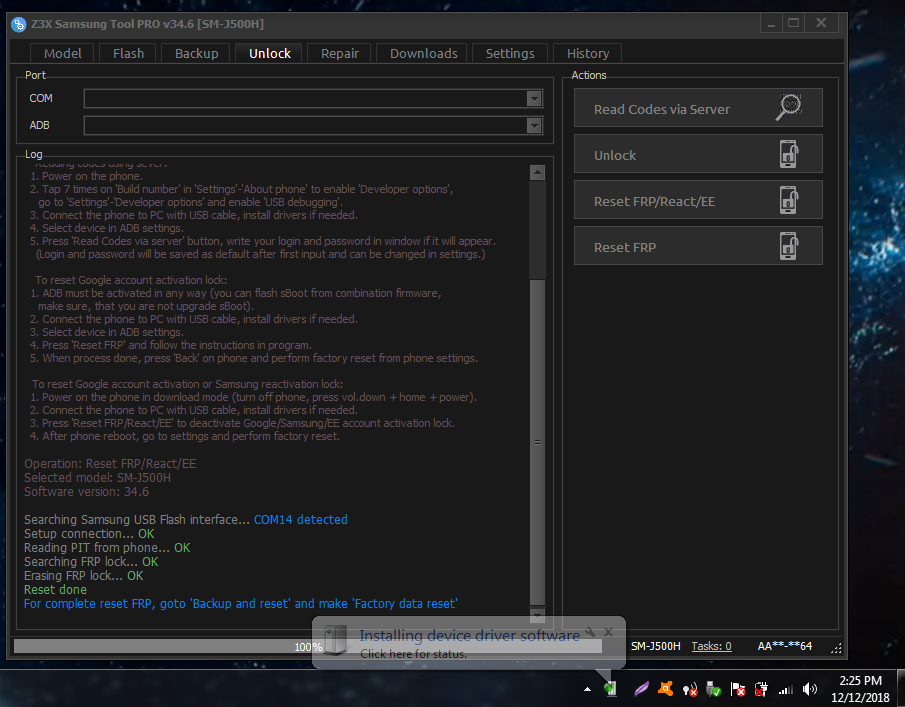
done..
salamat sa pag view mga boss.
for reference lang yan mga boss,
sa z3x,.lagay natin sa j500h para sa
mareset sya.download mode din ang unit,
ss;
Code:
  UNLOCK INSTRUCTIONS:
  1. Power on the phone.
  2. Type *#0808# and select 'DM+MODEM+ADB'.
  3. Type *#9090# and select 'DM/DUN over HSIC'.
     Or use 'Activate Diag' function from 'Repair' tab.
  4. Connect the phone to PC with USB cable, install drivers if needed.
  5. Select diagnostic port in port settings.
  6. Press 'Unlock' button for direct unlock.

    Reading codes using sever:
  1. Power on the phone.
  2. Tap 7 times on 'Build number' in 'Settings'-'About phone' to enable 'Developer options',
     go to 'Settings'-'Developer options' and enable 'USB debugging'.
  3. Connect the phone to PC with USB cable, install drivers if needed.
  4. Select device in ADB settings.
  5. Press 'Read Codes via server' button, write your login and password in window if it will appear.
    (Login and password will be saved as default after first input and can be changed in settings.)

    To reset Google account activation lock:
  1. ADB must be activated in any way (you can flash sBoot from combination firmware,
     make sure, that you are not upgrade sBoot).
  2. Connect the phone to PC with USB cable, install drivers if needed.
  3. Select device in ADB settings.
  4. Press 'Reset FRP' and follow the instructions in program.
  5. When process done, press 'Back' on phone and perform factory reset from phone settings.

   To reset Google account activation or Samsung reactivation lock:
  1. Power on the phone in download mode (turn off phone, press vol.down + home + power).
  2. Connect the phone to PC with USB cable, install drivers if needed.
  3. Press 'Reset FRP/React/EE' to deactivate Google/Samsung/EE account activation lock.
  4. After phone reboot, go to settings and perform factory reset.

Operation: Reset FRP/React/EE
Selected model: SM-J500H
Software version: 34.6

Searching Samsung USB Flash interface... COM14 detected
Setup connection... OK
Reading PIT from phone... OK
Searching FRP lock... OK
Erasing FRP lock... OK
Reset done
For complete reset FRP, goto 'Backup and reset' and make 'Factory data reset'

Done with Samsung Tool PRO v.34.6
done..
salamat sa pag view mga boss.
for reference lang yan mga boss,