Samsung SC-03E (Docom Easy to unlock READ CODE lang "FIRST in PH"[DONE for REFERENCE]
Samsung SC-03E (Docomo Galaxy S III) Unlock Done
Tools
1. Octopus Box Samsung
2. USB Micro
Procedure :
To connect SC-03E phone you have to perform the following steps:
1. Disconnect USB cable from phone.
2. Go to Menu->Settings->Developer options.
3. Turn on "USB Debugging" option.
4. When message is appear press "Yes".
5. Go to dial window.
6. Enter "*#7284#" number.
7. Set "UART" radio button to "MODEM" value.
8. Go to "Qualcomm USB Settings".
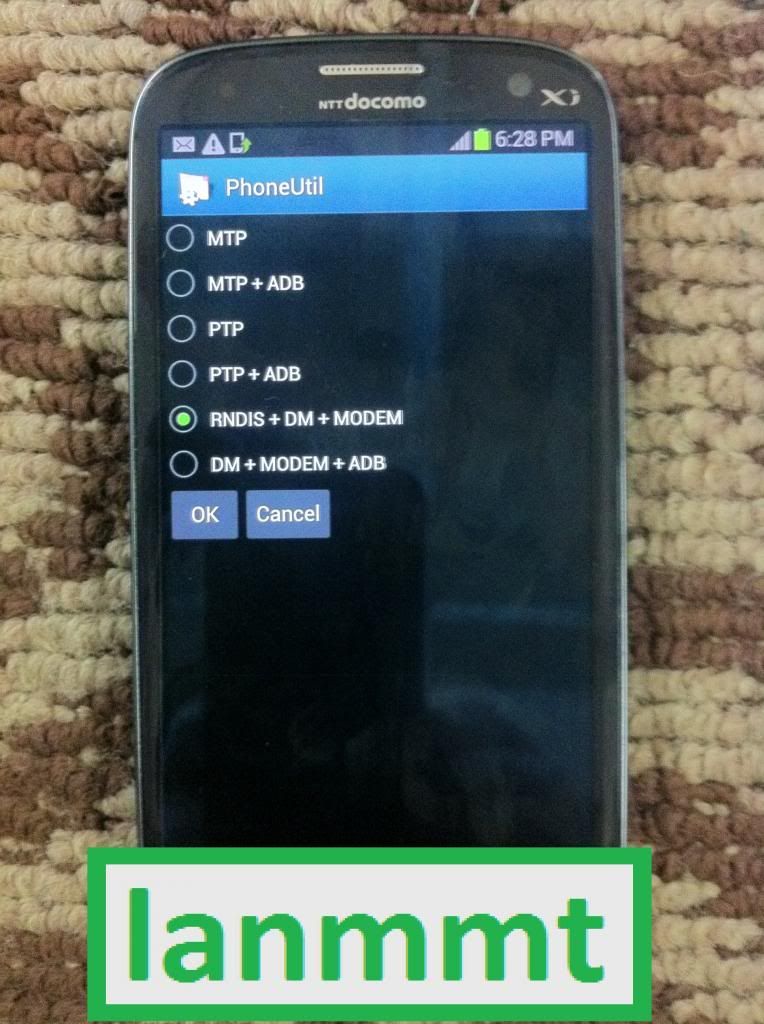
9. Select "RNDIS+DM+MODEM".
10. Close window.
11. Go to dial window.
12. Press "Read Info" in software.
Salpak mo ung USB din Read info:
Ganito lalabas
-----------------------------------------------------------------------------------
Platform: Samsung Android
Selected port: COM9
Selected model: SC-03E
Mode: Emergency
Codes for SC-03E phone in emergency mode can’t be read
-----------------------------------------------------------------------------------
Platform: Samsung Android
Selected port: COM9
Selected model: SC-03E
Mode: Emergency
Codes for SC-03E phone in emergency mode can’t be read
-----------------------------------------------------------------------------------
Platform: Samsung Android
Selected port: COM9
Selected model: SC-03E
Mode: Emergency
Codes for SC-03E phone in emergency mode can’t be read
-----------------------------------------------------------------------------------
Para ma-detect ang SC-03E
1. Enter "*#7284#" number.
2. Set "USB" radio button to "PDA" value.
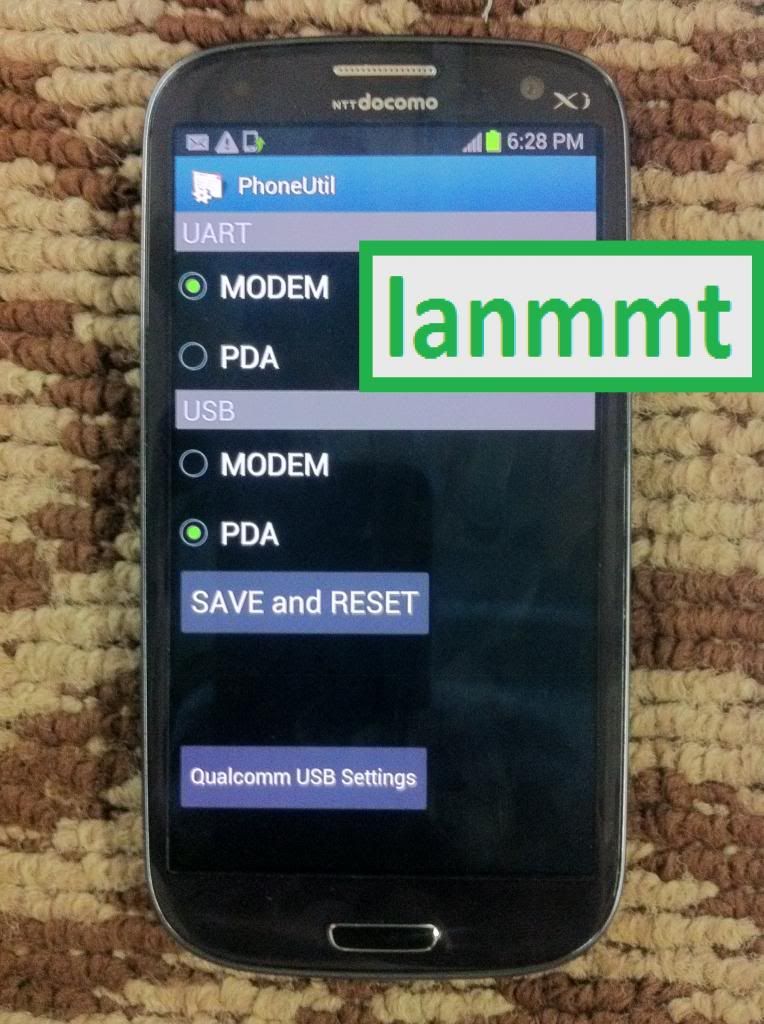
3. select (check) "Manual select" option and try again with each COM port
READ CODE MO
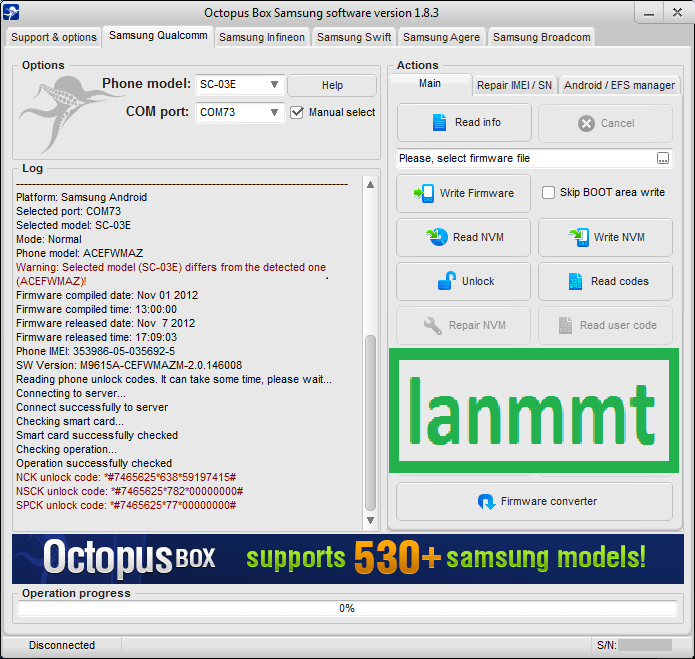
READ CODE DONE
Code:
----------------------------------------------------------------------------------- To connect SC-03E phone you have to perform the following steps: 1. Disconnect USB cable from phone. 2. Go to Menu->Settings->Developer options. 3. Turn on "USB Debugging" option. 4. When message is appear press "Yes". 5. Go to dial window. 6. Enter "*#7284#" number. 7. Set "UART" radio button to "MODEM" value. 8. Go to "Qualcomm USB Settings". 9. Select "RNDIS+DM+MODEM". 10. Close window. 11. Go to dial window. 12. Press "Read Info" in software. ----------------------------------------------------------------------------------- Platform: Samsung Android Selected port: COM72 Selected model: SC-03E Phone was not found on the selected port! Selected action can’t be performed ----------------------------------------------------------------------------------- Platform: Samsung Android Selected port: COM73 Selected model: SC-03E Mode: Normal Phone model: ACEFWMAZ Warning: Selected model (SC-03E) differs from the detected one (ACEFWMAZ)! Firmware compiled date: Nov 01 2012 Firmware compiled time: 13:00:00 Firmware released date: Nov 7 2012 Firmware released time: 17:09:03 Phone IMEI: 353986-05-035692-5 SW Version: M9615A-CEFWMAZM-2.0.146008 Reading phone unlock codes. It can take some time, please wait... Connecting to server... Connect successfully to server Checking smart card... Smart card successfully checked Checking operation... Operation successfully checked NCK unlock code: *#7465625*638*59197415# NSCK unlock code: *#7465625*782*00000000# SPCK unlock code: *#7465625*77*00000000# Log file "C:\Program Files\GsmServer\OctopusSamsung\LOG\13-03-2013_18-05-37.log" closed (3/13/2013 6:25:02 PM).
Enter mo ung NCK unlock code: *#7465625*638*59197415#
UNLOCK DONE
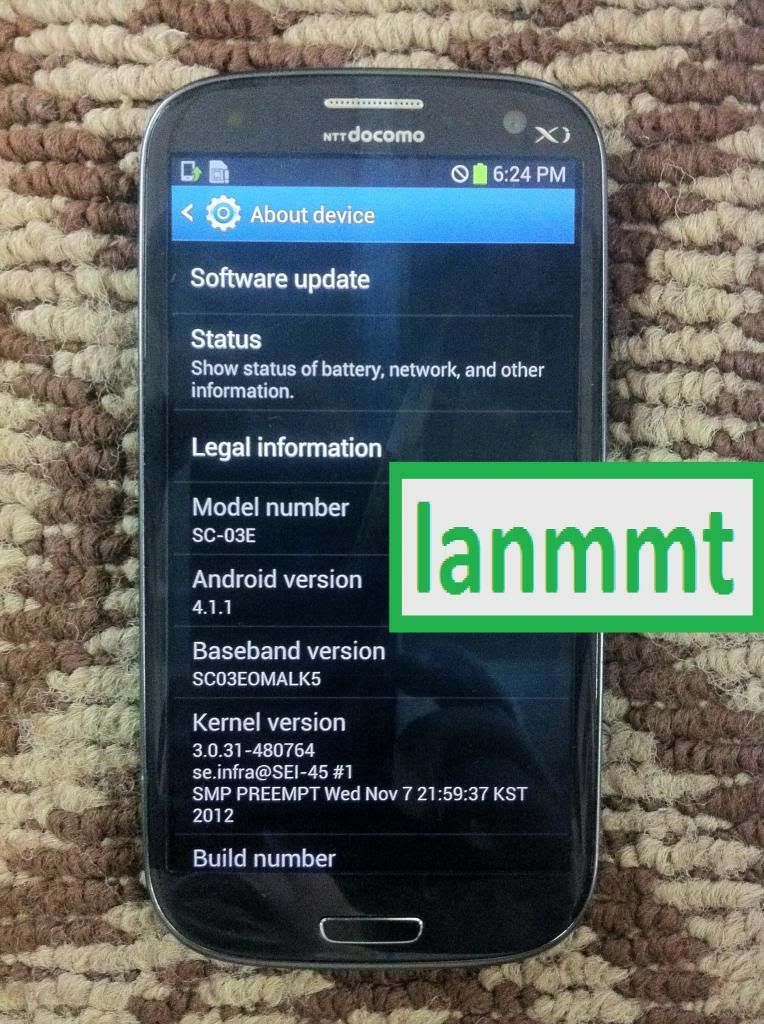
Maraming salamat po...
Tools
1. Octopus Box Samsung
2. USB Micro
Procedure :
To connect SC-03E phone you have to perform the following steps:
1. Disconnect USB cable from phone.
2. Go to Menu->Settings->Developer options.
3. Turn on "USB Debugging" option.
4. When message is appear press "Yes".
5. Go to dial window.
6. Enter "*#7284#" number.
7. Set "UART" radio button to "MODEM" value.
8. Go to "Qualcomm USB Settings".
9. Select "RNDIS+DM+MODEM".
10. Close window.
11. Go to dial window.
12. Press "Read Info" in software.
Salpak mo ung USB din Read info:
Ganito lalabas
-----------------------------------------------------------------------------------
Platform: Samsung Android
Selected port: COM9
Selected model: SC-03E
Mode: Emergency
Codes for SC-03E phone in emergency mode can’t be read
-----------------------------------------------------------------------------------
Platform: Samsung Android
Selected port: COM9
Selected model: SC-03E
Mode: Emergency
Codes for SC-03E phone in emergency mode can’t be read
-----------------------------------------------------------------------------------
Platform: Samsung Android
Selected port: COM9
Selected model: SC-03E
Mode: Emergency
Codes for SC-03E phone in emergency mode can’t be read
-----------------------------------------------------------------------------------
Para ma-detect ang SC-03E
1. Enter "*#7284#" number.
2. Set "USB" radio button to "PDA" value.
3. select (check) "Manual select" option and try again with each COM port
READ CODE MO
READ CODE DONE
Code:
----------------------------------------------------------------------------------- To connect SC-03E phone you have to perform the following steps: 1. Disconnect USB cable from phone. 2. Go to Menu->Settings->Developer options. 3. Turn on "USB Debugging" option. 4. When message is appear press "Yes". 5. Go to dial window. 6. Enter "*#7284#" number. 7. Set "UART" radio button to "MODEM" value. 8. Go to "Qualcomm USB Settings". 9. Select "RNDIS+DM+MODEM". 10. Close window. 11. Go to dial window. 12. Press "Read Info" in software. ----------------------------------------------------------------------------------- Platform: Samsung Android Selected port: COM72 Selected model: SC-03E Phone was not found on the selected port! Selected action can’t be performed ----------------------------------------------------------------------------------- Platform: Samsung Android Selected port: COM73 Selected model: SC-03E Mode: Normal Phone model: ACEFWMAZ Warning: Selected model (SC-03E) differs from the detected one (ACEFWMAZ)! Firmware compiled date: Nov 01 2012 Firmware compiled time: 13:00:00 Firmware released date: Nov 7 2012 Firmware released time: 17:09:03 Phone IMEI: 353986-05-035692-5 SW Version: M9615A-CEFWMAZM-2.0.146008 Reading phone unlock codes. It can take some time, please wait... Connecting to server... Connect successfully to server Checking smart card... Smart card successfully checked Checking operation... Operation successfully checked NCK unlock code: *#7465625*638*59197415# NSCK unlock code: *#7465625*782*00000000# SPCK unlock code: *#7465625*77*00000000# Log file "C:\Program Files\GsmServer\OctopusSamsung\LOG\13-03-2013_18-05-37.log" closed (3/13/2013 6:25:02 PM).
Enter mo ung NCK unlock code: *#7465625*638*59197415#
UNLOCK DONE
Maraming salamat po...