- Joined
- Apr 24, 2017
- Messages
- 18
- Reaction score
- 1
- Points
- 1
Share ko lang po mga boss
for reference, lang po.
Model:
Samsung SM-J320FN ( v5.1.1 )
- need to unlock/openline ( galing sa ibang bansa ) -
Action Taken:
Power on the phone, Enable USB debugging ( to enable tap
Build Number 7 times until Developer Options appear ),
then turn on also OEM Unlock.
Choose correct model, ( SM-J320FN ), then go to Unlock tab
and lastly tick Read codes.
Insert USB Cable ( Samsung Drivers must be Installed )
Ito po Screenshot:
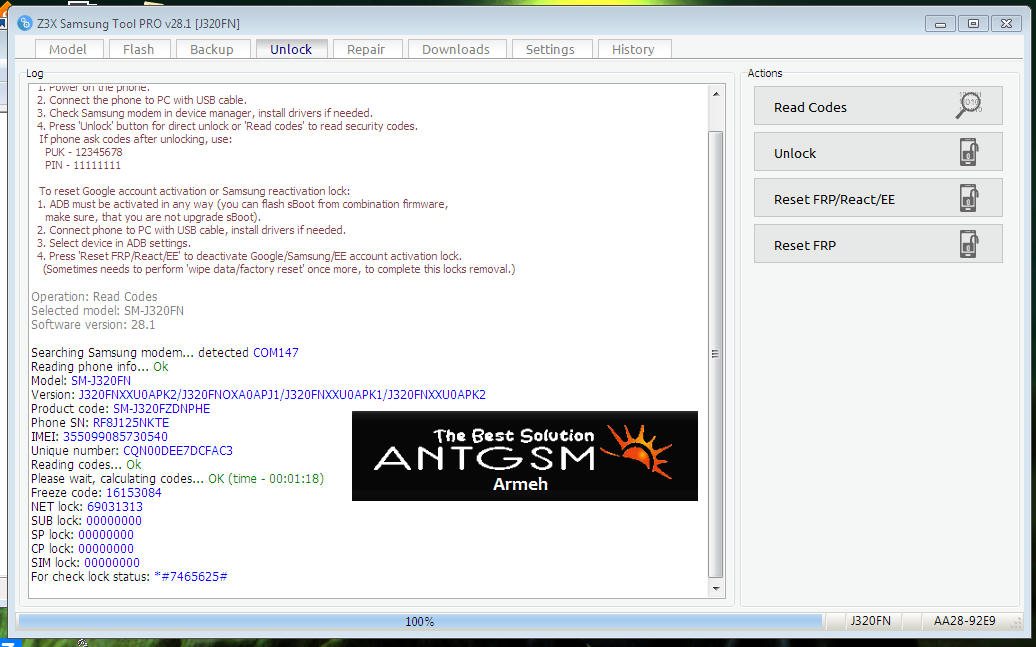
Di ko na po nakunan nang pic ang unit, nagmamadali po kasi si Tumer.
- Sana po makatulong -
for reference, lang po.
Model:
Samsung SM-J320FN ( v5.1.1 )
- need to unlock/openline ( galing sa ibang bansa ) -
Action Taken:
Power on the phone, Enable USB debugging ( to enable tap
Build Number 7 times until Developer Options appear ),
then turn on also OEM Unlock.
Choose correct model, ( SM-J320FN ), then go to Unlock tab
and lastly tick Read codes.
Insert USB Cable ( Samsung Drivers must be Installed )
Ito po Screenshot:
Di ko na po nakunan nang pic ang unit, nagmamadali po kasi si Tumer.
- Sana po makatulong -