Share ko lang po for reference mga idol.
Model; SM-J700F
Problem; NETWORK LOCK (globe)
Action Taken; ‘USB debugging’enable it,Copy and Transfer the SuperSu zip to phone then flash TWRP Recovery On SM-J700F via odin after that install and do direct unlock..
Download tools
1.Odin3_v3.10.6.zip http://odindownload.com/download/Odin3_v3.10.6.zip
2.twrp-2.8.7.0-j7elte.img .tar =http://sh.st/v4ICl
3.SuperSu zip = https://download.chainfire.eu/696/SuperSU/UPDATE-SuperSU-v2.46.zip?retrieve_file=1
LINK
Procedure;


Press and hold the Power + Volume Down + Home button.
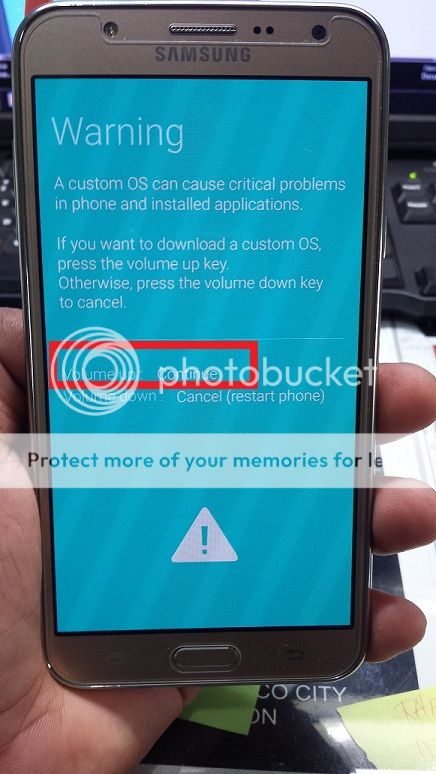

‘USB debugging’enable it,Copy and Transfer the SuperSu zip to phone then flash TWRP Recovery On SM-J700F via odin after that install.


Root is done.

Unlock..

DONE;

hayahay.. }{
}{
Model; SM-J700F
Problem; NETWORK LOCK (globe)
Action Taken; ‘USB debugging’enable it,Copy and Transfer the SuperSu zip to phone then flash TWRP Recovery On SM-J700F via odin after that install and do direct unlock..
Download tools
1.Odin3_v3.10.6.zip http://odindownload.com/download/Odin3_v3.10.6.zip
2.twrp-2.8.7.0-j7elte.img .tar =http://sh.st/v4ICl
3.SuperSu zip = https://download.chainfire.eu/696/SuperSU/UPDATE-SuperSU-v2.46.zip?retrieve_file=1
LINK
Procedure;


Press and hold the Power + Volume Down + Home button.


‘USB debugging’enable it,Copy and Transfer the SuperSu zip to phone then flash TWRP Recovery On SM-J700F via odin after that install.


Root is done.

Unlock..

DONE;

hayahay..
}{