
phone must be powered on -
connect umt dongle
open umt gsm 5.2
click samsung
click ultimate flasher
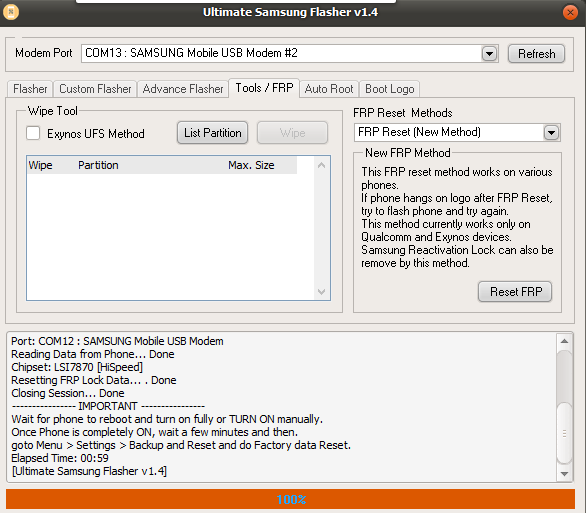
click tools/frp
frp reset method - select new method
click refresh - to check if phone detected - modem port
connect powered on phone
click reset frp
- wait until done -
Device: Samsung Device
Operation: Reset FRP (New Method)
Port: COM13 : SAMSUNG Mobile USB Modem #2
Checking for Device... Found [Normal Mode]
Reading Phone Information... OK
Model: SM-J710F
IMEI: 358662089402858
Software: J710FXXU4BRB2/J710FOJV4BRB1/J710FXXU4BRB2/J710FXXU4BRB2
Init Download Mode... OK
Port: COM12 : SAMSUNG Mobile USB Modem
Reading Data from Phone... Done
Chipset: LSI7870 [HiSpeed]
Resetting FRP Lock Data... . Done
Closing Session... Done
---------------- IMPORTANT ----------------
Wait for phone to reboot and turn on fully or TURN ON manually.
Once Phone is completely ON, wait a few minutes and then.
goto Menu > Settings > Backup and Reset and do Factory data Reset.
Elapsed Time: 00:59
[Ultimate Samsung Flasher v1.4]
connect umt dongle
open umt gsm 5.2
click samsung
click ultimate flasher
click tools/frp
frp reset method - select new method
click refresh - to check if phone detected - modem port
connect powered on phone
click reset frp
- wait until done -
Device: Samsung Device
Operation: Reset FRP (New Method)
Port: COM13 : SAMSUNG Mobile USB Modem #2
Checking for Device... Found [Normal Mode]
Reading Phone Information... OK
Model: SM-J710F
IMEI: 358662089402858
Software: J710FXXU4BRB2/J710FOJV4BRB1/J710FXXU4BRB2/J710FXXU4BRB2
Init Download Mode... OK
Port: COM12 : SAMSUNG Mobile USB Modem
Reading Data from Phone... Done
Chipset: LSI7870 [HiSpeed]
Resetting FRP Lock Data... . Done
Closing Session... Done
---------------- IMPORTANT ----------------
Wait for phone to reboot and turn on fully or TURN ON manually.
Once Phone is completely ON, wait a few minutes and then.
goto Menu > Settings > Backup and Reset and do Factory data Reset.
Elapsed Time: 00:59
[Ultimate Samsung Flasher v1.4]
Last edited by a moderator: