
link http://www.idownloadblog.com/2014/1...glish-team-launches-official-twitter-account/
add Crap Apps and AFC2add and install app add cydia Silv3rCube.myrepospace.com/silv3rCube
http://www.taig.com/en/tutorial.html
Crap Apps https://dl.dropboxusercontent.com/u/63491396/Crap%20Apps.deb …
<aside>
Step 2: Ensure that iTunes is installed and plug your device into your computer and make sure that iTunes recognizes it
Step 3: Restore your iPhone to iOS 8.1.1 (this tool can also jailbreak iOS 8.0, iOS 8.0.2, iOS 8.1)
Step 4: Make sure that Find My iPhone is turned off in Settings → iCloud
Step 5: Make sure that your passcode is disabled in Settings → Touch ID & Passcode
Step 6: Enable AirPlane mode via Control Center
Step 7: Right click on the TaiGJBreak_1006.exe tool and select Run as Administrator, followed by Yes
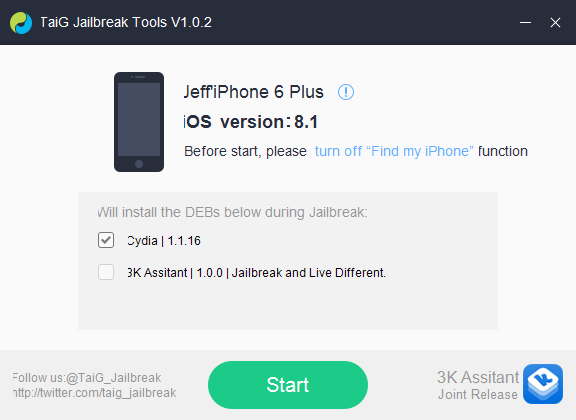
Step 8: Make sure the TaiG tool recognizes your iOS device, uncheck the second box but keep Cydia checked, and then click the green jailbreak button
Click to expand...
add Crap Apps and AFC2add and install app add cydia Silv3rCube.myrepospace.com/silv3rCube
para work un iistall ninyo na apps
<article>
Apple Mobile Phone Unlocking Service And Computer MacBook Laptop Repair Service.
</aside> Step 3: Restore your iPhone to iOS 8.1.1 (this tool can also jailbreak iOS 8.0, iOS 8.0.2, iOS 8.1)
Step 4: Make sure that Find My iPhone is turned off in Settings → iCloud
Step 5: Make sure that your passcode is disabled in Settings → Touch ID & Passcode
Step 6: Enable AirPlane mode via Control Center
Step 7: Right click on the TaiGJBreak_1006.exe tool and select Run as Administrator, followed by Yes
Step 8: Make sure the TaiG tool recognizes your iOS device, uncheck the second box but keep Cydia checked, and then click the green jailbreak button
Click to expand...
add Crap Apps and AFC2add and install app add cydia Silv3rCube.myrepospace.com/silv3rCube
para work un iistall ninyo na apps
<article>
work install app and games


</article>
Apple Mobile Phone Unlocking Service And Computer MacBook Laptop Repair Service.