(Tutorial) Upgrading , Administer Password , Reset EFI Password And PinLock MacLaptop
<fieldset class="fieldset"> <legend>Attached Images</legend> <table cellspacing="3" cellpadding="0" border="0"> <tbody><tr> <td>
 </td> <td>MacBook Air A1466 Mid 2012 EFI Password Removal.jpg (84.1 KB, 9626 views)</td> </tr><tr> <td>
</td> <td>Macbook Pro 15A1286 Late 2011 EFI Password Removal.jpg (176.0 KB, 9261 views)</td> </tr><tr> <td>
</td> <td>forgot-mac-password.jpg (23.6 KB, 8812 views)</td> </tr><tr> <td>
</td> <td>eZpkWfd.png.jpg (57.1 KB, 8614 views)</td> </tr> </tbody></table> </fieldset> <fieldset class="fieldset"> <legend>Attached Files</legend> <table cellspacing="3" cellpadding="0" border="0"> <tbody><tr> <td>
</td> <td>MacBook Air A1466 Mid 2012 EFI Password Removal.jpg (84.1 KB, 9626 views)</td> </tr><tr> <td>
</td> <td>Macbook Pro 15A1286 Late 2011 EFI Password Removal.jpg (176.0 KB, 9261 views)</td> </tr><tr> <td>
</td> <td>forgot-mac-password.jpg (23.6 KB, 8812 views)</td> </tr><tr> <td>
</td> <td>eZpkWfd.png.jpg (57.1 KB, 8614 views)</td> </tr> </tbody></table> </fieldset> <fieldset class="fieldset"> <legend>Attached Files</legend> <table cellspacing="3" cellpadding="0" border="0"> <tbody><tr> <td>
 </td> <td>Mac OS X Mountain Lion Installer - 10.8.4 AhmedZitoon.rar (332.3 KB, 2841 views)</td> </tr> </tbody></table> </fieldset>
<table id="post9750708" class="tborder" align="center" width="100%" cellspacing="0" cellpadding="6" border="0"><tbody><tr valign="top"><td class="alt1" id="td_post_9750708" style="border-right: 1px solid #000000">
</td></tr><tr> <td class="alt2" style="border: 1px solid #000000; border-top: 0px"> </td> <td class="alt1" style="border: 1px solid #000000; border-left: 0px; border-top: 0px" align="right"> </td></tr></tbody></table>
On This Thread , Let Know Much About Mac Lap Tops
First mac had 2 Sort Of Passwords
1- administrator password

There Are To ways
(I) Remove Password With Out Losing Data
- Power Mac With ( Command + S ) Key
- Press Ener Key
- mount -uw /
- rm /var/db/.AppleSetupDone
- shutdown -h now
(II) Remove Password And Setup New Mac Os
IF You Have Recovery
Go To Mac With Alt + Power Then Go Recovery Then Do Format To Partition then Put Mac OS X 10.8.4.dmg on flash disk and do install to Mac OS
IF You Have no Recovery
Instal New Mac OS By Mac OS CD , Or Lets Know How Can w Create Bootable Flash Dick On Mac OS
Download Mac OS X Mountain Lion 10.8.4 From Attachment Files
Note' You Can Us Any Os You Need Like 10.9
' Mac Book 2007- Only Working @10.7'
Then
Look Here ,
How to Create a Bootable Mountain Lion OS X 10.8 USB Flash Drive
Setup New Lion Mac OS With Any Surfing
Also Other Tool To Create Bootable Flash Dick
But ThisTool Not Supported 10.9
Download Lion DiskMaker 2.0.2
if ur Flash Disk 4GB Use This Version
Download Lion DiskMaker 1.7
2- Let Go About EFI Password's And PinLock

There Are 4 Sorts Of Passwords
(I) 2008 (II) 2010
(IV) 2011 (IIV) 2012
To Way's To Remove EFI Password
First CHANGE THE FIRMWARE CHIP


You Can Find It On You Motherboard
Second Reset EFI Password
Let's Go
(I) 2008
Quote:
<table width="100%" cellspacing="0" cellpadding="6" border="0"> <tbody><tr> <td class="alt2" style="border:1px inset"> Bypass Mac Firmware Password
1) Shut down your computer
2) Remove the battery
3) Slide one of the levers (it doesnt matter which one) to the left. This will release the RAM
4) Gently wiggle the RAM card out and put it aside, you will put it back later
5) Boot up the computer while holding COMMAND+OPTION+P+R (this resets the parameter ram)
6) Wait for the startup chime to sound 3 times
7) Release the keys and shutdown the machine once you reach the login screen
Replace the RAM module and slide the lever back while pushing it in until it does not wiggle anymore
9) Now if you boot up the machine you should bypass the Mac firmware password.
You can now use the machine as usual, boot from an external drive, or whatever else. </td> </tr> </tbody></table>
For 2010 2011 And 2012
There Are 10 Unlocks To Do Reset EFI For The 4 Generation
Take Look Here
MacBook Air A1466 Mid 2012 EFI Password Removal

Macbook Pro 15A1286 Late 2011 EFI Password Removal

If You Have This Unlocks In Second's You Can Remove Password And PinLock
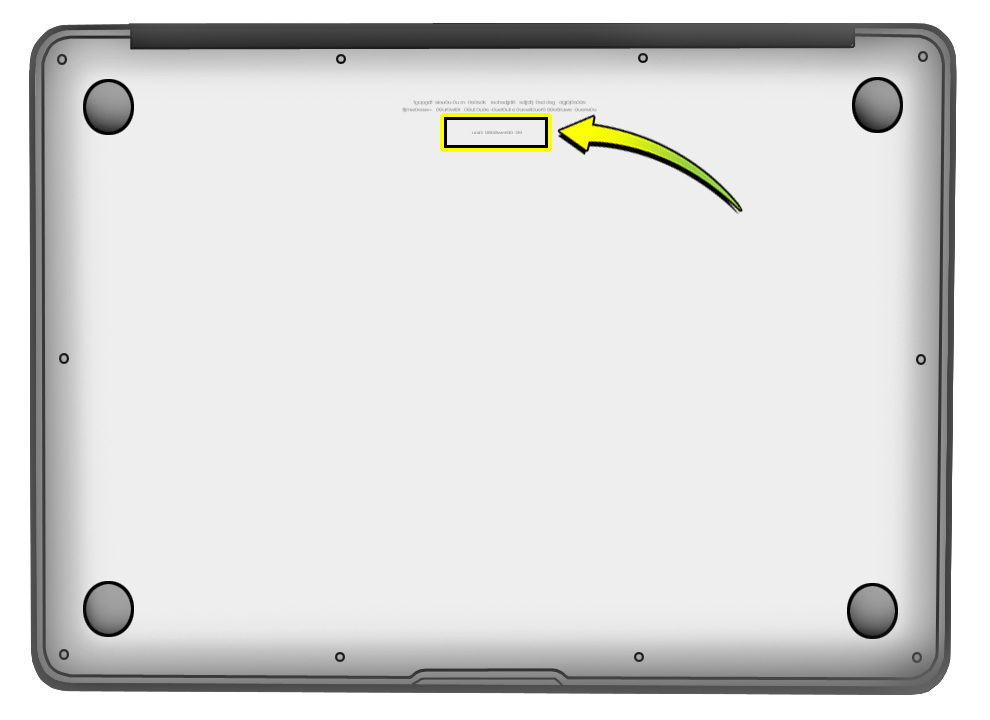
You Can Iditfiy Your Mac Laptop Year By Serial
Go Here Then Put Your Serial You 'll Get The Year Of Your MacLaptop
New (Tutorial) Next Week , How To Burn Mac Os And How To
Create Bootable Flash Dick On Window's And Trick's On Mac's
Please Don't Share My Thread
Br, Ahmed Zitoon
First mac had 2 Sort Of Passwords
1- administrator password
There Are To ways
(I) Remove Password With Out Losing Data
- Power Mac With ( Command + S ) Key
- Press Ener Key
- mount -uw /
- rm /var/db/.AppleSetupDone
- shutdown -h now
(II) Remove Password And Setup New Mac Os
IF You Have Recovery
Go To Mac With Alt + Power Then Go Recovery Then Do Format To Partition then Put Mac OS X 10.8.4.dmg on flash disk and do install to Mac OS
IF You Have no Recovery
Instal New Mac OS By Mac OS CD , Or Lets Know How Can w Create Bootable Flash Dick On Mac OS
Download Mac OS X Mountain Lion 10.8.4 From Attachment Files
Note' You Can Us Any Os You Need Like 10.9
' Mac Book 2007- Only Working @10.7'
Then
Look Here ,
How to Create a Bootable Mountain Lion OS X 10.8 USB Flash Drive
Setup New Lion Mac OS With Any Surfing
Also Other Tool To Create Bootable Flash Dick
But ThisTool Not Supported 10.9
Download Lion DiskMaker 2.0.2
if ur Flash Disk 4GB Use This Version
Download Lion DiskMaker 1.7
2- Let Go About EFI Password's And PinLock
There Are 4 Sorts Of Passwords
(I) 2008 (II) 2010
(IV) 2011 (IIV) 2012
To Way's To Remove EFI Password
First CHANGE THE FIRMWARE CHIP
You Can Find It On You Motherboard
Second Reset EFI Password
Let's Go
(I) 2008
Quote:
<table width="100%" cellspacing="0" cellpadding="6" border="0"> <tbody><tr> <td class="alt2" style="border:1px inset"> Bypass Mac Firmware Password
1) Shut down your computer
2) Remove the battery
3) Slide one of the levers (it doesnt matter which one) to the left. This will release the RAM
4) Gently wiggle the RAM card out and put it aside, you will put it back later
5) Boot up the computer while holding COMMAND+OPTION+P+R (this resets the parameter ram)
6) Wait for the startup chime to sound 3 times
7) Release the keys and shutdown the machine once you reach the login screen
Replace the RAM module and slide the lever back while pushing it in until it does not wiggle anymore
9) Now if you boot up the machine you should bypass the Mac firmware password.
You can now use the machine as usual, boot from an external drive, or whatever else. </td> </tr> </tbody></table>
For 2010 2011 And 2012
There Are 10 Unlocks To Do Reset EFI For The 4 Generation
Take Look Here
MacBook Air A1466 Mid 2012 EFI Password Removal
Macbook Pro 15A1286 Late 2011 EFI Password Removal
If You Have This Unlocks In Second's You Can Remove Password And PinLock
You Can Iditfiy Your Mac Laptop Year By Serial
Go Here Then Put Your Serial You 'll Get The Year Of Your MacLaptop
New (Tutorial) Next Week , How To Burn Mac Os And How To
Create Bootable Flash Dick On Window's And Trick's On Mac's
Please Don't Share My Thread
Br, Ahmed Zitoon
<fieldset class="fieldset"> <legend>Attached Images</legend> <table cellspacing="3" cellpadding="0" border="0"> <tbody><tr> <td>
<table id="post9750708" class="tborder" align="center" width="100%" cellspacing="0" cellpadding="6" border="0"><tbody><tr valign="top"><td class="alt1" id="td_post_9750708" style="border-right: 1px solid #000000">
</td></tr><tr> <td class="alt2" style="border: 1px solid #000000; border-top: 0px"> </td> <td class="alt1" style="border: 1px solid #000000; border-left: 0px; border-top: 0px" align="right">
</td></tr></tbody></table>