
U2800 HUAWEI from OPTUS LOCK
TOOLS:
- SIGMABOX
- USB CABLE FROM PHONE
- MUST INSTALLED DRIVER
Direct unlock Method:
TOOLS:
- SIGMABOX
- USB CABLE FROM PHONE
- MUST INSTALLED DRIVER
Direct unlock Method:
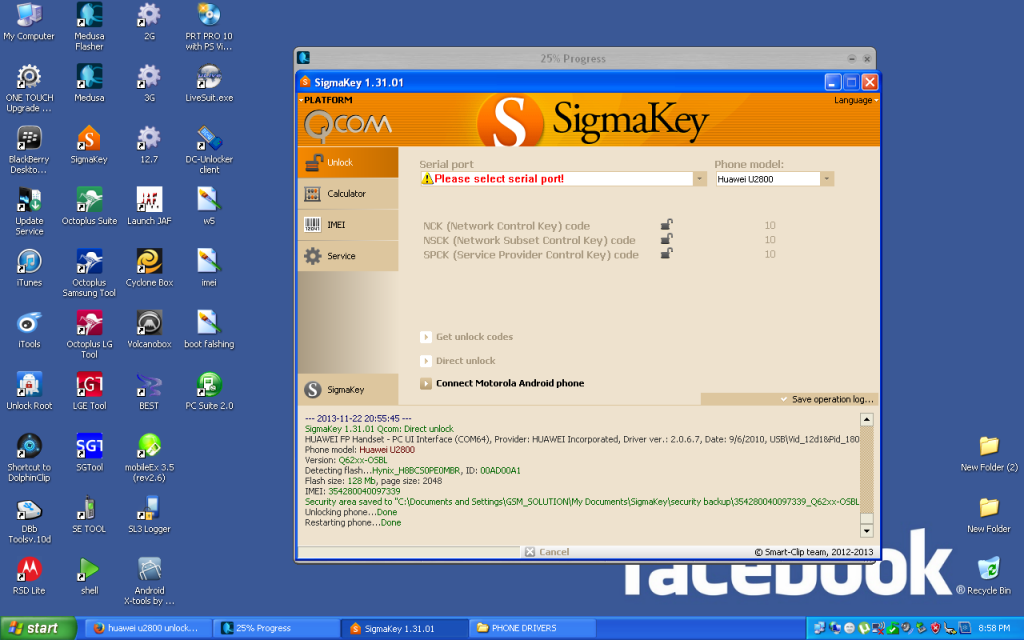
Select "Qualcomm" platform from the tab menu in the upper left side of the software
"Phone model" dropdown box has to be set to "Autodetect" Go to
"Unlock" tab
Set the phone either to Fastboot or to Download mode (procedure is explained in the Fastboot / Download mode manuals)
Connect your device to PC with USB cable
Install required Huawei smartphone driver (only if the phone is connected for the first time)
Fastboot driver
Download mode driver
Select required Interface in the ports selection tab:
Fastboot mode: Phone will be detected as Android Sooner Single ADB Interface in device manager
Download mode: Phone will be detected as DBAdapter Reserved Interface in device manager
Press "Unlock" button