VODAFONE 125
PROCEDURE : PINOUT :keyboard top
1..........8
1: phone Tx (RJ-45 pin-3)
2: phone Rx (RJ-45 pin-2)
3: Gnd
second step- unlock.
third step- insert sim follow this
Unlock instruction:
1. Power-On phone
2. Enter code: 12345678
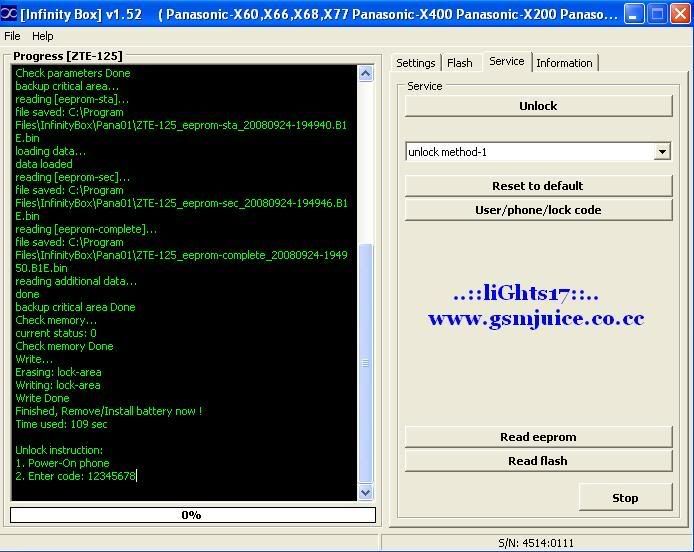
COM5 [VCP0] selected
Device: ZTE-125
Checking data, wait...
Action: unlock
unlock method-1
Boot...
Press and HOLD Power button now (if boot does not start remove/install batery) !
loading...
next part...
boot answer: 01
Release Power button now
Boot Done
Set Baud...
460800
Set Baud Done
Connecting...
flash: 0001:22C4
Connecting Done
Check hardware...
Check hardware Done
Check parameters...
Check parameters Done
backup critical area...
reading [eeprom-sta]...
file saved: C:\Program Files\InfinityBox\Pana01\ZTE-125_eeprom-sta_20080924-194940.B1E.bin
loading data...
data loaded
reading [eeprom-sec]...
file saved: C:\Program Files\InfinityBox\Pana01\ZTE-125_eeprom-sec_20080924-194946.B1E.bin
reading [eeprom-complete]...
file saved: C:\Program Files\InfinityBox\Pana01\ZTE-125_eeprom-complete_20080924-194950.B1E.bin
reading additional data...
done
backup critical area Done
Check memory...
current status: 0
Check memory Done
Write...
Erasing: lock-area
Writing: lock-area
Write Done
Finished, Remove/Install battery now !
Time used: 109 sec
Unlock instruction:
1. Power-On phone
2. Enter code: 12345678
PROCEDURE : PINOUT :keyboard top
1..........8
1: phone Tx (RJ-45 pin-3)
2: phone Rx (RJ-45 pin-2)
3: Gnd
second step- unlock.
third step- insert sim follow this
Unlock instruction:
1. Power-On phone
2. Enter code: 12345678
COM5 [VCP0] selected
Device: ZTE-125
Checking data, wait...
Action: unlock
unlock method-1
Boot...
Press and HOLD Power button now (if boot does not start remove/install batery) !
loading...
next part...
boot answer: 01
Release Power button now
Boot Done
Set Baud...
460800
Set Baud Done
Connecting...
flash: 0001:22C4
Connecting Done
Check hardware...
Check hardware Done
Check parameters...
Check parameters Done
backup critical area...
reading [eeprom-sta]...
file saved: C:\Program Files\InfinityBox\Pana01\ZTE-125_eeprom-sta_20080924-194940.B1E.bin
loading data...
data loaded
reading [eeprom-sec]...
file saved: C:\Program Files\InfinityBox\Pana01\ZTE-125_eeprom-sec_20080924-194946.B1E.bin
reading [eeprom-complete]...
file saved: C:\Program Files\InfinityBox\Pana01\ZTE-125_eeprom-complete_20080924-194950.B1E.bin
reading additional data...
done
backup critical area Done
Check memory...
current status: 0
Check memory Done
Write...
Erasing: lock-area
Writing: lock-area
Write Done
Finished, Remove/Install battery now !
Time used: 109 sec
Unlock instruction:
1. Power-On phone
2. Enter code: 12345678
Last edited by a moderator: