VODAFONE 225 DONE by INFINITY
VODAFONE 225 UNLOCK DONE
if you try to unlock direct unlock sorry to say your wasting your time!
here is some tricks!!!
Download this file's from support
*ZTE-225_Main_VDF-P108A2B06-Tu-TU02_g3dBV2.0_Jun-5-2007.B1M.bin
*ZTE-225_LP_VDF-P108A2B06-Tu-TU02_g3dBV2.0_Jun-5-2007_Tr.B1P.bin
*ZTE-225_repair_ffs_01.B1F.bin -open as ffs2 and select file-
*ZTE-225_repair_eeprom_complete_01.B1E.bin
flash this all requirements
note: don't forget to save all backups during flashing.
after flashing! unlock now don't save your backup its ok!!
Go back to flash tab!
write backup - eeprom sta - to eeprom after that write backup again - eeprom sec -
power on with locked sim enter code 123456789
happy unlocking!
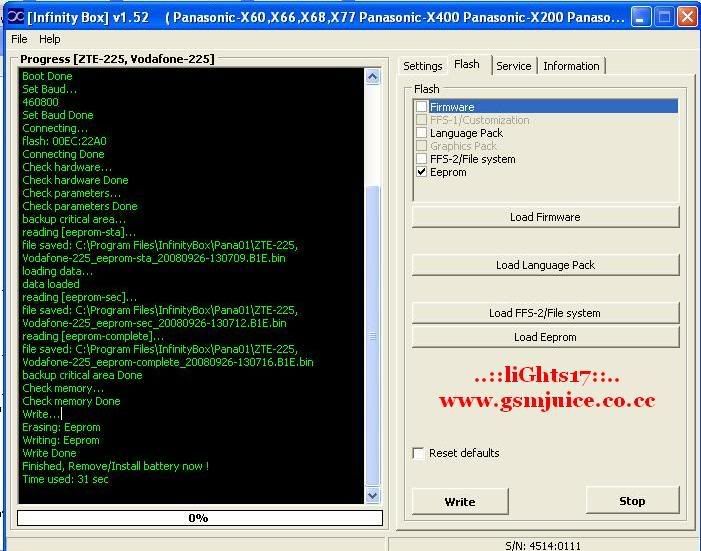
logs: COM5 [VCP0] selected
Device: ZTE-225, Vodafone-225
Checking data, wait...
Action: flash write
Boot...
Press and HOLD Power button now (if boot does not start remove/install batery) !
loading...
next part...
boot answer: 01
Release Power button now
Boot Done
Set Baud...
460800
Set Baud Done
Connecting...
flash: 00EC:22A0
Connecting Done
Check hardware...
Check hardware Done
Check parameters...
Check parameters Done
backup critical area...
reading [eeprom-sta]...
file saved: C:\Program Files\InfinityBox\Pana01\ZTE-225,
Vodafone-225_eeprom-sta_20080926-130709.B1E.bin
loading data...
data loaded
reading [eeprom-sec]...
file saved: C:\Program Files\InfinityBox\Pana01\ZTE-225,
Vodafone-225_eeprom-sec_20080926-130712.B1E.bin
reading [eeprom-complete]...
file saved: C:\Program Files\InfinityBox\Pana01\ZTE-225,
Vodafone-225_eeprom-complete_20080926-130716.B1E.bin
backup critical area Done
Check memory...
Check memory Done
Write...
Erasing: Eeprom
Writing: Eeprom
Write Done
Finished, Remove/Install battery now !
Time used: 31 sec
if you try to unlock direct unlock sorry to say your wasting your time!
here is some tricks!!!
Download this file's from support
*ZTE-225_Main_VDF-P108A2B06-Tu-TU02_g3dBV2.0_Jun-5-2007.B1M.bin
*ZTE-225_LP_VDF-P108A2B06-Tu-TU02_g3dBV2.0_Jun-5-2007_Tr.B1P.bin
*ZTE-225_repair_ffs_01.B1F.bin -open as ffs2 and select file-
*ZTE-225_repair_eeprom_complete_01.B1E.bin
flash this all requirements
note: don't forget to save all backups during flashing.
after flashing! unlock now don't save your backup its ok!!
Go back to flash tab!
write backup - eeprom sta - to eeprom after that write backup again - eeprom sec -
power on with locked sim enter code 123456789
happy unlocking!
logs: COM5 [VCP0] selected
Device: ZTE-225, Vodafone-225
Checking data, wait...
Action: flash write
Boot...
Press and HOLD Power button now (if boot does not start remove/install batery) !
loading...
next part...
boot answer: 01
Release Power button now
Boot Done
Set Baud...
460800
Set Baud Done
Connecting...
flash: 00EC:22A0
Connecting Done
Check hardware...
Check hardware Done
Check parameters...
Check parameters Done
backup critical area...
reading [eeprom-sta]...
file saved: C:\Program Files\InfinityBox\Pana01\ZTE-225,
Vodafone-225_eeprom-sta_20080926-130709.B1E.bin
loading data...
data loaded
reading [eeprom-sec]...
file saved: C:\Program Files\InfinityBox\Pana01\ZTE-225,
Vodafone-225_eeprom-sec_20080926-130712.B1E.bin
reading [eeprom-complete]...
file saved: C:\Program Files\InfinityBox\Pana01\ZTE-225,
Vodafone-225_eeprom-complete_20080926-130716.B1E.bin
backup critical area Done
Check memory...
Check memory Done
Write...
Erasing: Eeprom
Writing: Eeprom
Write Done
Finished, Remove/Install battery now !
Time used: 31 sec
Last edited by a moderator: