
- Joined
- Oct 10, 2014
- Messages
- 1,602
- Reaction score
- 248
- Points
- 181
Xiaomi Model Checker & Password Remover Tool
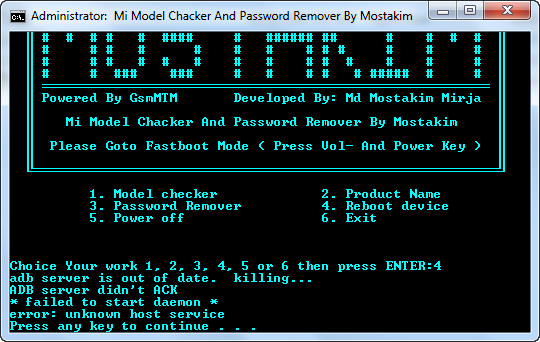
How To Use,
To use this tool you need to connect your phone to pc in fastboot mode {to enter fastboot mode press and hold volume down+ power key and connect usb cable to phone via pc}
also install drivers before doing any operation if you not install before.
2, Open xiaomi password remover tool exe .
3, Choose you operation by pressing 1,2,3,4 or 5 and press enter button.
Supported Modelsaqua = Xiaomi Mi 4S
aries = Xiaomi Mi 2/2S
armani = Redmi 1S
cancro = Xiaomi Mi 3 / Xiaomi Mi 4 CDMA/WCDMA/LTE
dior = Redmi Note 4G
ferrari = Xiaomi Mi 4i
gemini = Xiaomi Mi 5
gucci = Redmi Note Prime (4G Dual-SIM)
hennessy = Redmi Note 3 MTK
hermes = Redmi Note 2/Prime
hydrogen = Xiaomi Mi Max 16/32GB
helium = Xiaomi Mi Max 64G/128G
ido_xhdpi = Redmi 3/Prime
kenzo = Redmi Note 3 Qualcomm/Pro
kate = Redmi Note 3 Special Edition
nikel = Redmi Note 4/MTK
land = Redmi 3S/Prime/3X
latte = Xiaomi Mi Pad 2
leo = Xiaomi Mi Note Pro
libra = Xiaomi Mi 4c
mione_plus = Xiaomi Mi 1/1S
mocha = Xiaomi Mi Pad 1
pisces = Mi3 TD
virgo = Xiaomi Mi Note
wt88047 = Redmi 2
wt88047_pro = Xiaomi Mi 2A
taurus = Xiaomi Mi 2A
capricorn = Xiaomi Mi 5s
omega = Redmi Pro
natrium = Xiaomi Mi 5s Plus
CPR 1
CPR
Always Be Humble
How To Use,
To use this tool you need to connect your phone to pc in fastboot mode {to enter fastboot mode press and hold volume down+ power key and connect usb cable to phone via pc}
also install drivers before doing any operation if you not install before.
2, Open xiaomi password remover tool exe .
3, Choose you operation by pressing 1,2,3,4 or 5 and press enter button.
Supported Modelsaqua = Xiaomi Mi 4S
aries = Xiaomi Mi 2/2S
armani = Redmi 1S
cancro = Xiaomi Mi 3 / Xiaomi Mi 4 CDMA/WCDMA/LTE
dior = Redmi Note 4G
ferrari = Xiaomi Mi 4i
gemini = Xiaomi Mi 5
gucci = Redmi Note Prime (4G Dual-SIM)
hennessy = Redmi Note 3 MTK
hermes = Redmi Note 2/Prime
hydrogen = Xiaomi Mi Max 16/32GB
helium = Xiaomi Mi Max 64G/128G
ido_xhdpi = Redmi 3/Prime
kenzo = Redmi Note 3 Qualcomm/Pro
kate = Redmi Note 3 Special Edition
nikel = Redmi Note 4/MTK
land = Redmi 3S/Prime/3X
latte = Xiaomi Mi Pad 2
leo = Xiaomi Mi Note Pro
libra = Xiaomi Mi 4c
mione_plus = Xiaomi Mi 1/1S
mocha = Xiaomi Mi Pad 1
pisces = Mi3 TD
virgo = Xiaomi Mi Note
wt88047 = Redmi 2
wt88047_pro = Xiaomi Mi 2A
taurus = Xiaomi Mi 2A
capricorn = Xiaomi Mi 5s
omega = Redmi Pro
natrium = Xiaomi Mi 5s Plus
CPR 1
CPR
Always Be Humble