
Phone Model: Xiaomi 2016102
Problem: Google lock and MI account
Procedures:
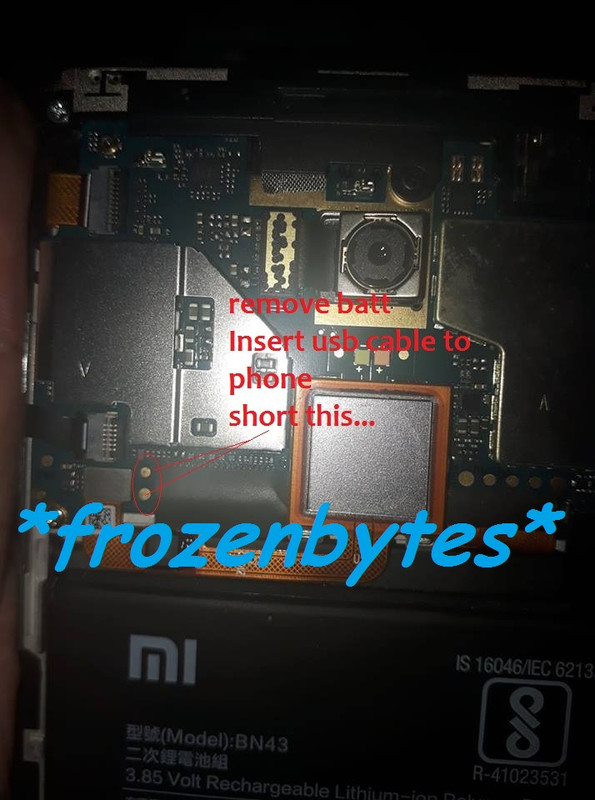
Open the phone back case for testpoint
Remove battery connection
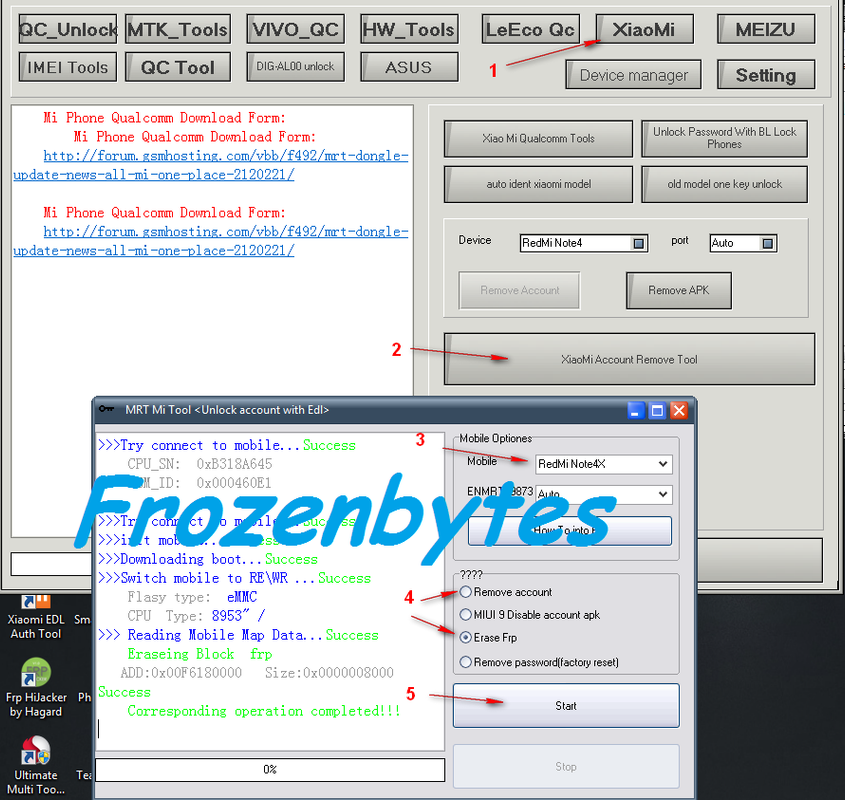
Open MRT software
Click Xiaomi tab
Click Xiaomi account remove tool tab
Under mobile option select redmi note 4x
Mark (o) Erase FRP or (o) Remove account
Insert USB cable to phone
short the testpoint until the phone detected as EDL mode
Click start
Then wait until finished Process...
sana nakatulong po ito.. :x
Problem: Google lock and MI account
Procedures:
Open the phone back case for testpoint
Remove battery connection
Open MRT software
Click Xiaomi tab
Click Xiaomi account remove tool tab
Under mobile option select redmi note 4x
Mark (o) Erase FRP or (o) Remove account
Insert USB cable to phone
short the testpoint until the phone detected as EDL mode
Click start
Then wait until finished Process...
sana nakatulong po ito.. :x