- Joined
- Mar 11, 2015
- Messages
- 604
- Reaction score
- 15
- Points
- 81
Asus Fonepad 7 (KO12) HANG on LOGO Done
Magandang tanghali po mga Kapatid Share ko lang po itong tanggap ko ngayon Asus Fonepad 7 (KO12) HANG on LOGO Done
HISTORY: Nagbura lang daw ng games yung me ari nag hang na..
Try ko ihard reset pero walang nangyari kaya wala ng ibang paraan kundi iflash ang unit..
Firmware: http://www.asus.com/support/Download...W6VJEzTjQR/32/
TOOLS: http://www.4shared.com/zip/QMTj89osc...1-windows.html
ito po ang procedure sundan lang po..
1. idownload ang firmware at tools at pagsamahin sa iisang folder parang ganito
<textarea style="width: 500px;" readonly="readonly" class="ncode_imageresizer_warning" id="ncode_imageresizer_warning_1">Click here to view the original image of 879x494px.</textarea>
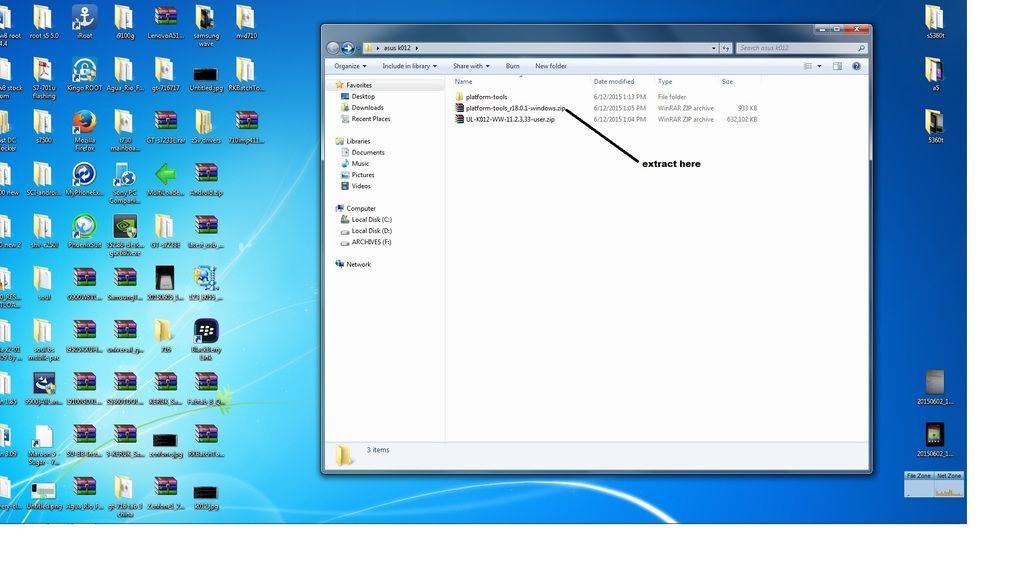
AT EXTRACT ANG TOOLS sa parehong folder..
2.i copy ang FIRMWARE at ipaste sa PLATFORM-TOOLS na folder na naextract natin
<textarea style="width: 500px;" readonly="readonly" class="ncode_imageresizer_warning" id="ncode_imageresizer_warning_2">Click here to view the original image of 879x494px.</textarea>
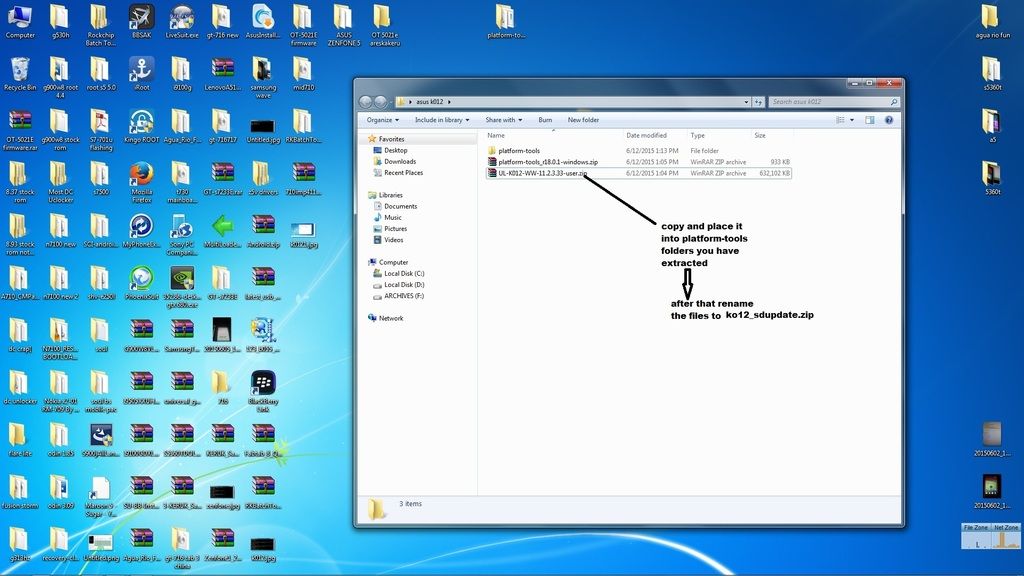
3.irename ang FIRMWARE na kinopya natin, gawin nating k012_sdupdate.zip..at pagkatapos irename,buksan ang files at extract natin yung tatlong files sa kaparehong folder
<textarea style="width: 500px;" readonly="readonly" class="ncode_imageresizer_warning" id="ncode_imageresizer_warning_3">Click here to view the original image of 879x298px.</textarea>
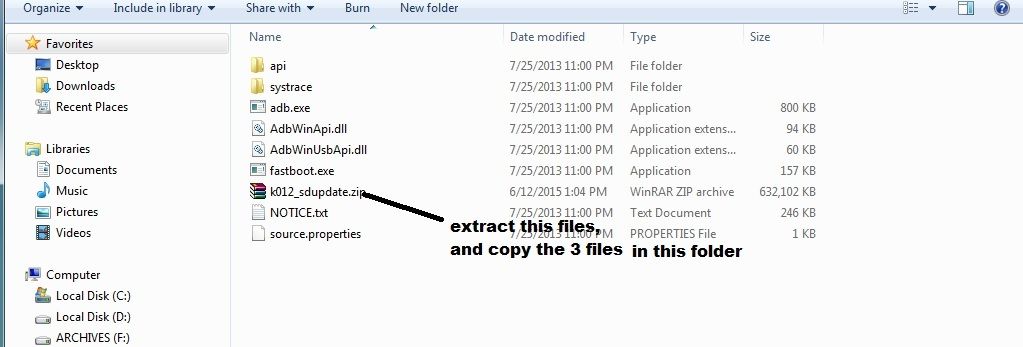
4.eto po oh
<textarea style="width: 500px;" readonly="readonly" class="ncode_imageresizer_warning" id="ncode_imageresizer_warning_4">Click here to view the original image of 879x487px.</textarea>
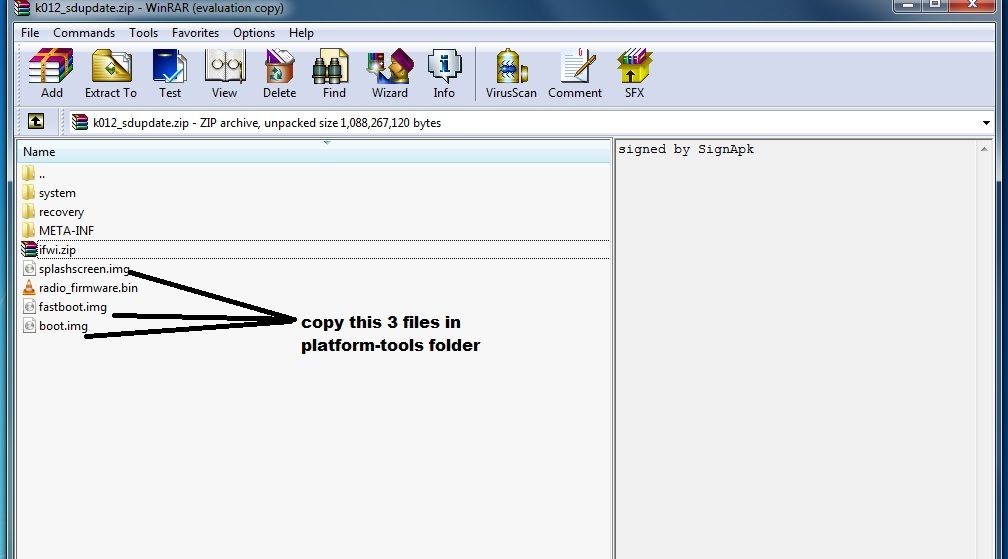
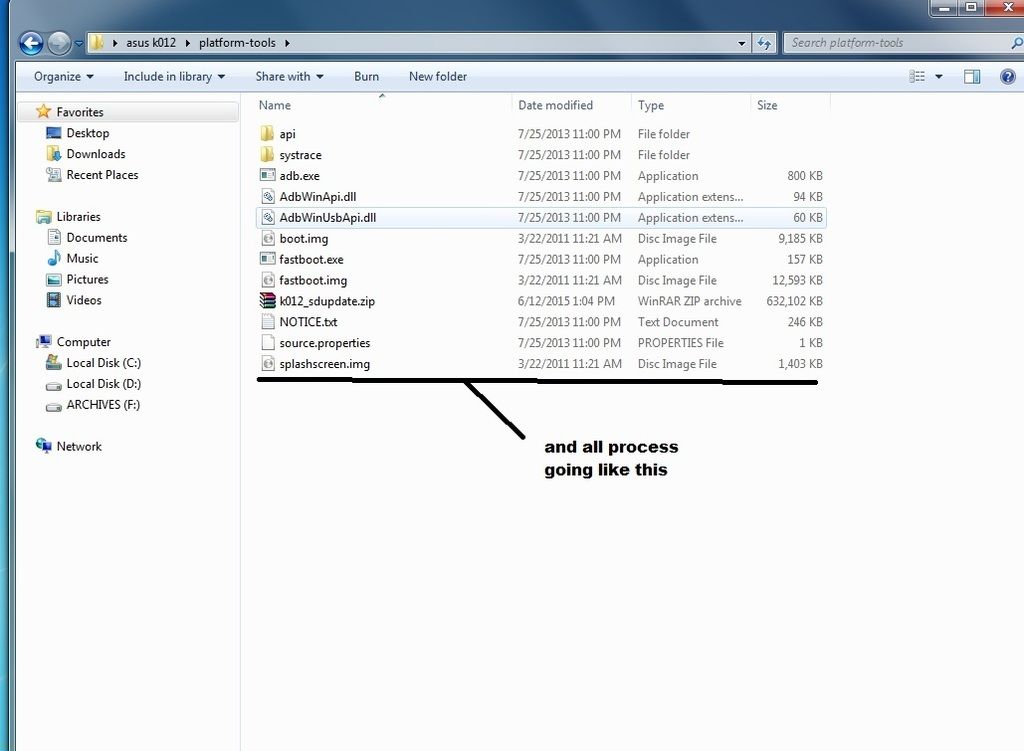
5. dapat po ganito ang kalabasan
<textarea style="width: 500px;" readonly="readonly" class="ncode_imageresizer_warning" id="ncode_imageresizer_warning_5">Click here to view the original image of 879x645px.</textarea>
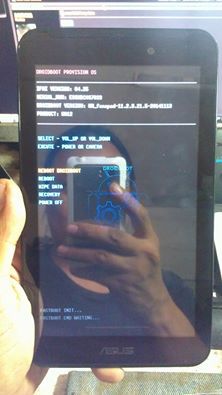
6.connect the tablet sa computer in fastboot mode, by pressing volume up at power.. ganito po
<textarea style="width: 500px;" readonly="readonly" class="ncode_imageresizer_warning" id="ncode_imageresizer_warning_6">Click here to view the original image of 768x1024px.</textarea>

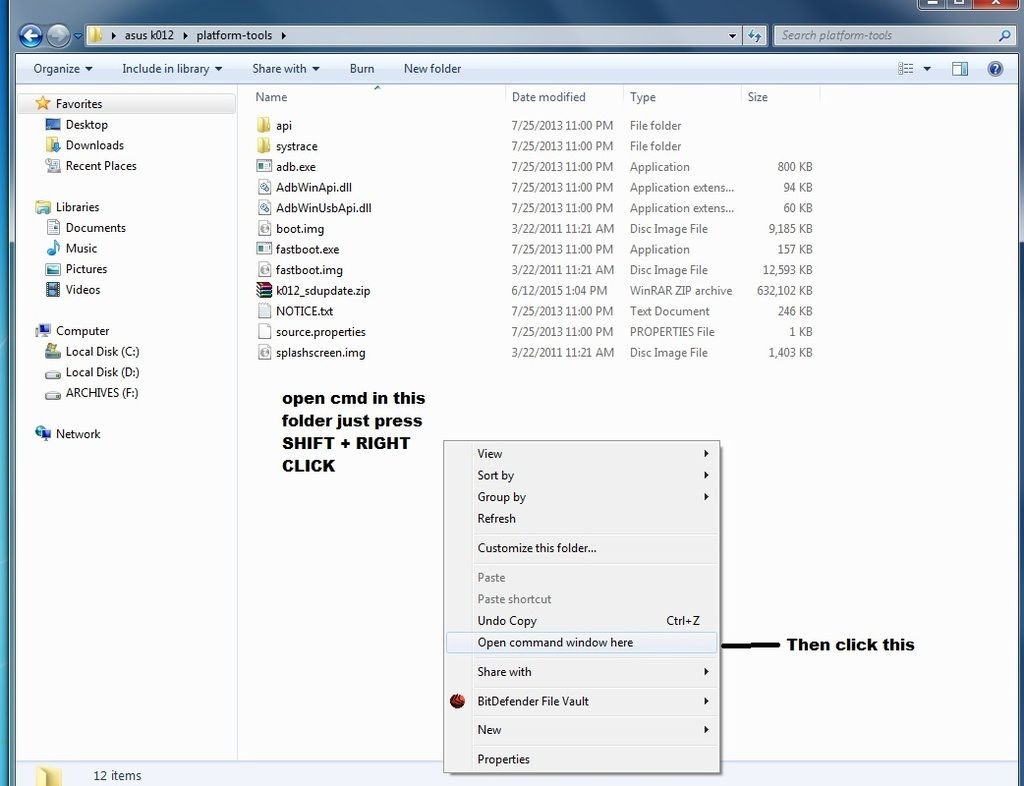
7.sa PLATFORM-TOOLS na folder pindutin po natin ang " SHIFT at RIGHT CLICK at open natin yung cmd ganito po..
<textarea style="width: 500px;" readonly="readonly" class="ncode_imageresizer_warning" id="ncode_imageresizer_warning_7">Click here to view the original image of 879x675px.</textarea>
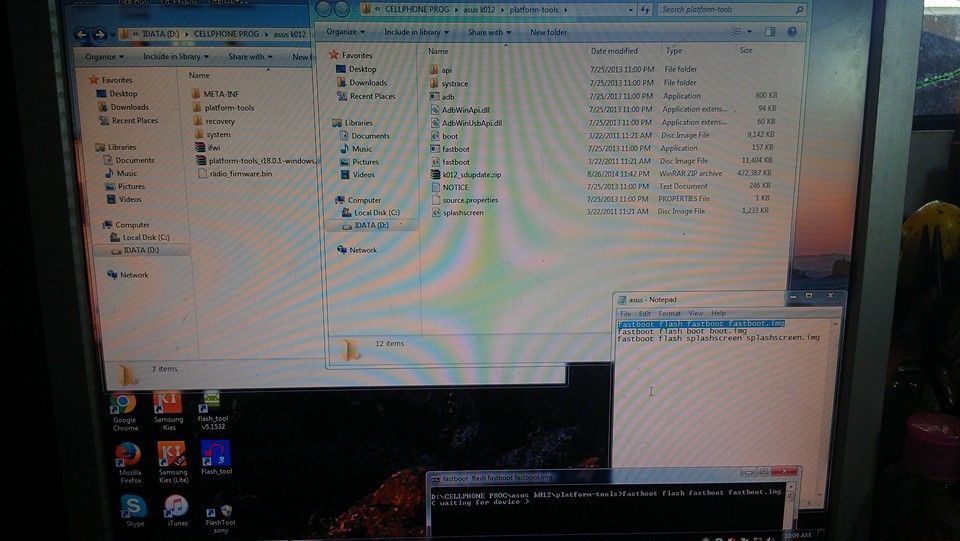
8.paglabas ng cmd itype po natin ang fastboot flash fastboot fastboot.img hintayin mtapos sunod ay fastboot flash boot boot.img at ang huli ay fastboot flash splashscreen splashscreen.img ganito po ang kalalabasan
<textarea style="width: 500px;" readonly="readonly" class="ncode_imageresizer_warning" id="ncode_imageresizer_warning_8">Click here to view the original image of 674x339px.</textarea>
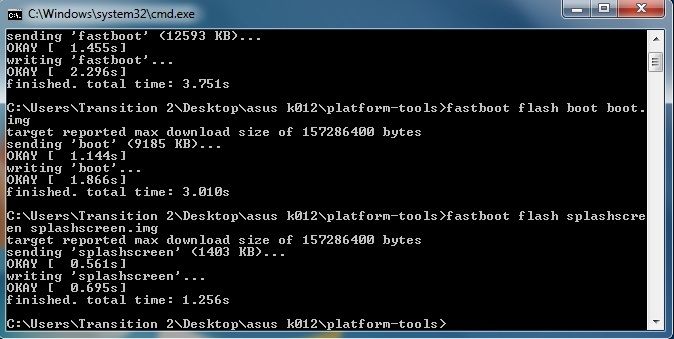
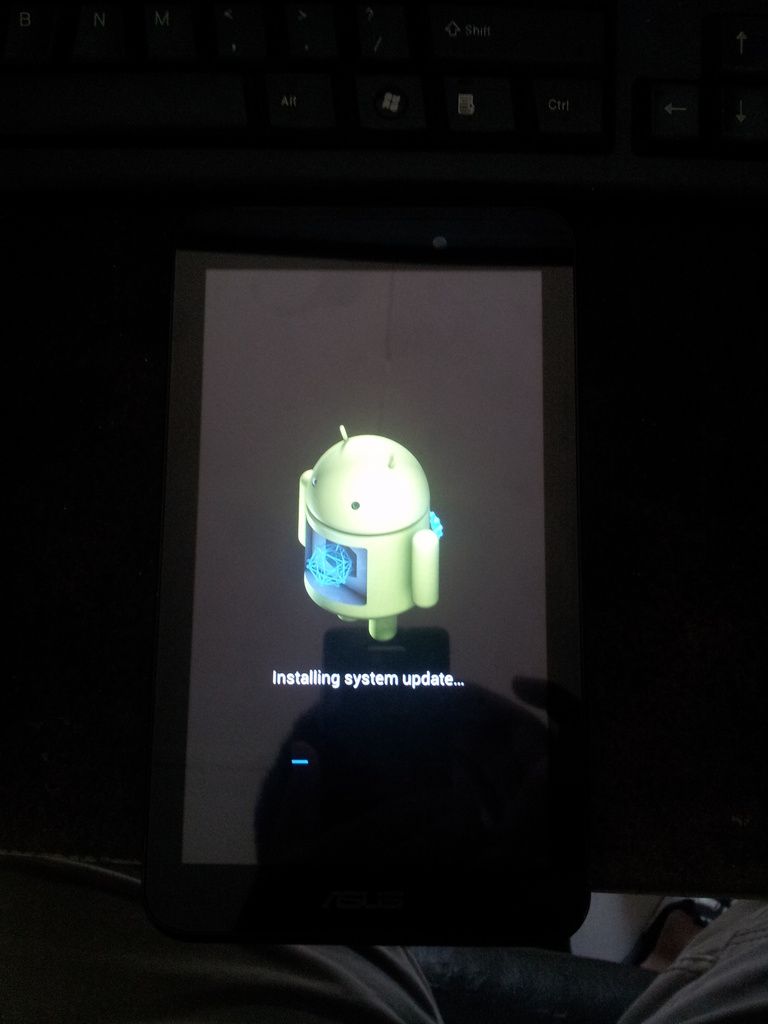
9.pumunta sa PLATFORM-TOOLS na folders at kopyahin ang " k012_sdupdate " at ilagay sa memory card,,note sa labas lang po,.tapos isalpak sa tablet ang memory card at pindutin ang VOLUME UP at POWER wag bibitawan hanggang hindi lumilitaw to
<textarea style="width: 500px;" readonly="readonly" class="ncode_imageresizer_warning" id="ncode_imageresizer_warning_9">Click here to view the original image of 768x1024px.</textarea>
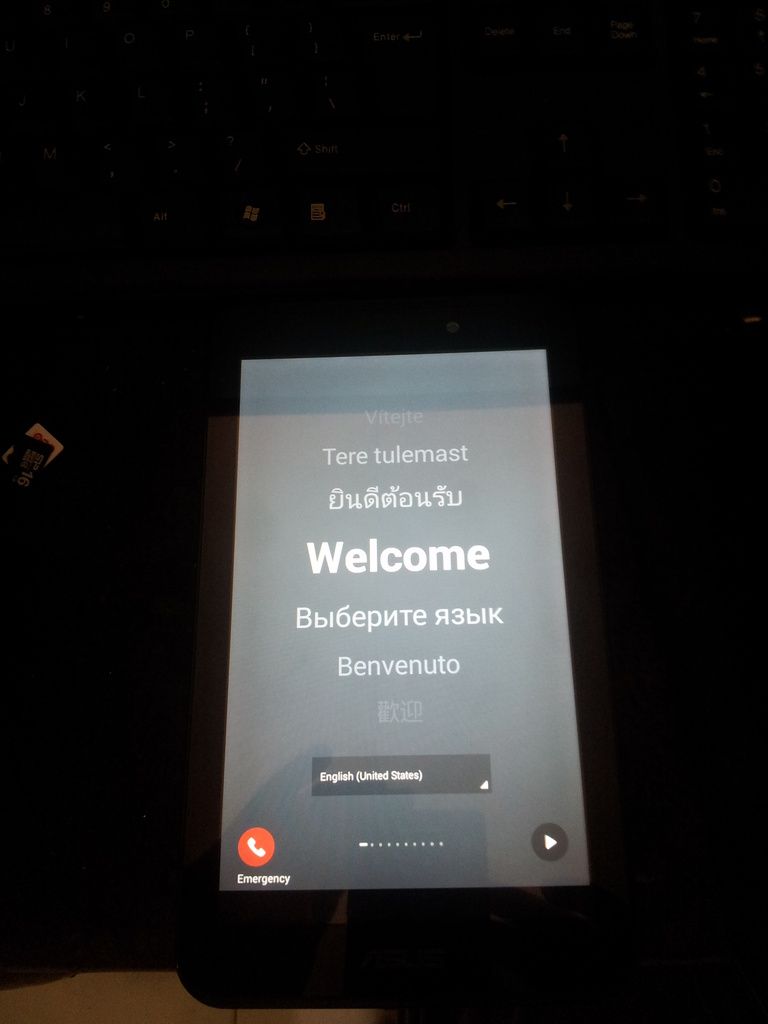
hintayin lang magreboot medyo matagal.. and done
<textarea style="width: 500px;" readonly="readonly" class="ncode_imageresizer_warning" id="ncode_imageresizer_warning_10">Click here to view the original image of 768x1024px.</textarea>
Magandang tanghali po mga Kapatid Share ko lang po itong tanggap ko ngayon Asus Fonepad 7 (KO12) HANG on LOGO Done
HISTORY: Nagbura lang daw ng games yung me ari nag hang na..
Try ko ihard reset pero walang nangyari kaya wala ng ibang paraan kundi iflash ang unit..
Firmware: http://www.asus.com/support/Download...W6VJEzTjQR/32/
TOOLS: http://www.4shared.com/zip/QMTj89osc...1-windows.html
ito po ang procedure sundan lang po..
1. idownload ang firmware at tools at pagsamahin sa iisang folder parang ganito
<textarea style="width: 500px;" readonly="readonly" class="ncode_imageresizer_warning" id="ncode_imageresizer_warning_1">Click here to view the original image of 879x494px.</textarea>

AT EXTRACT ANG TOOLS sa parehong folder..
2.i copy ang FIRMWARE at ipaste sa PLATFORM-TOOLS na folder na naextract natin
<textarea style="width: 500px;" readonly="readonly" class="ncode_imageresizer_warning" id="ncode_imageresizer_warning_2">Click here to view the original image of 879x494px.</textarea>

3.irename ang FIRMWARE na kinopya natin, gawin nating k012_sdupdate.zip..at pagkatapos irename,buksan ang files at extract natin yung tatlong files sa kaparehong folder
<textarea style="width: 500px;" readonly="readonly" class="ncode_imageresizer_warning" id="ncode_imageresizer_warning_3">Click here to view the original image of 879x298px.</textarea>

4.eto po oh
<textarea style="width: 500px;" readonly="readonly" class="ncode_imageresizer_warning" id="ncode_imageresizer_warning_4">Click here to view the original image of 879x487px.</textarea>

5. dapat po ganito ang kalabasan
<textarea style="width: 500px;" readonly="readonly" class="ncode_imageresizer_warning" id="ncode_imageresizer_warning_5">Click here to view the original image of 879x645px.</textarea>

6.connect the tablet sa computer in fastboot mode, by pressing volume up at power.. ganito po
<textarea style="width: 500px;" readonly="readonly" class="ncode_imageresizer_warning" id="ncode_imageresizer_warning_6">Click here to view the original image of 768x1024px.</textarea>

7.sa PLATFORM-TOOLS na folder pindutin po natin ang " SHIFT at RIGHT CLICK at open natin yung cmd ganito po..
<textarea style="width: 500px;" readonly="readonly" class="ncode_imageresizer_warning" id="ncode_imageresizer_warning_7">Click here to view the original image of 879x675px.</textarea>

8.paglabas ng cmd itype po natin ang fastboot flash fastboot fastboot.img hintayin mtapos sunod ay fastboot flash boot boot.img at ang huli ay fastboot flash splashscreen splashscreen.img ganito po ang kalalabasan
<textarea style="width: 500px;" readonly="readonly" class="ncode_imageresizer_warning" id="ncode_imageresizer_warning_8">Click here to view the original image of 674x339px.</textarea>

9.pumunta sa PLATFORM-TOOLS na folders at kopyahin ang " k012_sdupdate " at ilagay sa memory card,,note sa labas lang po,.tapos isalpak sa tablet ang memory card at pindutin ang VOLUME UP at POWER wag bibitawan hanggang hindi lumilitaw to
<textarea style="width: 500px;" readonly="readonly" class="ncode_imageresizer_warning" id="ncode_imageresizer_warning_9">Click here to view the original image of 768x1024px.</textarea>

hintayin lang magreboot medyo matagal.. and done
<textarea style="width: 500px;" readonly="readonly" class="ncode_imageresizer_warning" id="ncode_imageresizer_warning_10">Click here to view the original image of 768x1024px.</textarea>