M
mang_kanor
Anonymous
Step By Steps :
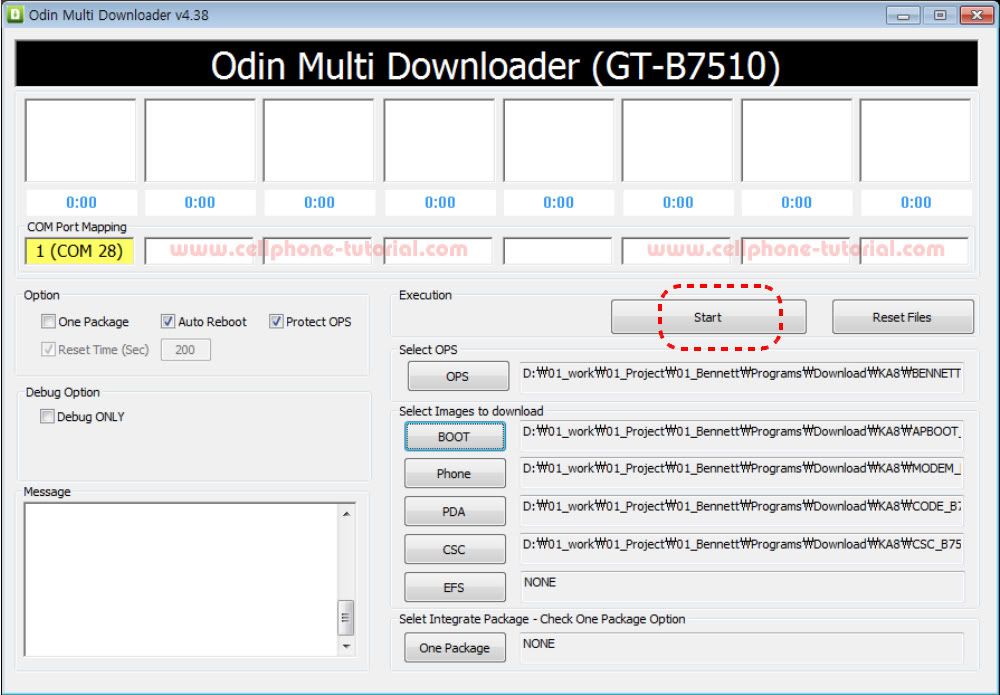
1. Execute the binary download program, which is "Odin Multi Downloader v4.38".
2. Load the files of OPS, BOOT, PHONE, PDS, CSC from the folder that you saved
binary files. (CLICK the each Naming Button and select the file)
-OPS : OPS file
-BOOT : APBOOT_...
-phone : MODEM_...
-PDA : CODE_...
-CSC : CSC_...
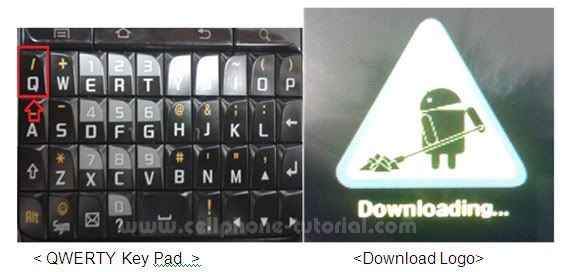
3. Turn On the Mobile with push 'Q' Button to enter the Download mode and check
the Download Logo on LCD
4. Click the Start button when a port is ready
5. After downloading finished successfully, there is a "PASS" message.
6. Done....,

1. Execute the binary download program, which is "Odin Multi Downloader v4.38".
2. Load the files of OPS, BOOT, PHONE, PDS, CSC from the folder that you saved
binary files. (CLICK the each Naming Button and select the file)
-OPS : OPS file
-BOOT : APBOOT_...
-phone : MODEM_...
-PDA : CODE_...
-CSC : CSC_...
3. Turn On the Mobile with push 'Q' Button to enter the Download mode and check
the Download Logo on LCD
4. Click the Start button when a port is ready
5. After downloading finished successfully, there is a "PASS" message.
6. Done....,