
First thing to do is:
1. Download the Following:
Take Note: Make Sure na meron na kayong Winrar para na Extract ang naka Zip na B593u-12 FW.rar
UPGRADER TOOL: https://www.4shared.com/file/TJOo8jJnce/B593_upgrade.html
FIRMWARE : https://www.4shared.com/file/v820zT8eba/B593.html
2. Ikabit Ang Lan Cable sa LAN3 or LAN4 port sa Likod Inyong B593 at sa Port ng Lan ng PC ninyo.
3. I- ON na ang B593
4. Now Open ninyo ang B593_upgrade.exe
5. Select and Lan Card kung saan naka Connect ang B593u-12

6. Select Router

7. Sa may File Path. Click Open Then Select ninyo ang B593.trx

8. I Off mo ang Iyong B593 Modem mo. Bumalik ka sa Upgrade Tool(B593) at Pindution ang START
9. I Power On mo ang Iyong B593 Modem mo. Makikita mong Connected na Ulit siya.

10. Mapapansin na ninyo and B593 niyo na Lahat ng LED is naka LIGHT Ibig sabihin niyang START na yang ng pag-Upgrade. First 1 Palang yung Signal Bar and Umiilaw hanggang sa maging 5 Bars yung Signal.
11. Pag napuno na or 5 Bars na ang SIGNAL. Click mo na STOP sa Upgrade Tool at i-Close na ang Upgrade Tool . Tapos nay an mag UPGRADE.
12. I Power OFF ninyo ang B593 Modem niyo at I-On ulit. Open Mozilla or Google Chrome and Type 192.168.1.1 Try to Log-in PASSWORD : admin
13. Pag ayaw Tusukin ang RESET BUTTON sa Gilid ng B593 Modem mo ng 30 Seconds. Try mo ulit mag Log-in ASSWORD : admin
UNLOCK CODE: http://huaweicodecalculator.com/new-algo/
"Credits to Lorenzfunk07"
Dagdag Kaalaman
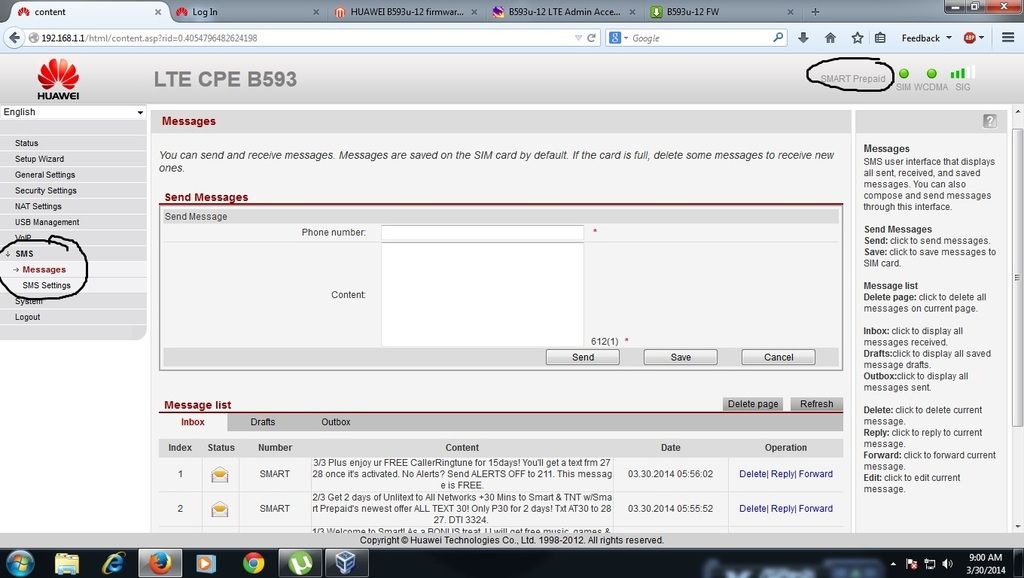
For SMS FEATURE ng B593u-12
Firmware upgrade — Quick Guide for upgrade
1) Download the latest HUAWEI B593u-12 firmware upgrade> (. zip 26 Mb) http://4gltemall.com/ftp/files/B593u...01C26SP054.zip
2) Save the file to your desktop and unzip the file when you are finished.
3) Open your browser and log into your router via 192.168.1.1
Username: admin
Password: xxxx
4) Select S ystem > Upgrade > select tar. (The file you just extracted from the zip. file)> press Upgrade, then wait for few minutes, the system will auto upgrade the firmware of the HUAWEI B593u-12.
By: teerfz
1. Download the Following:
Take Note: Make Sure na meron na kayong Winrar para na Extract ang naka Zip na B593u-12 FW.rar
UPGRADER TOOL: https://www.4shared.com/file/TJOo8jJnce/B593_upgrade.html
FIRMWARE : https://www.4shared.com/file/v820zT8eba/B593.html
2. Ikabit Ang Lan Cable sa LAN3 or LAN4 port sa Likod Inyong B593 at sa Port ng Lan ng PC ninyo.
3. I- ON na ang B593
4. Now Open ninyo ang B593_upgrade.exe
5. Select and Lan Card kung saan naka Connect ang B593u-12
6. Select Router
7. Sa may File Path. Click Open Then Select ninyo ang B593.trx
8. I Off mo ang Iyong B593 Modem mo. Bumalik ka sa Upgrade Tool(B593) at Pindution ang START
9. I Power On mo ang Iyong B593 Modem mo. Makikita mong Connected na Ulit siya.
10. Mapapansin na ninyo and B593 niyo na Lahat ng LED is naka LIGHT Ibig sabihin niyang START na yang ng pag-Upgrade. First 1 Palang yung Signal Bar and Umiilaw hanggang sa maging 5 Bars yung Signal.
11. Pag napuno na or 5 Bars na ang SIGNAL. Click mo na STOP sa Upgrade Tool at i-Close na ang Upgrade Tool . Tapos nay an mag UPGRADE.
12. I Power OFF ninyo ang B593 Modem niyo at I-On ulit. Open Mozilla or Google Chrome and Type 192.168.1.1 Try to Log-in PASSWORD : admin
13. Pag ayaw Tusukin ang RESET BUTTON sa Gilid ng B593 Modem mo ng 30 Seconds. Try mo ulit mag Log-in ASSWORD : admin
UNLOCK CODE: http://huaweicodecalculator.com/new-algo/
"Credits to Lorenzfunk07"
Dagdag Kaalaman
For SMS FEATURE ng B593u-12
Firmware upgrade — Quick Guide for upgrade
1) Download the latest HUAWEI B593u-12 firmware upgrade> (. zip 26 Mb) http://4gltemall.com/ftp/files/B593u...01C26SP054.zip
2) Save the file to your desktop and unzip the file when you are finished.
3) Open your browser and log into your router via 192.168.1.1
Username: admin
Password: xxxx
4) Select S ystem > Upgrade > select tar. (The file you just extracted from the zip. file)> press Upgrade, then wait for few minutes, the system will auto upgrade the firmware of the HUAWEI B593u-12.

By: teerfz
Last edited by a moderator:


