
How to remove Google Account protection & Factory Reset protection in MOTOROLA Moto G 3rd Generation XT1540 phone?
Tools and Drivers
download link..
Drivers
motorola Diag_Drivers/
mfastboot_adb
FRP Reset tools
Install Necessary Drivers and Tools
Unpack Diag_Drivers and install Drivers.
Unpack mfasboot_adb by any packer to c:\mfastboot
Unpack FRP Reset tool and copy all unpacked file to c:\mfastboot
Google Account protection / Factory Reset protection Tutorial
1.Connect MOTOROLA Moto G 3rd Generation XT1540 phone to usb cable in bootloader mode.
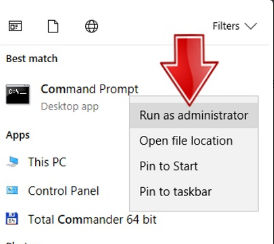
2.Launch the command line with admin rights.command line with admin right
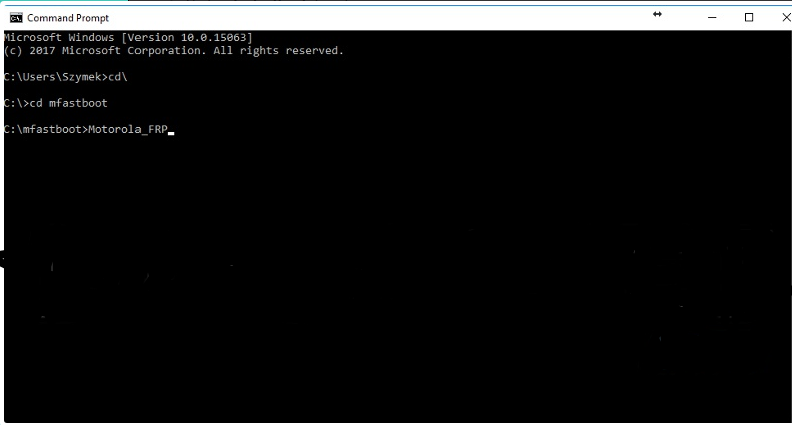
Go to c:\mfastboot directory
Type cd\ and press enter key.
Type cd mfastboot and press enter key.
3.Type Motorola_FRP or Motorola_FRP.exe depend on windows and press enter key.
Motorola FRP toolIf windows ask for admin right allow it.
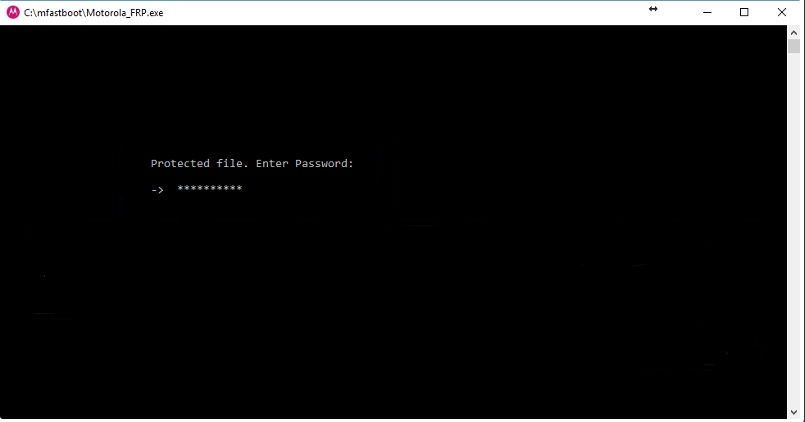
4.Software will ask for password enter iguru4life and press enter key.Motorola FRP tool ask for password iguru4life
5.Now, wait until process end. This takes a little and phone will restart few times just wait until you will see on phone start screen without Google Account verification.
Tools and Drivers
download link..
Drivers
motorola Diag_Drivers/
mfastboot_adb
FRP Reset tools
Install Necessary Drivers and Tools
Unpack Diag_Drivers and install Drivers.
Unpack mfasboot_adb by any packer to c:\mfastboot
Unpack FRP Reset tool and copy all unpacked file to c:\mfastboot
Google Account protection / Factory Reset protection Tutorial
1.Connect MOTOROLA Moto G 3rd Generation XT1540 phone to usb cable in bootloader mode.
2.Launch the command line with admin rights.command line with admin right
Go to c:\mfastboot directory
Type cd\ and press enter key.
Type cd mfastboot and press enter key.
3.Type Motorola_FRP or Motorola_FRP.exe depend on windows and press enter key.
Motorola FRP toolIf windows ask for admin right allow it.
4.Software will ask for password enter iguru4life and press enter key.Motorola FRP tool ask for password iguru4life
5.Now, wait until process end. This takes a little and phone will restart few times just wait until you will see on phone start screen without Google Account verification.