Easy-JTAG Very HOT Update. v1.9.0.5 – FIRST IN THE WORLD!
NO ANY ADDITION ACTIVATION, NO ANY ADAPTERS.
LIKE USUALLY all hotest solution come free for all z3x users, 10years on market!!!
Hope z3x users will repair today all bricked EMMC
After 6month of playing with EMMC we have new solution for you:
This solution can repair 90% dead KMVTU000LM-B503 eMMC.
For work with solution you just need connect 1 MAGIC Z3X-TP for force EMMC firmware emmc mode.
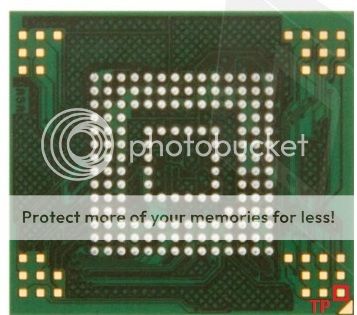
Testpoint Location:
HERE is step by step repair with screenshots!
Here is Repair Manual:
1. Download latest Easy-Jtag install
2. Identify eMMC:
LOG:
OCR READY TIMEOUT [EMMC BAD]
Done.
3. Disconnect eMMC from power lines and easy-jtag box connector
(disconnect eMMCfrom box is important, because some voltage leakage via CMD, CLK, DAT0)
4. Make short testpoint [TP] to [GND] (solder small wire)
5. Plug eMMC power and connect Easy-Jtag box connector
6. Remove short [TP] to [GND]
7. Identify eMMC
LOG:
EMMC Date: 05/2005 Rev.0x56
EMMC NAME: 000000, S/N: 537986854
8. Start Custom Operation ->’SAMSUNG: eMMC Update Firmware’
9. Confirm eMMC Part Number ‘KMVTU000LM-B503′
EasyJtag_Release_v2.0.4.0, new phones added via ISP and JTAG interface
EasyJtag_Release_v2.0.4.0 New phones
Added via JTAG:
- support LG E411G (Read/Write/JTAG_pinout/Dump/oneclickrepair)
Added via ISP(EMMC_DIRECT):
- support SAMSUNG SM-G313HZ (Read/Write/EMMC_ISP_pinout/Dump)
- support SAMSUNG SM-G386F (Read/Write/EMMC_ISP_pinout/Dump)
- support SAMSUNG GT-B5330L (Read/Write/EMMC_ISP_pinout/Dump)
- support LENOVO K910 (Read/Write/EMMC_ISP_pinout/Dump)
- support LG VS930 (Read/Write/Dump)
- support SAMSUNG SHV-E250K (Read/Write/EMMC_ISP_pinout)
Z3X Easy-JTAG Update. v.2.0.5.0. Direct eMMC ODIN added
EasyJTAG Release v2.0.5.0. Direct eMMC ODIN flasher added.
New plugin: Direct eMMC ODIN flasher
We have made new beautiful standalone tool called Direct eMMC ODIN flasher.
This tool allow to write Samsung Factory images + PIT files directly
on eMMC card or SD card for later boot recovery. There is no matter
what version reside inside killed phone. Big thanks to tihiy_grom for
porting libpit to delphi and his great
You don't need to search new SDC
You don't need to search new DUMP
Just download latest tar.gz firmware from z3x support.
Select PIT and partitions , necesary to write and write it on eMMC.
Phone will be reprtitioned and in bootable codition.
Ever more our tool able to flash whole Samsung tar.gz Image to eMMC ( beta ) to
make phone full ok codition. You need only fix IMEI.
There is also some changes in EasyJTAG Main software:
- eMMC Read , Write and Erase buttons are moved now in separate tab , called
[Flasher] there its more flexible by opinions of many our users.
- added [Write All] button. Now you dont need swith ROM1 / ROM2 / ROM3
by yourself. Just select 3 files and tick [Write ALL] thanks BABAK NURI for
this great idea.
Added:
- HTC8X –ћ2330000 + CPUID 0x707910E1 to supported list;
- HW reset capbility enable bit is byte 162 in card EXT_CSD
register, only version4.4 card or later.HW reset feature can be used
to reset eMMC card when occures timeout errors during read/write/erase.
The EXT_CSD_RST_N_FUNCTION can be set to one of values:
EXT_CSD_HW_RESET_EN 01
EXT_CSD_HW_RESET_DIS 02
Or it can left in unprogrammed state 0x00. Beware - this value are OTP
and can be programmed one time in most eMMC cards. Samsung is exception
and this value are resetted to 0x00 with MoviNAND factory reset.
Fixed:
- "Error calling init()" error if init file is corrupted
- "error purging CDC device: 0" error if init file is corrupted
P.S. Lot of phone will be added in upcoming update. Be ready.
- new 1.8 ISP IO Voltage Mode for Exynos ISP
- PINOUT Upload to Server Dialog
- On-fly Compress Reading eMMC ( GZIP/ZIP )
- 1.58 Firmware ( new IO levels detection )
- Open Logs Folder Context Menu
- Colors are back in log window
- Bugfixes in eMMC core.
- Added erase block size option ( 64mb per block very fast )
- Added writing of compressed gZIP files read by EasyJTAG.
- Added eMMC TP locations for 24 Samsung chips.
- Added URL of Dump field in Upload dialog.
- Added current operation performance and CLK speed in statusbar.
- Added limit writing data size option.
- Fixed JTAG Pinout loading from rcp files.
Easy JTAG Plus eMMC Tool 1.0.0.43
- Added new Spreadtrum CPU support.
- Rewritten ext4 browser from zero ( faster in 20x times ).
- Added UNICODE filenames in ext4 browser
- Added lot of small fixes and additions.
Added phones dumps and ISP pinout for following devices. Most of them
Added through Upload pinout form of Classic Software. Thanks everybody for
sharing ISP pinouts and dumps with team.
- The project is written "from scratch"
- The project is fully translated into C ++
- A brand-new NATIVE engine-driver for accessing the EXT2 / 3/4 File System
- All the functions of scanning partitions have been reworked.
- The ability to open a separately read partition without markup
- Partition manager in the form of a tree with information
- Full-featured file manager with the ability to view information, multiple choice of files
- Hot Links button for frequently accessing files (Contacts \ SMS \ Passwords, etc.)
- The ability to save both individual files and folders
- The ability to sort Files by Name \ Type \ Size \
- Ability to change the style of displaying files / folders
- Copying file / folder names to the clipboard
- Ability to quickly view a single file
- Reading section information
- Address bar with manual address input support
- Automatic folder structure buffering
- Automatic read buffer, which maximizes file read speed
- No hanging of the interface
- Saving the entire partition to the BIN format
- HiPower CLK Support
- Support voltage EMMC 1.8 / 2.8 / 3.3 volts
- Supports CLK bus frequency up to 21 MHz
Check EmmcFilemanagerManagerAddon_v1.3.exe on support.
This site uses cookies to help personalise content, tailor your experience and to keep you logged in if you register.
By continuing to use this site, you are consenting to our use of cookies.