
Video Guide
jan ako kumuha ng idea,
sayang ndi ko na SS ang procedure , kala ko kase ndi mag success pero
eto procedure
1 power off ang unit , open mtk hydra & select correct model ( INSTALL DRIVERS IF NEEDED )
2 sa REBOOT TAB = select + "metamodeeVCOM/PRELOADER METHOD"
3 hold both volumes then connect ang unit , ( hayaan lang nakaconnect ang cp hanggang matapos ang procedure )
4 after magreboot sa meta mode , lipat sa READ INFO tab , select "+ Meta"
5 and then lipat sa "format / factory reset / screenlock" TAB & select sa meta mode "FACTORY RESET EMMC1" (sa bandang baba)
6 dapat nakacheck auto reboot then EXECUTE , w8 mo matapos at mag boot ang phone ,
7 DONE!!! just DIAL ( *#813# para sa frp )
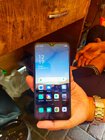
eto ung unit (credit sa uploader ng video) SALAMAT PO
jan ako kumuha ng idea,
sayang ndi ko na SS ang procedure , kala ko kase ndi mag success pero
eto procedure
1 power off ang unit , open mtk hydra & select correct model ( INSTALL DRIVERS IF NEEDED )
2 sa REBOOT TAB = select + "metamodeeVCOM/PRELOADER METHOD"
3 hold both volumes then connect ang unit , ( hayaan lang nakaconnect ang cp hanggang matapos ang procedure )
4 after magreboot sa meta mode , lipat sa READ INFO tab , select "+ Meta"
5 and then lipat sa "format / factory reset / screenlock" TAB & select sa meta mode "FACTORY RESET EMMC1" (sa bandang baba)
6 dapat nakacheck auto reboot then EXECUTE , w8 mo matapos at mag boot ang phone ,
7 DONE!!! just DIAL ( *#813# para sa frp )
eto ung unit (credit sa uploader ng video) SALAMAT PO