fresh format ba ang pc mo sa windows 8/8.1? at na-encounter mo na ba to?
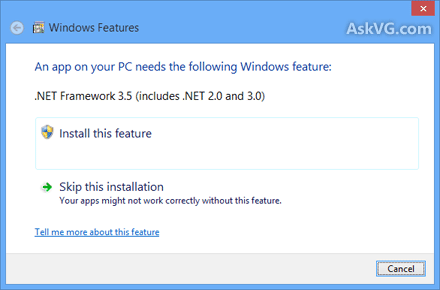
at nataong wala ka pang internet connection! kaibigan eto kailangan mo!
para po sa mga windows 8/8.1 users na walang internet connection
ito po ang isang procedure para ma-enable nyo ang net framework 3.5 sa inyong PC
basahin po muna ng maigi
requirements:
windows 8/8.1 bootable usb or dvd
steps:
1. isaksak ang bootable usb sa iyong computer o ang dvd sa optical drive ng iyong computer
2. pagkatapos basahin ng computer ang inyong installer, i-press ang windows button + x sa inyong keyboard.
3. piliin ang "command prompt (Administrator)"
4. at i-type ang mga sumusunod:
dism /online /enable-feature /featurename:netframework3 /all /source:x:\sources\sxs /limitaccess
5. i-press ang enter at hintaying matapos hanggang umabot ng 100% enabled na net framework 3.5 sa pc mo.
tandaan!
ang "x" sa "/source:x:\sources\sxs /limitaccess" ay ang drive letter ng bootable usb o dvd installer mo.
sana makatulong po ito sa inyo, salamat po!
at nataong wala ka pang internet connection! kaibigan eto kailangan mo!
para po sa mga windows 8/8.1 users na walang internet connection
ito po ang isang procedure para ma-enable nyo ang net framework 3.5 sa inyong PC
basahin po muna ng maigi
requirements:
windows 8/8.1 bootable usb or dvd
steps:
1. isaksak ang bootable usb sa iyong computer o ang dvd sa optical drive ng iyong computer
2. pagkatapos basahin ng computer ang inyong installer, i-press ang windows button + x sa inyong keyboard.
3. piliin ang "command prompt (Administrator)"
4. at i-type ang mga sumusunod:
dism /online /enable-feature /featurename:netframework3 /all /source:x:\sources\sxs /limitaccess
5. i-press ang enter at hintaying matapos hanggang umabot ng 100% enabled na net framework 3.5 sa pc mo.
tandaan!
ang "x" sa "/source:x:\sources\sxs /limitaccess" ay ang drive letter ng bootable usb o dvd installer mo.
sana makatulong po ito sa inyo, salamat po!
Last edited by a moderator: