
Compare new patch with old one,update as follow(The main problem that Rpatch activation card can resolve):
1 The Rpatch can not be installed directly on ios;7.1-7.x before,because it was blocked by Ios, and completely useless on iPhone 5 5s 5c.if it was blocked at broad,that means 3G/4G SIM card can not use on any iPhone,but the card of Global operators released almost are 3G or more,if no new Rpatch,that means the card abroad is useless.the new Rpatch are conquered the Ios7 completely,and it can stall and use in any iPhone(especially stand out in AU from Japan ,Softbank and Docomo)Rpatch is the only one and first one to support the Rpatch installed on line of Ios 7.1 system, help all 3G-4G SIM card abroad unlock and use.
2 the methods of installing Rpatch before is complicated,cos it needs connecting PC data cable and installing according PC system software,it caused inconvinece.(it needed date cable ,take pc with, install itunes and so on).even it can not install for connection problems. new rpatch can install one-click on line by connection iPhone with wifi.it’s very convenient to use.
3 The Rpatch did not support refreshing on line before,but new Rpatch integrate various software and information of the unlock card line ,so that you can master unlock card news and information,and Rpatch reserve access entry of ios:8 and ios:7.x,after new Rpatch refreshing,user can refresh on line directly.
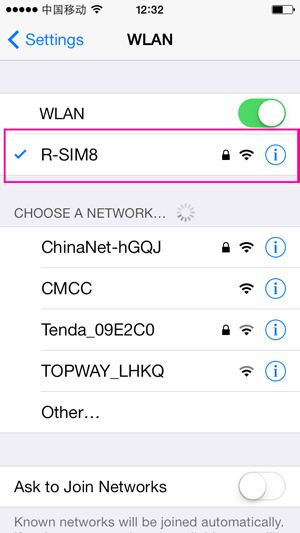
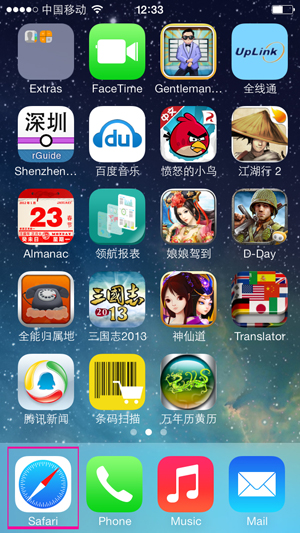
The first step:Connect your iPhone with WIFI(Make sure that network speed is good), and open your iPhone desktop Safari web browser(as the following picture)
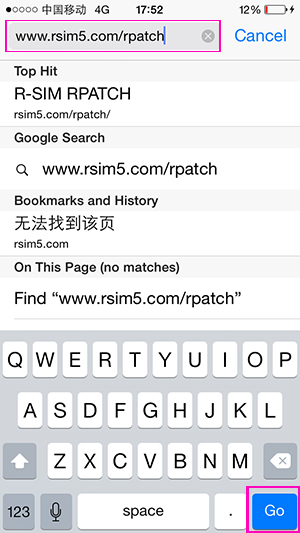
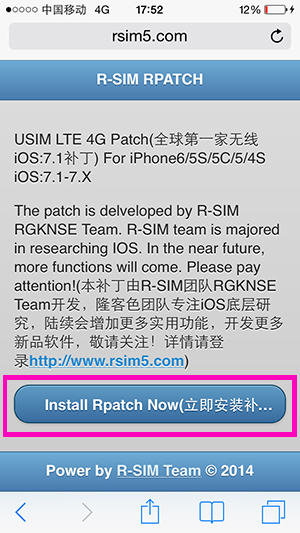
The second step:Please input LTE3G/4G USIM Cards patch address: www.rsim5.com/Rpatch, and please click “GOâ€, and then click “Install the patch immediatelyâ€
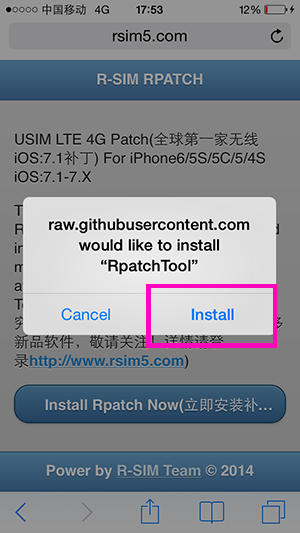
The third step:Please click “Installâ€, it will show the iconâ€Installing....†on the desktop.
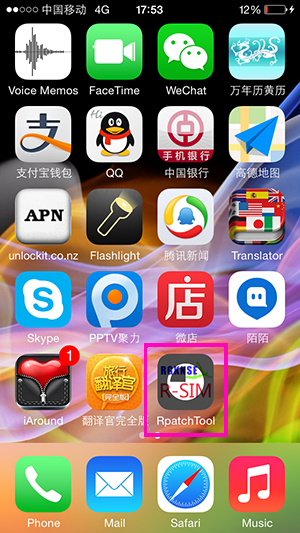
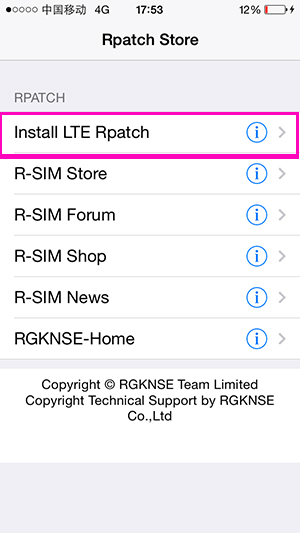
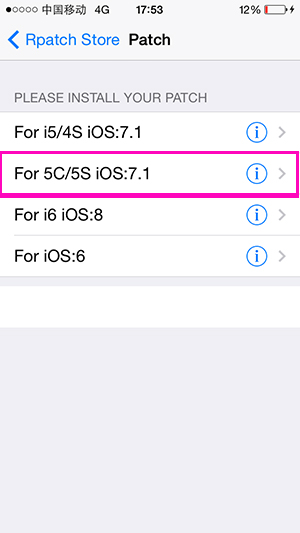
The fourth step:After finishing the above steps, the desktop will show a blue and red icon about complete “Rpatch Toolâ€, and please click the R-SIM Logo icon again, And click the first "Install LTE Rpatch" in Rpatch Store installation interface,then select the corresponding models and iOS(for example you should choose 5c/5s Ios:7.1 if your iPhone is 5 s Ios7 s).PS:Navigation menu has function of the corresponding connection and updating patch in the Rpatch store.
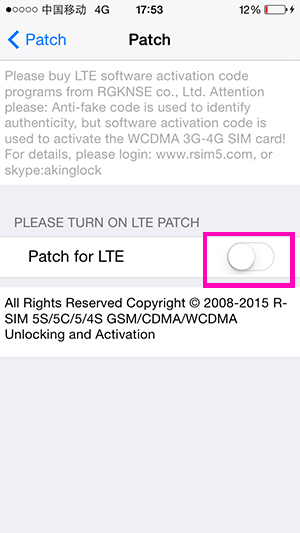
The fifth step:it will show the picture of activation code after click Patch for LTE, please type 12 digit Activation codes in the Activation code space, then click “OK ( PS:This activation code only is usded for the Rpatch software.It is different from the old activation code that it begins with "R" or "W" and can not useed for the old activation code software.)
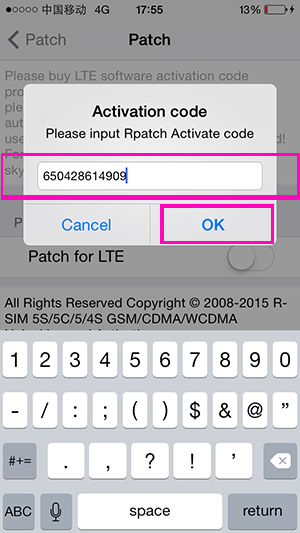
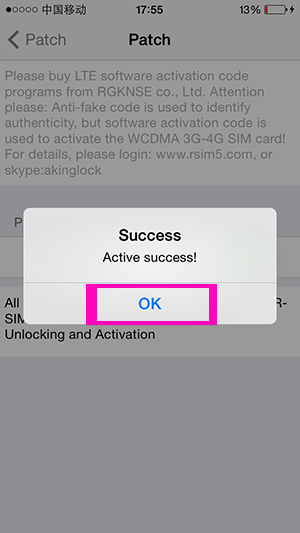
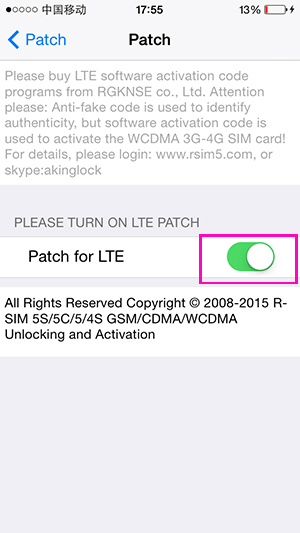
The sixth step:it will show “Success!â€after type the right Rpatch code,then coick “OKâ€,means installation complete .(you can can arbitrarily changethe the key of Patch for LTE after installation complete,please attention : you do not need to do it again after type the right activation code. Just click the “OKâ€when prompted to type the activation code patches)
ORIG LINK
1 The Rpatch can not be installed directly on ios;7.1-7.x before,because it was blocked by Ios, and completely useless on iPhone 5 5s 5c.if it was blocked at broad,that means 3G/4G SIM card can not use on any iPhone,but the card of Global operators released almost are 3G or more,if no new Rpatch,that means the card abroad is useless.the new Rpatch are conquered the Ios7 completely,and it can stall and use in any iPhone(especially stand out in AU from Japan ,Softbank and Docomo)Rpatch is the only one and first one to support the Rpatch installed on line of Ios 7.1 system, help all 3G-4G SIM card abroad unlock and use.
2 the methods of installing Rpatch before is complicated,cos it needs connecting PC data cable and installing according PC system software,it caused inconvinece.(it needed date cable ,take pc with, install itunes and so on).even it can not install for connection problems. new rpatch can install one-click on line by connection iPhone with wifi.it’s very convenient to use.
3 The Rpatch did not support refreshing on line before,but new Rpatch integrate various software and information of the unlock card line ,so that you can master unlock card news and information,and Rpatch reserve access entry of ios:8 and ios:7.x,after new Rpatch refreshing,user can refresh on line directly.
The first step:Connect your iPhone with WIFI(Make sure that network speed is good), and open your iPhone desktop Safari web browser(as the following picture)
The second step:Please input LTE3G/4G USIM Cards patch address: www.rsim5.com/Rpatch, and please click “GOâ€, and then click “Install the patch immediatelyâ€
The third step:Please click “Installâ€, it will show the iconâ€Installing....†on the desktop.
The fourth step:After finishing the above steps, the desktop will show a blue and red icon about complete “Rpatch Toolâ€, and please click the R-SIM Logo icon again, And click the first "Install LTE Rpatch" in Rpatch Store installation interface,then select the corresponding models and iOS(for example you should choose 5c/5s Ios:7.1 if your iPhone is 5 s Ios7 s).PS:Navigation menu has function of the corresponding connection and updating patch in the Rpatch store.
The fifth step:it will show the picture of activation code after click Patch for LTE, please type 12 digit Activation codes in the Activation code space, then click “OK ( PS:This activation code only is usded for the Rpatch software.It is different from the old activation code that it begins with "R" or "W" and can not useed for the old activation code software.)
The sixth step:it will show “Success!â€after type the right Rpatch code,then coick “OKâ€,means installation complete .(you can can arbitrarily changethe the key of Patch for LTE after installation complete,please attention : you do not need to do it again after type the right activation code. Just click the “OKâ€when prompted to type the activation code patches)
ORIG LINK
Last edited by a moderator: