What's new
PinoyTechnician

This is a sample guest message. Register a free account today to become a member! Once signed in, you'll be able to participate on this site by adding your own topics and posts, as well as connect with other members through your own private inbox!

REFERENCE Huawei P40 Pro 5G (ELS-NX9) Android 10 Remove Huawei ID By Sigma Box

ChunChun

Moderator
Staff member
Joined
Mar 27, 2016
Messages
2,715
Reaction score
1,774
Points
641
Location
General Trias Cavite
Unit Model:
Huawei P40 Pro 5G (ELS-NX9)


Issue:
Huawei ID


6RpawHI.jpg


Solution:

Sigma Activated Pack 1,2,3,4 & 5

-Open Sigmakey Box
-Select Platform HiSilicon
-Make The Testpoint & Select USB Port
-Select P40/P40Pro 5G (Boot 2)
-Then Hit Remove Huawei ID
-Wait Until Finished
-Your Done


WNIJzzg.jpg


koJiwBM.jpg


Finished Product


vam5ygr.jpg


KUiJXl8.jpg


"Walang Tool DM Me For Remote Service"


Simple Hit Thanks Is Enough For My Effort!


SuBkkiy.jpg


4X5bYcB.jpg
 
Unit Model:
Huawei P40 Pro 5G (ELS-NX9)


Issue:
Huawei ID


6RpawHI.jpg


Solution:

Sigma Activated Pack 1,2,3,4 & 5

-Open Sigmakey Box
-Select Platform HiSilicon
-Make The Testpoint & Select USB Port
-Select P40/P40Pro 5G (Boot 2)
-Then Hit Remove Huawei ID
-Wait Until Finished
-Your Done


WNIJzzg.jpg


koJiwBM.jpg


Finished Product


vam5ygr.jpg


KUiJXl8.jpg


"Walang Tool DM Me For Remote Service"


Simple Hit Thanks Is Enough For My Effort!


SuBkkiy.jpg


4X5bYcB.jpg
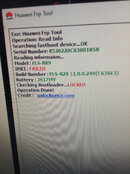
Boss asking ako Kung Kaya din BA itong hawak KO na ELS-NX9 din Huawei id din boss at kano Kaya Yan fastboot read info nya boss
 

Attachments

  • IMG_20240422_121504.jpg
    IMG_20240422_121504.jpg
    155.3 KB · Views: 6
Back
Top