huawei U7519 UNLOCKING
PROBLEM
NETWORK LOCK
GADGET
SIGMA BOX
USB
PROCEDURES
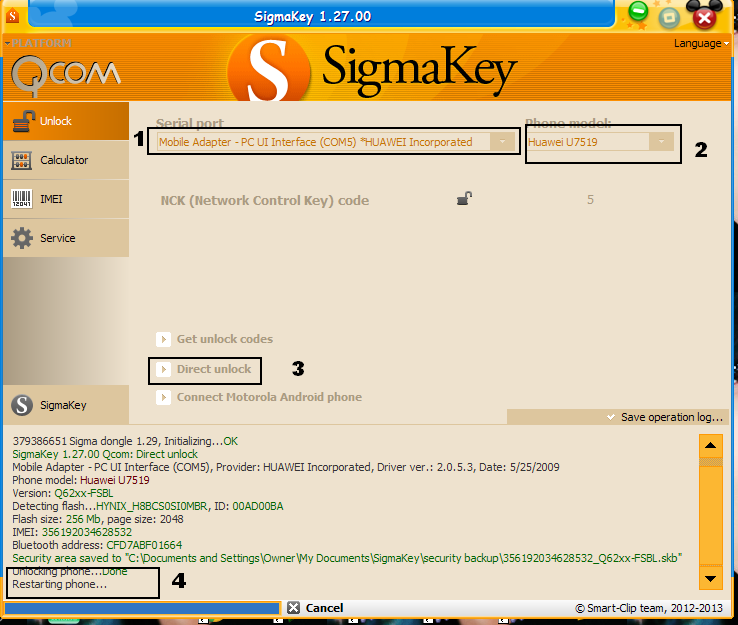
Select "Qualcomm" platform from the tab menu in the upper left side of the software
Go to "Unlock" tab
Select model from the "Phone model" list
Connect the phone to PC with USB cable in the appropriate mode; connection details for each separate model are described in the "How to connect the phone" manual:
NORMAL MODE: power the phone ON and insert USB cable
Insgsikbtall required Huawei phone USB driver (only if the phone is connected for the first time):
NORMAL MODE connection: when you connect the phone for the first time, it will install required drivers automatically
Select "PC UI Interface" in the ports selection tab
Press "Direct Unlock" button
The message "Unlocking phone... Done" indicates that procedure was completed successfully
Wait for the message "Restarting phone... Done" to appear in Sigma dialog window; only after that you can disconnect the phone
NETWORK LOCK
GADGET
SIGMA BOX
USB
PROCEDURES
Select "Qualcomm" platform from the tab menu in the upper left side of the software
Go to "Unlock" tab
Select model from the "Phone model" list
Connect the phone to PC with USB cable in the appropriate mode; connection details for each separate model are described in the "How to connect the phone" manual:
NORMAL MODE: power the phone ON and insert USB cable
Insgsikbtall required Huawei phone USB driver (only if the phone is connected for the first time):
NORMAL MODE connection: when you connect the phone for the first time, it will install required drivers automatically
Select "PC UI Interface" in the ports selection tab
Press "Direct Unlock" button
The message "Unlocking phone... Done" indicates that procedure was completed successfully
Wait for the message "Restarting phone... Done" to appear in Sigma dialog window; only after that you can disconnect the phone