
- Joined
- Apr 9, 2018
- Messages
- 1,801
- Reaction score
- 3,452
- Points
- 741
watch this
or try notepad guide
copy to sd card account unlock.apk
https://www.mediafire.com/file/zbmbqjplbbdw79b/Account+Unlock.apk
copy also to sd card apex launcher
apex launcher 4.7.2
https://www.apkhere.com/app/com.anddoes.launcher
connect first to wifi
must have sim with pin
on a lets go menu or start menu
insert sim
enter sim card unlock pin will appear ( nothing to enter numbers )
now unplug sim using injector
but it must be at the same time
eject simultaneously by pressing power
if nothing happens repeat the procedure.
or try trick from youtube link attached at the top
plug sim with pin
eject then plug again and quickly scroll down from above
now enter the pin of ur sim
then click ok and quickly double tap notification settings
there u go
tap see all
at the most rescent select all
scroll down and tap youtube
scroll down and tap in app notification settings
tap about
tap google privacy and policy
accept and continue
click no thanks for sign in chrome
on search bar type Frpfile.com/bypass or vnrom.net
download android 8.0 gam apk
install gam.apk
activate allow from this source
plug sd card
from download history
select sd card
look for apex launcher.apk u download earlier
install..select allow from this source
then open
or try download apex launcher install then open
go to settings
go to device security
other security settings
device admin
disable find my device
go back to apss
go to google play services
disable it
now go to file or file manager
install account unlock.apk
after install go cloud and accounts or accounts and backup
click accounts
click add acct
choose google
sign in to ur google acct
after sign in
go back to apps from settings
click all apps
click disabled apps
enable google play services
now restart phone
after restart
setup
next next til u see account added
now u know what to do setup til u reach menu
go to setting
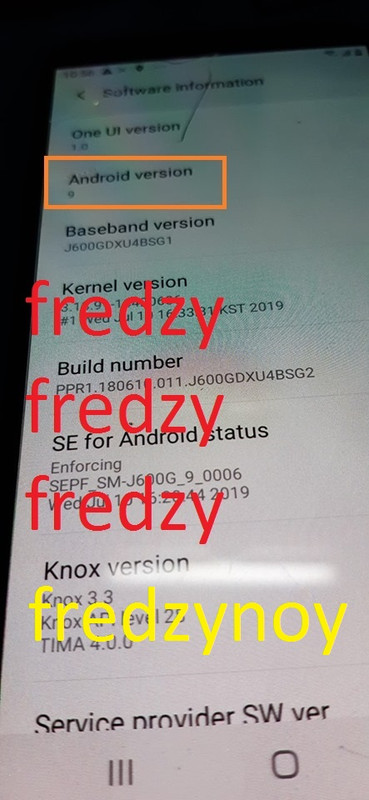
about
software info
tap up to 7x build to activate developers option
enable usb debugging
enable oem
or if there is no on oem
go to accts and remove google acct
now go back to settings
about
at the bottom tick reset
factory reset
and ur done
for easy steps follow this also
link
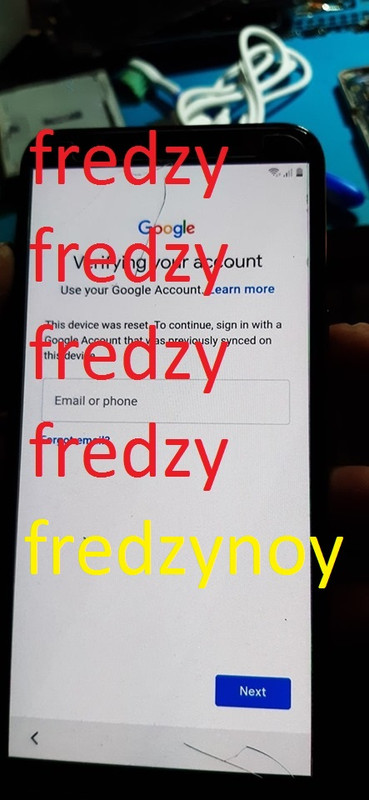
from google account sign in do this trick
plug sim tray with sim quick tap the screen
scroll down
til u see a notification settings
enter sim pin and quick double tap or triple tap
notification settings
there u go
tap see all
at the most rescent select all
scroll down and tap youtube
scroll down and tap in app notification settings
tap about
tap google privacy and policy
accept and continue
click no thanks for sign in chrome
when u choose vnrom.net
much better type in search bar google
then type vnrom.net
select bypass google then it will launch
bypass google account 2019
tap google accout manager android 8 apk
install gam 8.0 apk
next tap frp bypass apk
install then open
on the 3 dots upper right side select browser sign in
sign in ur google account
the restart
and so on do the setup
ayan kumpleto na po yan kahit mabroken images katagalan andyan parin ang guide
br,
fredzynoy ( fredzy )
copy to sd card account unlock.apk
https://www.mediafire.com/file/zbmbqjplbbdw79b/Account+Unlock.apk
copy also to sd card apex launcher
apex launcher 4.7.2
https://www.apkhere.com/app/com.anddoes.launcher
connect first to wifi
must have sim with pin
on a lets go menu or start menu
insert sim
enter sim card unlock pin will appear ( nothing to enter numbers )
now unplug sim using injector
but it must be at the same time
eject simultaneously by pressing power
if nothing happens repeat the procedure.
or try trick from youtube link attached at the top
plug sim with pin
eject then plug again and quickly scroll down from above
now enter the pin of ur sim
then click ok and quickly double tap notification settings
there u go
tap see all
at the most rescent select all
scroll down and tap youtube
scroll down and tap in app notification settings
tap about
tap google privacy and policy
accept and continue
click no thanks for sign in chrome
on search bar type Frpfile.com/bypass or vnrom.net
download android 8.0 gam apk
install gam.apk
activate allow from this source
plug sd card
from download history
select sd card
look for apex launcher.apk u download earlier
install..select allow from this source
then open
or try download apex launcher install then open
go to settings
go to device security
other security settings
device admin
disable find my device
go back to apss
go to google play services
disable it
now go to file or file manager
install account unlock.apk
after install go cloud and accounts or accounts and backup
click accounts
click add acct
choose google
sign in to ur google acct
after sign in
go back to apps from settings
click all apps
click disabled apps
enable google play services
now restart phone
after restart
setup
next next til u see account added
now u know what to do setup til u reach menu
go to setting
about
software info
tap up to 7x build to activate developers option
enable usb debugging
enable oem
or if there is no on oem
go to accts and remove google acct
now go back to settings
about
at the bottom tick reset
factory reset
and ur done
for easy steps follow this also
link
plug sim tray with sim quick tap the screen
scroll down
til u see a notification settings
enter sim pin and quick double tap or triple tap
notification settings
there u go
tap see all
at the most rescent select all
scroll down and tap youtube
scroll down and tap in app notification settings
tap about
tap google privacy and policy
accept and continue
click no thanks for sign in chrome
when u choose vnrom.net
much better type in search bar google
then type vnrom.net
select bypass google then it will launch
bypass google account 2019
tap google accout manager android 8 apk
install gam 8.0 apk
next tap frp bypass apk
install then open
on the 3 dots upper right side select browser sign in
sign in ur google account
the restart
and so on do the setup
ayan kumpleto na po yan kahit mabroken images katagalan andyan parin ang guide
br,
fredzynoy ( fredzy )
