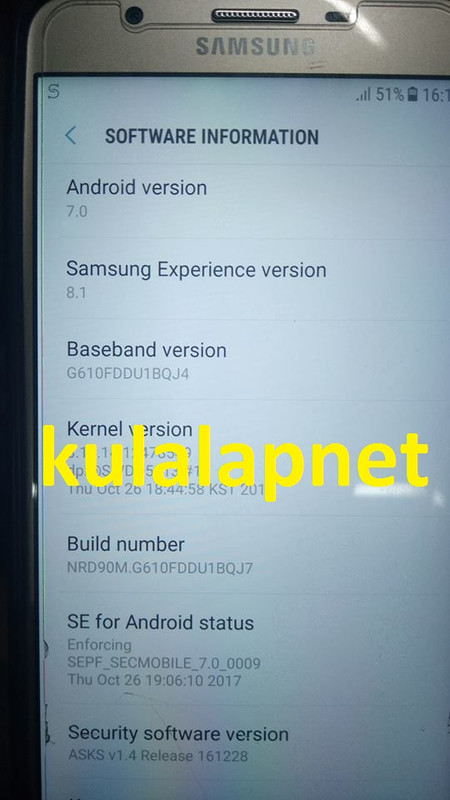
J7 Prime
Custom Binary blocked by frp done
/open octopus samsung software
/select g610f model
/load firmware
/wait and done
logs:
Selected AP file: C:\garbage\G610FDDU1BQJ7_G610FOJV1BQJ7_Egypt\AP_G610FDDU1BQJ7_CL12478549_QB15465504_REV00_user_low_ship_meta.tar.md5
Selected CP file: C:\garbage\G610FDDU1BQJ7_G610FOJV1BQJ7_Egypt\CP_G610FDDU1BQJ4_CP7763425_CL12417615_QB15304404_REV00_user_low_ship.tar.md5
Selected CSC file: C:\garbage\G610FDDU1BQJ7_G610FOJV1BQJ7_Egypt\CSC_OJV_G610FOJV1BQJ7_CL12480153_QB15466755_REV00_user_low_ship.tar.md5
Please put the phone into Download Mode and connect USB cable.
To put SM-G610F into Download Mode, You have to perform the following steps:
1. Reconnect the battery.
2. Press and hold "Volume-" + "Home" + "Power ON" keys.
3. When phone turns on, press "Volume+" key.
Found phone on
Advanced mode!
Firmware write started.
Writing BOOT section...
BOOT section has been written successfully.
Writing RECOVERY section...
RECOVERY section has been written successfully.
Writing SYSTEM section...
SYSTEM section has been written successfully.
Writing USERDATA section...
USERDATA section has been written successfully.
Writing RADIO section...
RADIO section has been written successfully.
Writing CACHE section...
CACHE section has been written successfully.
Writing HIDDEN section...
HIDDEN section has been written successfully.
Firmware writing successfully completed.
Performed by 2.7.1.5 Software version.
logs:
Operation: Reset FRP - UART EMMC
Searching for UART interface..
COM27
Connect Samsung Micro UART cable(with 525K resistor), press and hold "Vol-" + "Power" buttons for 15-20 seconds
Searching for device. Please wait...
Phone found.
Rebooting phone in Upload Mode...
OK
Please connect phone to USB cable..
Searching for a phone. Please wait...
OK
Reading data...
Checking operation...
OK
Searching for UART interface..
COM27
Connect Samsung Micro UART cable(with 525K resistor), press and hold "Vol-" + "Power" buttons for 15-20 seconds
Searching for device. Please wait...
Phone found.
Resetting FRP lock (1/4 attempt)..
success
FRP / Reactivation lock is successfully reseted!
Performed by 2.7.1.5 Software version.
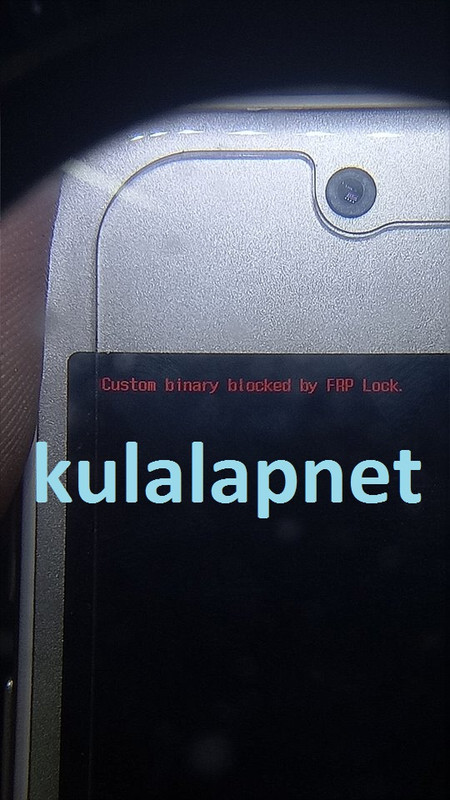
Custom Binary blocked by frp done
/open octopus samsung software
/select g610f model
/load firmware
/wait and done
logs:
Selected AP file: C:\garbage\G610FDDU1BQJ7_G610FOJV1BQJ7_Egypt\AP_G610FDDU1BQJ7_CL12478549_QB15465504_REV00_user_low_ship_meta.tar.md5
Selected CP file: C:\garbage\G610FDDU1BQJ7_G610FOJV1BQJ7_Egypt\CP_G610FDDU1BQJ4_CP7763425_CL12417615_QB15304404_REV00_user_low_ship.tar.md5
Selected CSC file: C:\garbage\G610FDDU1BQJ7_G610FOJV1BQJ7_Egypt\CSC_OJV_G610FOJV1BQJ7_CL12480153_QB15466755_REV00_user_low_ship.tar.md5
Please put the phone into Download Mode and connect USB cable.
To put SM-G610F into Download Mode, You have to perform the following steps:
1. Reconnect the battery.
2. Press and hold "Volume-" + "Home" + "Power ON" keys.
3. When phone turns on, press "Volume+" key.
Found phone on
Advanced mode!
Firmware write started.
Writing BOOT section...
BOOT section has been written successfully.
Writing RECOVERY section...
RECOVERY section has been written successfully.
Writing SYSTEM section...
SYSTEM section has been written successfully.
Writing USERDATA section...
USERDATA section has been written successfully.
Writing RADIO section...
RADIO section has been written successfully.
Writing CACHE section...
CACHE section has been written successfully.
Writing HIDDEN section...
HIDDEN section has been written successfully.
Firmware writing successfully completed.
Performed by 2.7.1.5 Software version.
logs:
Operation: Reset FRP - UART EMMC
Searching for UART interface..
COM27
Connect Samsung Micro UART cable(with 525K resistor), press and hold "Vol-" + "Power" buttons for 15-20 seconds
Searching for device. Please wait...
Phone found.
Rebooting phone in Upload Mode...
OK
Please connect phone to USB cable..
Searching for a phone. Please wait...
OK
Reading data...
Checking operation...
OK
Searching for UART interface..
COM27
Connect Samsung Micro UART cable(with 525K resistor), press and hold "Vol-" + "Power" buttons for 15-20 seconds
Searching for device. Please wait...
Phone found.
Resetting FRP lock (1/4 attempt)..
success
FRP / Reactivation lock is successfully reseted!
Performed by 2.7.1.5 Software version.