
share ko lang gawa ko
rootfile ;https://www.4shared.com/zip/5CiBX7Lyee/CF-Auto-Root-j7xelte-j7xeltexx.html
after ma root my lalabas na reset click ang reset at hintayin lumabas ang program nya at pagkatapos root mo ulit para makita mo pag labas ng supersu at open na si z3x para sa pag unlock naman
ss.
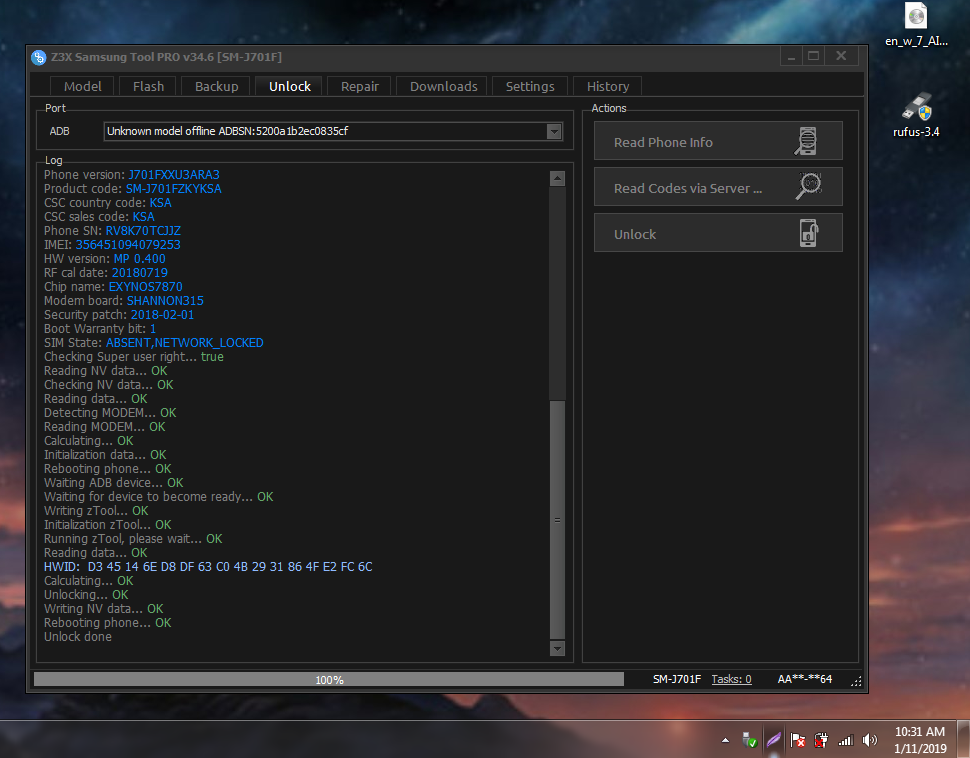 image upload link
salamat sa pagview mga boss.
rootfile ;https://www.4shared.com/zip/5CiBX7Lyee/CF-Auto-Root-j7xelte-j7xeltexx.html
after ma root my lalabas na reset click ang reset at hintayin lumabas ang program nya at pagkatapos root mo ulit para makita mo pag labas ng supersu at open na si z3x para sa pag unlock naman
ss.
image upload link
Code:
 UNLOCK INSTRUCTIONS:
    To unlock:
    Phone must be rooted!
  If the software can't root the phone automatically,
  then you must root your device manually.
  1. Power on the phone.
  2. Tap 7 times on 'Build number' in 'Settings'-'About phone' to enable 'Developer options',
     go to 'Settings'-'Developer options' and enable 'USB debugging'.
  3. Connect the phone to PC with USB cable, install drivers if needed.
  4. Select device in ADB settings.
  5. Press 'Unlock' for direct unlock.

    Reading codes using sever:
    Warning! Knox warranty must be active (0x00)!
    If you have it voided (0x01(void)), then you can't unlock this phone using sever.
  1. Power on the phone.
  2. Type *#0808# and select 'DM+MODEM+ADB'.
  3. Connect the phone to PC with USB cable, install drivers if needed.
  4. Press 'Read Codes via server' button, write your login and password in window if it will appear.
    (Login and password will be saved as default after first input and can be changed in settings)

Operation: Unlock
Selected model: SM-J701F
Software version: 34.6

Waiting ADB device... OK
Reading phone info...
Model: SM-J701F
Android version: 7.0
PDA version: J701FXXU3ARB1
CSC version: J701FOJV3ARB1
Phone version: J701FXXU3ARA3
Product code: SM-J701FZKYKSA
CSC country code: KSA
CSC sales code: KSA
Phone SN: RV8K70TCJJZ
IMEI: 356451094079253
HW version: MP 0.400
RF cal date: 20180719
Chip name: EXYNOS7870
Modem board: SHANNON315
Security patch: 2018-02-01
Boot Warranty bit: 1
SIM State: ABSENT,NETWORK_LOCKED
Checking Super user right... true
Reading NV data... OK
Checking NV data... OK
Reading data... OK
Detecting MODEM... OK
Reading MODEM... OK
Calculating... OK
Initialization data... OK
Rebooting phone... OK
Waiting ADB device... OK
Waiting for device to become ready... OK
Writing zTool... OK
Initialization zTool... OK
Running zTool, please wait... OK
Reading data... OK
HWID:  D3 45 14 6E D8 DF 63 C0 4B 29 31 86 4F E2 FC 6C
Calculating... OK
Unlocking... OK
Writing NV data... OK
Rebooting phone... OK
Unlock done

Done with Samsung Tool PRO v.34.6
salamat sa pagview mga boss.