
- Joined
- Jun 27, 2014
- Messages
- 1,315
- Reaction score
- 755
- Points
- 521
- Location
- San Jose Del Monte Bulacan
LG Optimus Black P970 firmware flash file
Additionally, you should consider making a backup of your current firmware, and all other important data on your phone. Flashing will completely erase your phone. Also, you should only flash your device if you actually know what you’re doing. To avoid messing up your device, or turning it into a brick.
It’s also important that your device is charged up to at least 30% so the process is not interrupted due to shutdown.
Link broken? do not hesitate to report via the comments section or use the contact form if necessary.
FLASHING INSTRUCTIONS
First, you need to download and install LG Mobile Universal driver if it has not been installed before. Download here
Additionally, you should consider making a backup of your current firmware, and all other important data on your phone. Flashing will completely erase your phone. Also, you should only flash your device if you actually know what you’re doing. To avoid messing up your device, or turning it into a brick.
It’s also important that your device is charged up to at least 30% so the process is not interrupted due to shutdown.
Link broken? do not hesitate to report via the comments section or use the contact form if necessary.
| Build | Firmware | Size |
|---|---|---|
| lgp970_v30b_cis | Download | 320 MB |
| LGP970AT-00-V20b-CIS | Download | 249 MB |
| LGP970AT-00-V20a-CIS | Download | 235 MB |
| LGP970AT-00-V10c-EUR | Download | 229 MB |
| LGP970AT-00-V10b-CIS | Download | 230 MB |
| LGP970AT-00-V10a-EEU | Download | 228 MB |
First, you need to download and install LG Mobile Universal driver if it has not been installed before. Download here
- Unpack the archive “SmartFlashTool_External.rar” (Download here) with the utility “SmartFlash“. Unpack, preferably on disk “C”
- Unpack the archive with the firmware, for example “BIN_LGP970AT-00-V10a-EEU-XXX-MAY-09-2011_0.zip“.
(You can flash the firmware you need right away, this one is shown as an example)
There are two files inside the archive (file names differ according to the firmware build you downloaded):- LGP970AT-00-V10a-EEU-XXX-MAY-09-2011 + 0_AP.bin
- LGP970AT-00-V10a-EEU-XXX-MAY-09-2011 + 0_CP.fl
- Run ” B_SmartFlashTool_Extern.exe ” as administrator
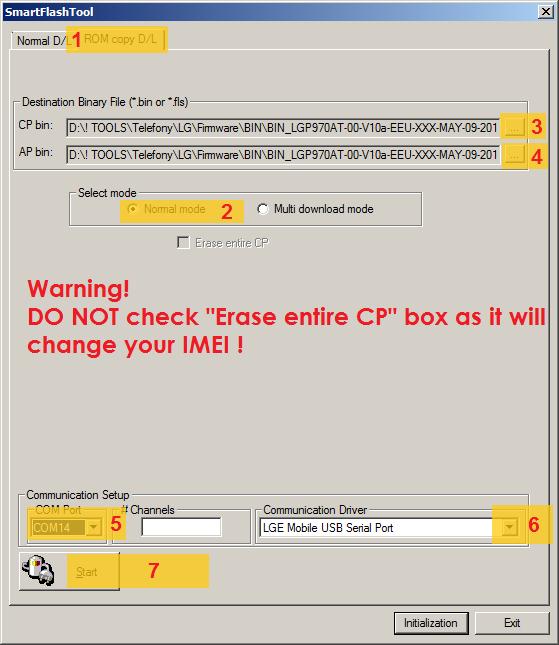
- Select the ” ROM copy D / L ” tab
- Set ” Select mode ” to ” Normal mode “
- Select CP file: “LGP970AT-00-V10a-EEU-XXX-MAY-09-2011 + 0_CP.fls”
- Select AP file: “LGP970AT-00-V10a-EEU-XXX-MAY-09-2011 + 0_AP.bin”
- Connect the phone in the ” S / W Update ” mode :
With the phone turned off , with the battery inserted, hold down the volume + key and connect the USB cable. The USB cable itself must be plugged into the rear connector of the motherboard . After that, the message ” S / W Update ” should appear on the phone , and the drivers will be installed on the computer, if you have not installed them before. - Select COM port (should be selected automatically)
- Select “LGE Mobile USB Serial Port” in “Communication Driver” (should be selected automatically)
- Click “Start” and wait for the end.