MAKE YOUR OWN TARPAULIN AS EASY AS 123 (COMPLETE TUTORIALS)
Mga idol, magshare lang po uli ako.
Tutorial naman about sa paggawa ng tarpaulin.
tulad ng wish ni idol blaze25
I. Download Adobe Photoshop, kahit anong version.. (Gamit ko ay CS5)
meron ng nakapost dito sa atin na CS6 ==>> PASOK DITO Hit thanks kayo sa kanya.
II. Download images needed para sa project nyo. Hallimbawa ay gagawa tayo ng tarpaulin about sa repair.
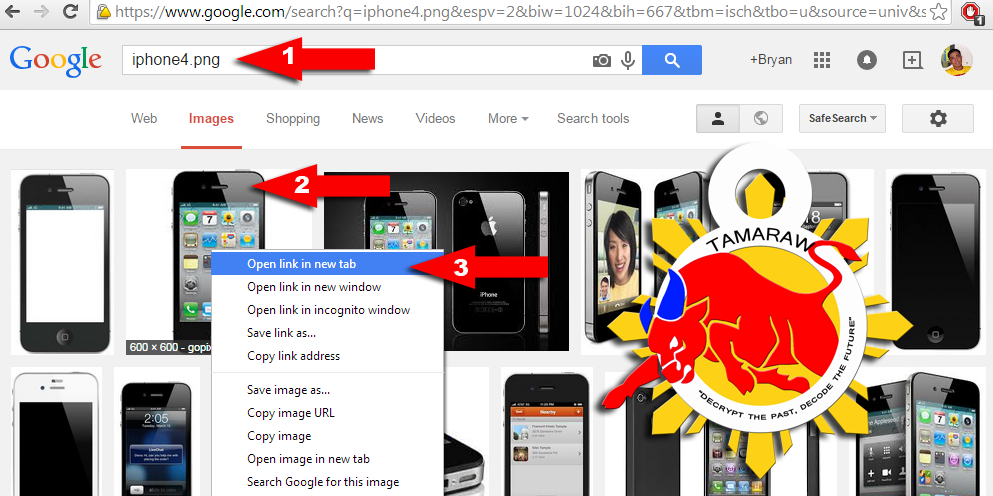
1. Go to Google, type any keyword para sa isisearch nyo at piliin ang images tab (ex. iphone4.png)
Bakit may .PNG sa dulo? para po transparent ang paligid ng images na madadownload natin.
2. Right click lang ang image na napili
3. at select open in new tab.
4. open nyo sa google ang tab ng image nanapili nyo at idownload ito (right click then save as) sa desktop.
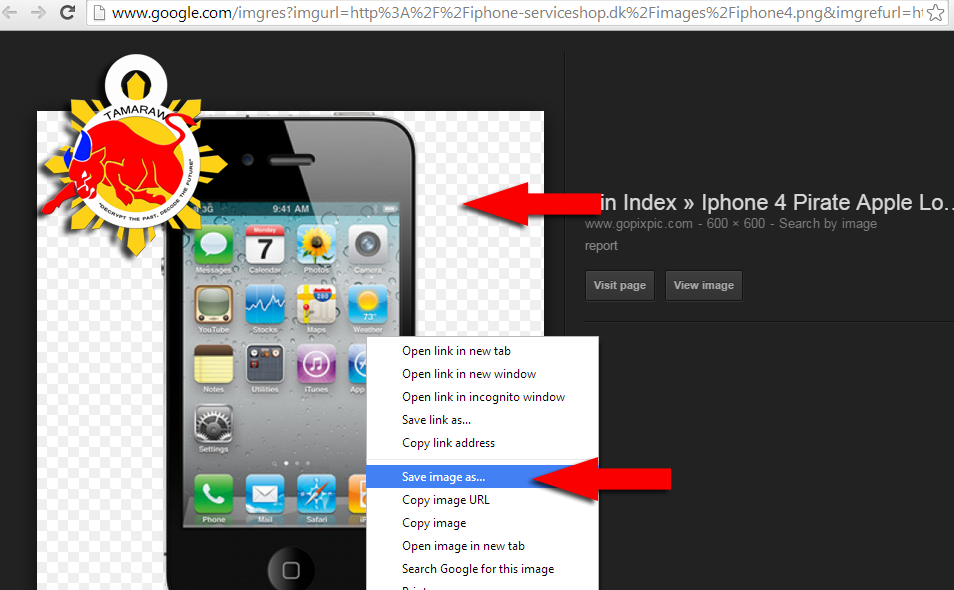
5. kapag nadownload na ay itabi nyo lang muna
III. Open Photoshop, and edit proper size.
1. Open nyo angbagong install na PS nyo.
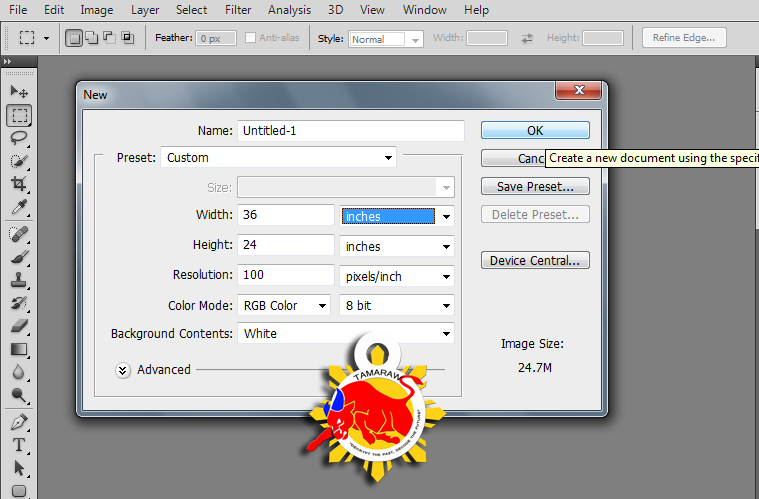
2. Press CTRL + N or go to file and select new.
3. Halimbawa ang gagawin natin ay 2x3 feet, (24"x36") ilagay ang tamang sukat tulad ngnasa larawan
IV. Make a Background Color foryour tarpaulin (Yellow)
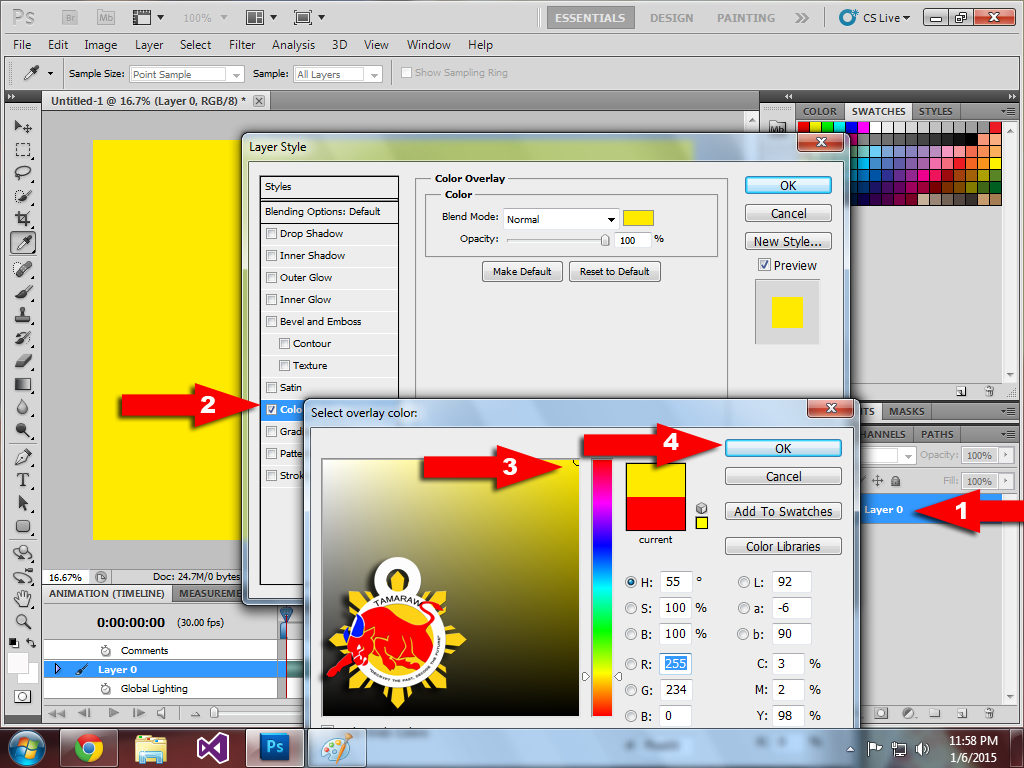
1. Double Click layer 0 para ma-unlock, double click uli para lumabas ang Layer style window
2. Check Color overlay
3. Select color yellow
4. Select OK
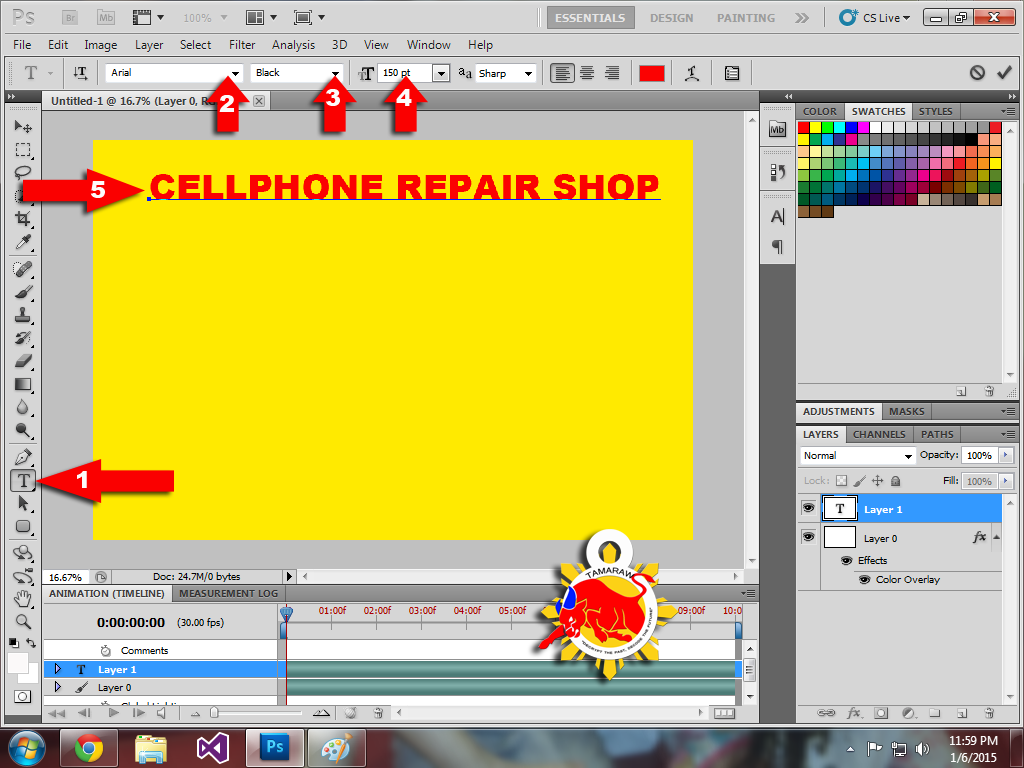
V. Add text information, (ex. CELLPHONE REPAIR)
1. click Horizontal type tool and type the words(CELLPHONE REPAIR SHOP)
2. select font
3. select font style
4. select font size
5. allign and adjust proper positioning
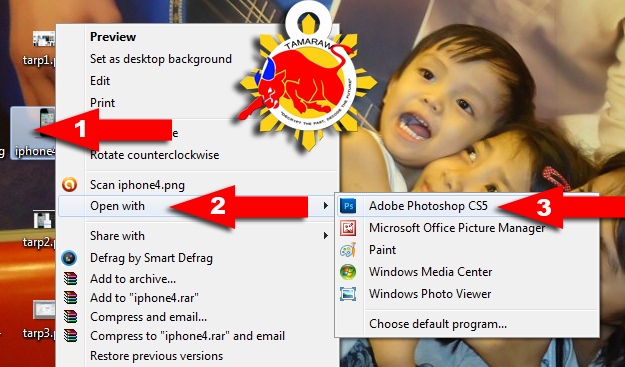
VI. Add your downloaded images for additional designs (sa atin ay iphone4.pngna nakasavesa desktop)
1. right click the image
2. click open with
3. and select Adobe Photoshop, Kapag walanglumalabas sa inyo ay click nyo lang yung sa ibaba na choose default program at ibrowse nyo sa c;\program files\adobe\adobe photoshop cs5\
NOTE: dapat tanggalan nyo ng check yung "Always use the selected program to open this kind of file"
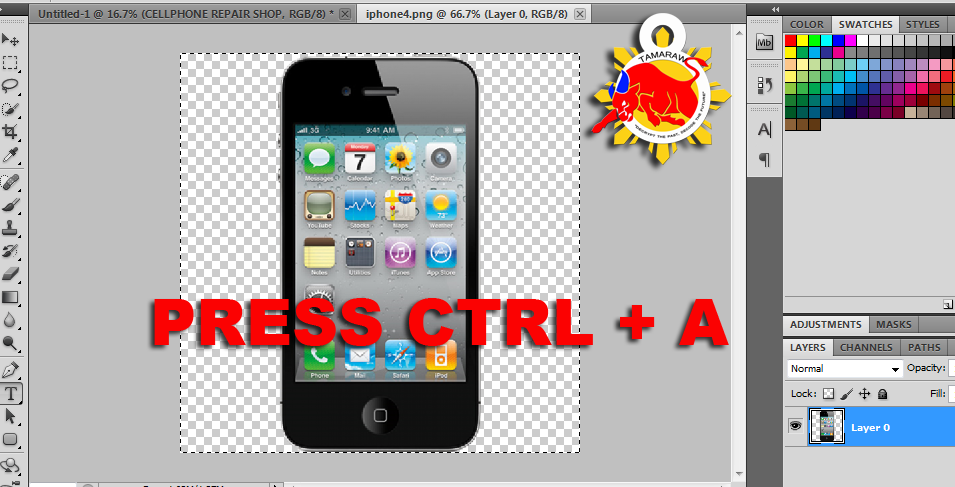
VII. Copy the image and paste to your project
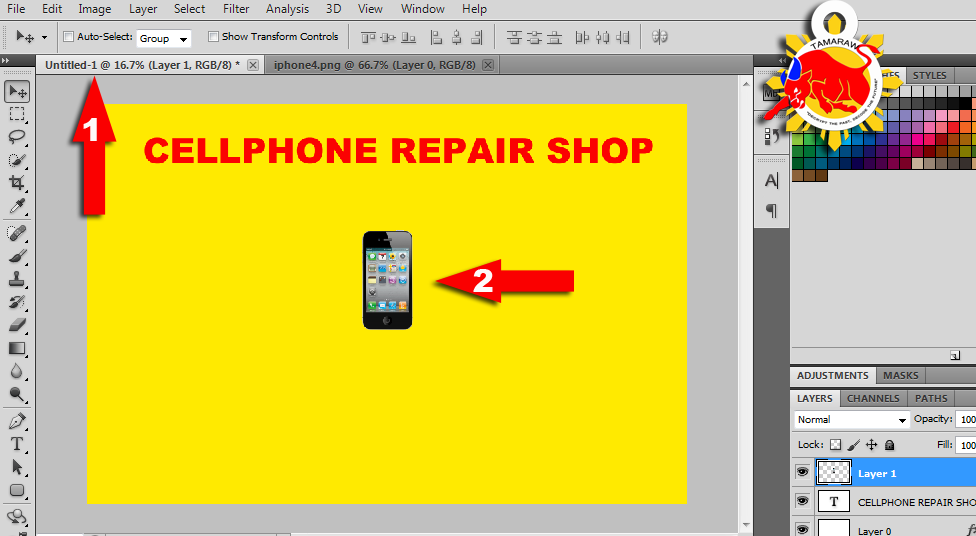
VIII. Open your project then press CTRL + V (paste)
IX. Add additional design to your fonts.
1. click zoom level
2. zoom in your project to 100%
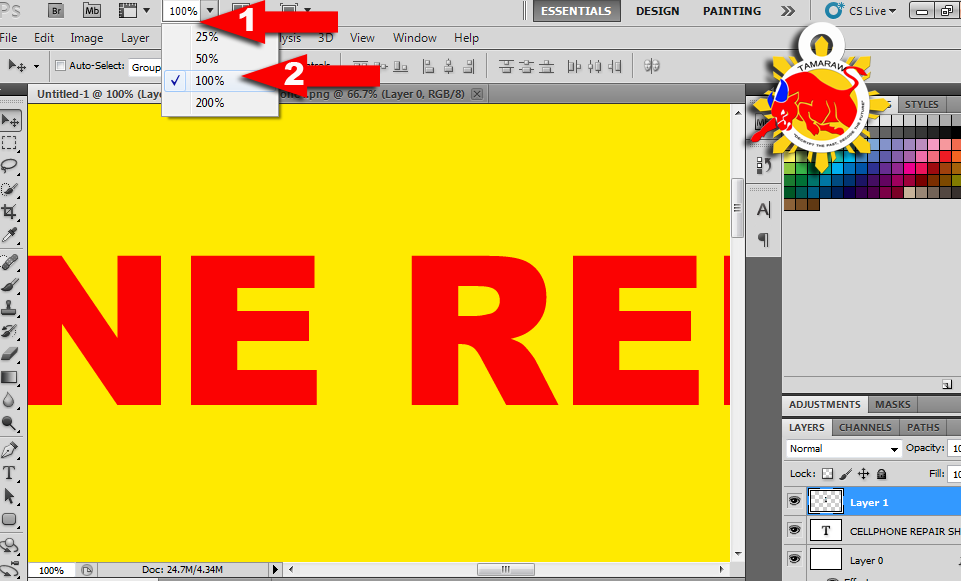
3. tick drop shadow, outer glow at bevel and emboss
tulad ng nasa larawan.
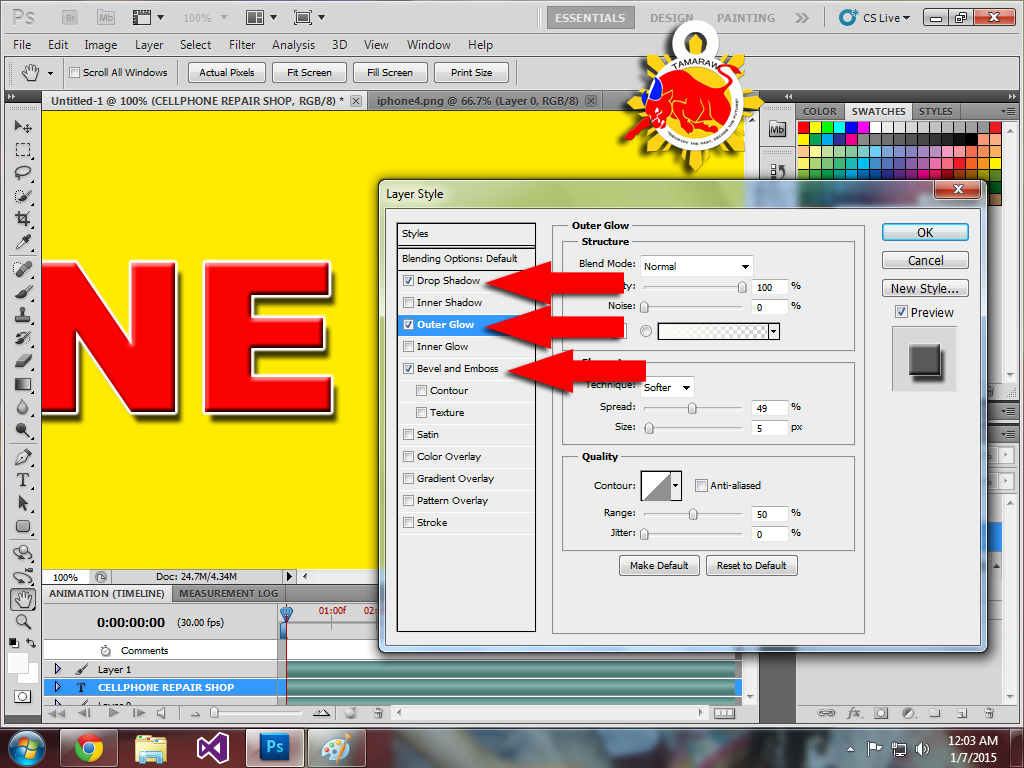
at i-adjust nyo sa nais ninyong design..
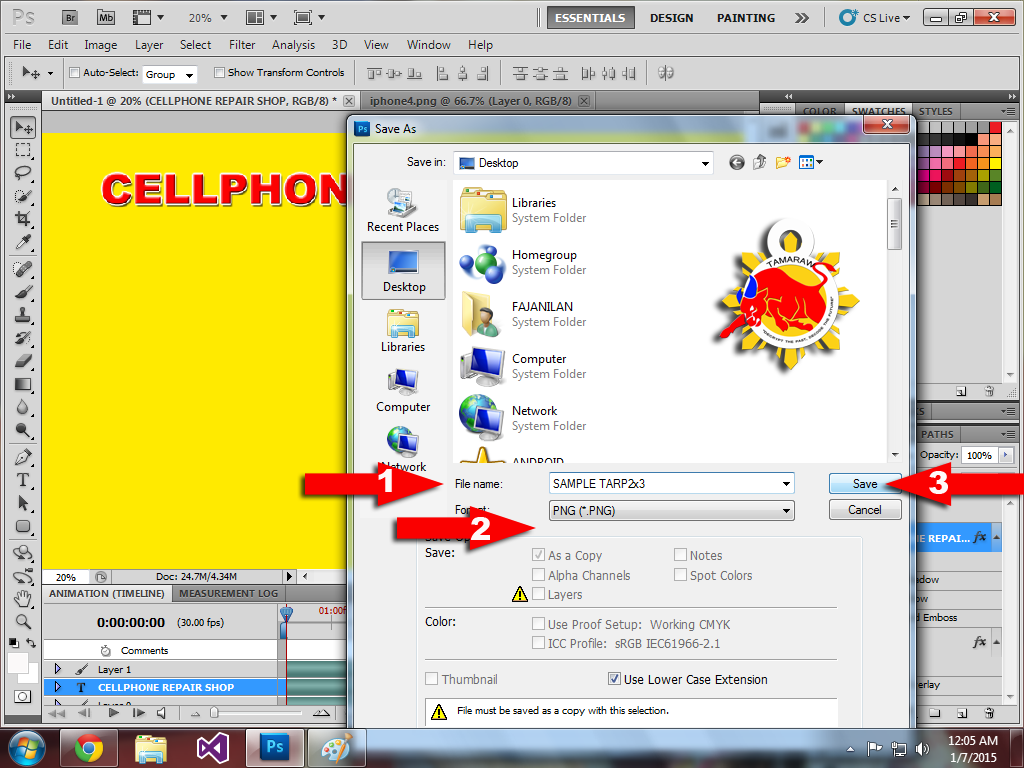
X. Save your project.
Press CTRL + S to save
1. add name to your filename
2. Select PNG or JPG format
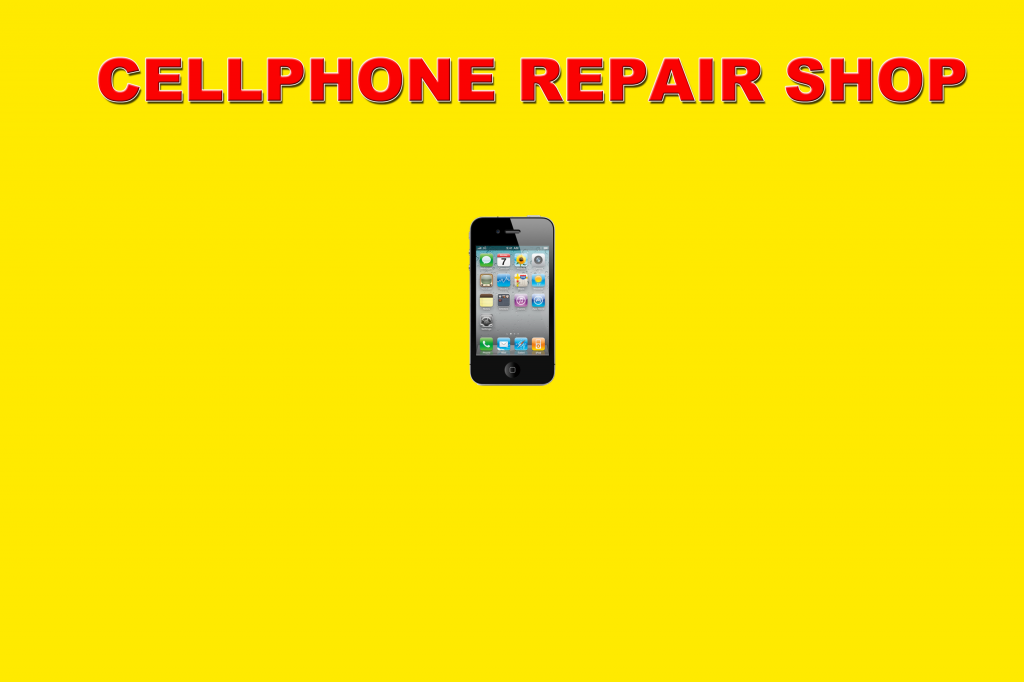
Preview ng sample natin
br .
TAMARAW8
THANKS Button lang ay masaya na ako
Mga idol, magshare lang po uli ako.
Tutorial naman about sa paggawa ng tarpaulin.
tulad ng wish ni idol blaze25
Dami talaga gustong mag pa lay out...,sana may maka isip na lang mag post ng tutor kung paano maka gawa niyan sa photoshop kahit BASIC lang...
I. Download Adobe Photoshop, kahit anong version.. (Gamit ko ay CS5)
meron ng nakapost dito sa atin na CS6 ==>> PASOK DITO Hit thanks kayo sa kanya.
II. Download images needed para sa project nyo. Hallimbawa ay gagawa tayo ng tarpaulin about sa repair.
1. Go to Google, type any keyword para sa isisearch nyo at piliin ang images tab (ex. iphone4.png)
Bakit may .PNG sa dulo? para po transparent ang paligid ng images na madadownload natin.
2. Right click lang ang image na napili
3. at select open in new tab.
4. open nyo sa google ang tab ng image nanapili nyo at idownload ito (right click then save as) sa desktop.
5. kapag nadownload na ay itabi nyo lang muna
III. Open Photoshop, and edit proper size.
1. Open nyo angbagong install na PS nyo.
2. Press CTRL + N or go to file and select new.
3. Halimbawa ang gagawin natin ay 2x3 feet, (24"x36") ilagay ang tamang sukat tulad ngnasa larawan
IV. Make a Background Color foryour tarpaulin (Yellow)
1. Double Click layer 0 para ma-unlock, double click uli para lumabas ang Layer style window
2. Check Color overlay
3. Select color yellow
4. Select OK
V. Add text information, (ex. CELLPHONE REPAIR)
1. click Horizontal type tool and type the words(CELLPHONE REPAIR SHOP)
2. select font
3. select font style
4. select font size
5. allign and adjust proper positioning
VI. Add your downloaded images for additional designs (sa atin ay iphone4.pngna nakasavesa desktop)
1. right click the image
2. click open with
3. and select Adobe Photoshop, Kapag walanglumalabas sa inyo ay click nyo lang yung sa ibaba na choose default program at ibrowse nyo sa c;\program files\adobe\adobe photoshop cs5\
NOTE: dapat tanggalan nyo ng check yung "Always use the selected program to open this kind of file"
VII. Copy the image and paste to your project
VIII. Open your project then press CTRL + V (paste)
IX. Add additional design to your fonts.
1. click zoom level
2. zoom in your project to 100%
3. tick drop shadow, outer glow at bevel and emboss
tulad ng nasa larawan.
at i-adjust nyo sa nais ninyong design..
X. Save your project.
Press CTRL + S to save
1. add name to your filename
2. Select PNG or JPG format
Preview ng sample natin
br .
TAMARAW8
THANKS Button lang ay masaya na ako
Last edited by a moderator:


 O
O