
box
octupos
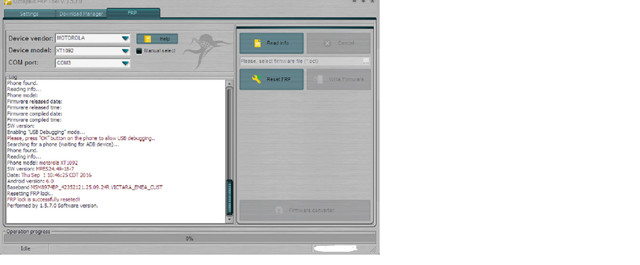
open frp tool
select proper unit
tick reset frp
follow command
viola
done
Selected model: XT1092
Put the phone into Factory Mode:
1. Power phone OFF;
2. Press and hold "Vol-" + "Power" buttons;
3. Select Factory Mode, then confirm your selection;
4. Wait until the phone Power ON;
5. Connect USB cable.
Searching for a phone. Please wait...
Phone found.
Reading info...
Phone model:
Firmware released date:
Firmware released time:
Firmware compiled date:
Firmware compiled time:
SW version:
Enabling "USB Debugging" mode...
Please, press "OK" button on the phone to allow USB debugging..
Searching for a phone (waiting for ADB device)...
Phone found.
Reading info...
Phone model: motorola XT1092
SW version: MPES24.49-18-7
Date: Thu Sep 1 10:46:25 CDT 2016
Android version: 6.0
Baseband MSM8974BP_42352121.25.09.24R VICTARA_EMEA_CUST
Resetting FRP lock..
FRP lock is successfully reseted!
Performed by 1.5.7.0 Software version
2012 bmw x5 xdrive50i 0 60
octupos
open frp tool
select proper unit
tick reset frp
follow command
viola
done
Selected model: XT1092
Put the phone into Factory Mode:
1. Power phone OFF;
2. Press and hold "Vol-" + "Power" buttons;
3. Select Factory Mode, then confirm your selection;
4. Wait until the phone Power ON;
5. Connect USB cable.
Searching for a phone. Please wait...
Phone found.
Reading info...
Phone model:
Firmware released date:
Firmware released time:
Firmware compiled date:
Firmware compiled time:
SW version:
Enabling "USB Debugging" mode...
Please, press "OK" button on the phone to allow USB debugging..
Searching for a phone (waiting for ADB device)...
Phone found.
Reading info...
Phone model: motorola XT1092
SW version: MPES24.49-18-7
Date: Thu Sep 1 10:46:25 CDT 2016
Android version: 6.0
Baseband MSM8974BP_42352121.25.09.24R VICTARA_EMEA_CUST
Resetting FRP lock..
FRP lock is successfully reseted!
Performed by 1.5.7.0 Software version
2012 bmw x5 xdrive50i 0 60