
Note 2 korean Variant
Super kunat...
To connect SHV-E250S phone you have to perform the following
steps:
1. Go to dial window.
2. Enter "319712358" number.
3. Enter "996412" password.
4. Go to System->SIO mode.
5. Select "PDA" radio button for USB section.
6. Go to Qualcomm USB Settings.
7. Select "DM+Modem+ADB".
8. Restart phone.
9. Press "Read Info" in software.
Note: Need micro UART cable on the last step ( Just read logs first before you attempt to unlock)
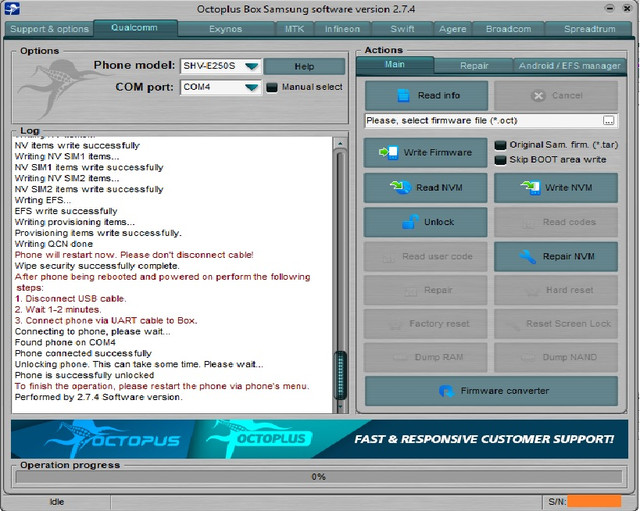
Welcome to Octoplus Box Samsung software version 2.7.4
-----------------------------------------------------------------------------------
Platform: Samsung Android
Selected port: COM78
Selected model: SHV-E250S
Operation: Unlock
Proper android device not found. Make shure that "USB debug" option
on the device is turned on.
Phone unlocking failed
Performed by 2.7.4 Software version.
-----------------------------------------------------------------------------------
Platform: Samsung Android
Selected port: COM4
Selected model: SHV-E250S
Operation: Unlock
Proper android device not found. Make shure that "USB debug" option
on the device is turned on.
Phone unlocking failed
Performed by 2.7.4 Software version.
-----------------------------------------------------------------------------------
Platform: Samsung Android
Selected port: COM80
Selected model: SHV-E250S
Operation: Unlock
Detected phone model: SHV-E250S
Firmware compiled date: Tue Apr 14 12:00:12 KST 2015
PDA version: E250SKSUKOD3
CSC version: E250SSKTKOD3
SW version: E250SKSUKNI2
Phone IMEI: 355827050998142
Phone SN: R33D10VMD9
Android version: 4.4.2 (KOT49H)
Sales code: SKT
Country: KOREA
HW platform: exynos4
HW Chip: smdk4x12_prime
HW Modem: MDM9x15
Warranty Void: 0
SIM 1 status: absent
Codename: t0lteskt
Reading info...
Mode: Normal
Firmware compiled date: Sep 04 2014
Firmware compiled time: 05:00:00
Firmware released date: Sep 25 2014
Firmware released time: 12:53:51
SW Version: M9615A-CEFWMAZM-3.0.12109.193123
Reading QCN...
Send SPC...
Reading mobile property...
Mobile property read successfully
Reading feature mask...
Feature mask read successfully
Reading roaming list 0
Reading roaming list 0 read successfully
Reading NV items...
NV items read successfully
Reading NV SIM1 items...
NV SIM1 items read successfully
Reading NV SIM2 items...
NV SIM2 items read successfully
Reading NV items...
NV items read successfully
Reading EFS...
EFS read successfully
Reading provisioning items...
Provisioning items read successfully
Reading QCN done!
Backup saved as C:\Program Files (x86)\Octoplus\Octoplus_Samsung
\BACKUP\QCN-SHV-E250S-355827050998142-26-11-2018_22-24-
22-.qcn file
Checking Root:
Phone is Rooted.
Reading security backup, please wait...
Backup saved as C:\Program Files (x86)\Octoplus\Octoplus_Samsung
\BACKUP\Security-SHV-E250S-355827050998142-26-11-2018_22-29-
22-.asec file
Wiping EFS...
EFS wipe successfully
Phone will restart now. Please don't disconnect cable!
Searching for a phone. Please wait...
Reading info...
Mode: Normal
Firmware compiled date: Sep 04 2014
Firmware compiled time: 05:00:00
Firmware released date: Sep 25 2014
Firmware released time: 12:53:51
SW Version: M9615A-CEFWMAZM-3.0.12109.193123
Send SPC...
SPC send successfully
Writing QCN...
Writing NV items...
NV items write successfully
Writing NV SIM1 items...
NV SIM1 items write successfully
Writing NV SIM2 items...
NV SIM2 items write successfully
Wrting EFS...
EFS write successfully
Writing provisioning items...
Provisioning items write successfully.
Writing QCN done
Phone will restart now. Please don't disconnect cable!
Wipe security successfully complete.
After phone being rebooted and powered on perform the following
steps:
1. Disconnect USB cable.
2. Wait 1-2 minutes.
3. Connect phone via UART cable to Box.
Connecting to phone, please wait...
Found phone on COM4
Phone connected successfully
Unlocking phone. This can take some time. Please wait...
Phone is successfully unlocked
To finish the operation, please restart the phone via phone's menu.
Performed by 2.7.4 Software version.
(l:0(l:0(l:0
Super kunat...
To connect SHV-E250S phone you have to perform the following
steps:
1. Go to dial window.
2. Enter "319712358" number.
3. Enter "996412" password.
4. Go to System->SIO mode.
5. Select "PDA" radio button for USB section.
6. Go to Qualcomm USB Settings.
7. Select "DM+Modem+ADB".
8. Restart phone.
9. Press "Read Info" in software.
Note: Need micro UART cable on the last step ( Just read logs first before you attempt to unlock)
Welcome to Octoplus Box Samsung software version 2.7.4
-----------------------------------------------------------------------------------
Platform: Samsung Android
Selected port: COM78
Selected model: SHV-E250S
Operation: Unlock
Proper android device not found. Make shure that "USB debug" option
on the device is turned on.
Phone unlocking failed
Performed by 2.7.4 Software version.
-----------------------------------------------------------------------------------
Platform: Samsung Android
Selected port: COM4
Selected model: SHV-E250S
Operation: Unlock
Proper android device not found. Make shure that "USB debug" option
on the device is turned on.
Phone unlocking failed
Performed by 2.7.4 Software version.
-----------------------------------------------------------------------------------
Platform: Samsung Android
Selected port: COM80
Selected model: SHV-E250S
Operation: Unlock
Detected phone model: SHV-E250S
Firmware compiled date: Tue Apr 14 12:00:12 KST 2015
PDA version: E250SKSUKOD3
CSC version: E250SSKTKOD3
SW version: E250SKSUKNI2
Phone IMEI: 355827050998142
Phone SN: R33D10VMD9
Android version: 4.4.2 (KOT49H)
Sales code: SKT
Country: KOREA
HW platform: exynos4
HW Chip: smdk4x12_prime
HW Modem: MDM9x15
Warranty Void: 0
SIM 1 status: absent
Codename: t0lteskt
Reading info...
Mode: Normal
Firmware compiled date: Sep 04 2014
Firmware compiled time: 05:00:00
Firmware released date: Sep 25 2014
Firmware released time: 12:53:51
SW Version: M9615A-CEFWMAZM-3.0.12109.193123
Reading QCN...
Send SPC...
Reading mobile property...
Mobile property read successfully
Reading feature mask...
Feature mask read successfully
Reading roaming list 0
Reading roaming list 0 read successfully
Reading NV items...
NV items read successfully
Reading NV SIM1 items...
NV SIM1 items read successfully
Reading NV SIM2 items...
NV SIM2 items read successfully
Reading NV items...
NV items read successfully
Reading EFS...
EFS read successfully
Reading provisioning items...
Provisioning items read successfully
Reading QCN done!
Backup saved as C:\Program Files (x86)\Octoplus\Octoplus_Samsung
\BACKUP\QCN-SHV-E250S-355827050998142-26-11-2018_22-24-
22-.qcn file
Checking Root:
Phone is Rooted.
Reading security backup, please wait...
Backup saved as C:\Program Files (x86)\Octoplus\Octoplus_Samsung
\BACKUP\Security-SHV-E250S-355827050998142-26-11-2018_22-29-
22-.asec file
Wiping EFS...
EFS wipe successfully
Phone will restart now. Please don't disconnect cable!
Searching for a phone. Please wait...
Reading info...
Mode: Normal
Firmware compiled date: Sep 04 2014
Firmware compiled time: 05:00:00
Firmware released date: Sep 25 2014
Firmware released time: 12:53:51
SW Version: M9615A-CEFWMAZM-3.0.12109.193123
Send SPC...
SPC send successfully
Writing QCN...
Writing NV items...
NV items write successfully
Writing NV SIM1 items...
NV SIM1 items write successfully
Writing NV SIM2 items...
NV SIM2 items write successfully
Wrting EFS...
EFS write successfully
Writing provisioning items...
Provisioning items write successfully.
Writing QCN done
Phone will restart now. Please don't disconnect cable!
Wipe security successfully complete.
After phone being rebooted and powered on perform the following
steps:
1. Disconnect USB cable.
2. Wait 1-2 minutes.
3. Connect phone via UART cable to Box.
Connecting to phone, please wait...
Found phone on COM4
Phone connected successfully
Unlocking phone. This can take some time. Please wait...
Phone is successfully unlocked
To finish the operation, please restart the phone via phone's menu.
Performed by 2.7.4 Software version.
(l:0(l:0(l:0