
oppo a3s cphCPH1853 password / frp done by UT tool
procedure:
- open ut tool https://unlocktool.net/ download --->
- tab oppo search cph1853
- [edl] factory reset
- para pomasok driver off unit hold voll down and power button
- Please boot to edl on recovery mode, press the text "Ver 1.2" many times then select OK phone will go to download mode !
and wait...... mag done
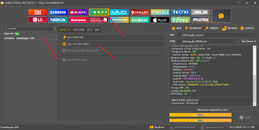
sa frp typ: *813#
logs:
[EDL] FACTORY RESET Selected Model : Oppo A3s
Code Name : CPH1853
Operation : Factory Reset [1]
Authenticating... OK
Retrieving data... OK [232.7 KiB]
Initializing data... OK
Tips : Please boot to edl on recovery mode, press the text "Ver 1.2" many times then select OK phone will go to download mode !
Waiting for HS-USB QDLoader 9008... COM3
Connecting to device... OK
Handshaking... OK
Reading bootloader info... OK
Serial : 4245795357 SoC : [Snapdragon 450] [SDM450] [0x0009A0E1]
OEM : Qualcomm [0x0000] Model : Unknown [0x0000]
PK_HASH[0] : 2ED896C3A8D0B9FBE8A4D55ED77AB4B2
PK_HASH[1] : EA52D4D8DAF8DB2F37D458C05E4B472D
Writing flash programmer... OK
Connecting to flash programmer... OK
Configuring device... OK
Firehose config : eMMC [Sector:512] [Target:4096] [Host:1048576]
Reading partition map... OK - LU Count : 1
Reading software info... OK [system]
Model Name : CPH1829
Manufacturer : OPPO
Platform : msm8953
Android Version : 8.1.0
Security Patch : 2020-12-05
Build ID : CPH1829EX_11_A.39
Build Date : Sun Dec 27 21:27:30 CST 2020
OTA Version : CPH1829EX_11.A.39_0390_202012272032
Erasing FRP... OK
Erasing USERDATA... OK
Rebooting... OK
UNLOCKTOOL 2024.09.02.0
Elapsed time : 39 seconds
procedure:
- open ut tool https://unlocktool.net/ download --->
- tab oppo search cph1853
- [edl] factory reset
- para pomasok driver off unit hold voll down and power button
- Please boot to edl on recovery mode, press the text "Ver 1.2" many times then select OK phone will go to download mode !
and wait...... mag done
sa frp typ: *813#
logs:
[EDL] FACTORY RESET Selected Model : Oppo A3s
Code Name : CPH1853
Operation : Factory Reset [1]
Authenticating... OK
Retrieving data... OK [232.7 KiB]
Initializing data... OK
Tips : Please boot to edl on recovery mode, press the text "Ver 1.2" many times then select OK phone will go to download mode !
Waiting for HS-USB QDLoader 9008... COM3
Connecting to device... OK
Handshaking... OK
Reading bootloader info... OK
Serial : 4245795357 SoC : [Snapdragon 450] [SDM450] [0x0009A0E1]
OEM : Qualcomm [0x0000] Model : Unknown [0x0000]
PK_HASH[0] : 2ED896C3A8D0B9FBE8A4D55ED77AB4B2
PK_HASH[1] : EA52D4D8DAF8DB2F37D458C05E4B472D
Writing flash programmer... OK
Connecting to flash programmer... OK
Configuring device... OK
Firehose config : eMMC [Sector:512] [Target:4096] [Host:1048576]
Reading partition map... OK - LU Count : 1
Reading software info... OK [system]
Model Name : CPH1829
Manufacturer : OPPO
Platform : msm8953
Android Version : 8.1.0
Security Patch : 2020-12-05
Build ID : CPH1829EX_11_A.39
Build Date : Sun Dec 27 21:27:30 CST 2020
OTA Version : CPH1829EX_11.A.39_0390_202012272032
Erasing FRP... OK
Erasing USERDATA... OK
Rebooting... OK
UNLOCKTOOL 2024.09.02.0
Elapsed time : 39 seconds