
Good day to my fellow ka PINOYtech!
FRP BYPASS SA OPPO A57 BA HANAP NYO ?
USE THIS METHOD- TESTED KO TO
WATCH THIS VIDEO TUTORIAL KUNG NAHIHIRAPAN : https://www.youtube.com/watch?v=bun2mgnL6tI
HERE'S THE TEXT PROCEEDURES
step 1 : Turn on Talk Back using long pressed Vol + Vol - button and wait until Accessibility Shortcut appeared.
step 2 : after Accessibility Pop-up on your screen pressed Use Accessibility Shortcut.
step 3 : swipe left to up gesture to use Voice Command.
step 4 : if there's Permission Bar pops-up on your screen press Allow or While using this app.
step 5: then if there's a green dots on the edge of the screen or mic logo, speak " GOOGLE ASSISTANT ".
step 6 : after Google Assistant pops-up, Turn off your talkback by pressing vol- and vol + button for 5-7 seconds.
then after that proceed to step 7.
Step 7 : then type or speak "Open Youtube " to redirect to YouTube App.
Step 8: if youtube app is already pop-up on your screen Go to more settings > About > Term and Conditions to redirect to Default Browser or Chrome.
step 9 : go to https://vnrom.net/bypass/
step 10 : press the Setting shortcut link.
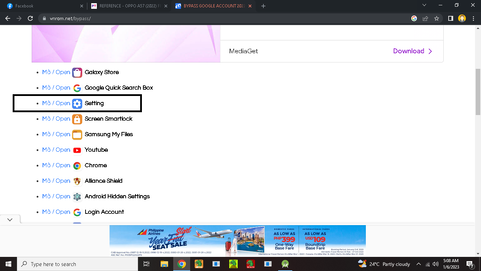
after you are in of system settings
Step 11 : find factory reset
step 12 : press Reset all Settings
step 13 : after done loading press Erase all Data
And wait after restarting phone and that's all <3 <3 sana makatulong.
FRP BYPASS SA OPPO A57 BA HANAP NYO ?
USE THIS METHOD- TESTED KO TO
WATCH THIS VIDEO TUTORIAL KUNG NAHIHIRAPAN : https://www.youtube.com/watch?v=bun2mgnL6tI
HERE'S THE TEXT PROCEEDURES
step 1 : Turn on Talk Back using long pressed Vol + Vol - button and wait until Accessibility Shortcut appeared.
step 2 : after Accessibility Pop-up on your screen pressed Use Accessibility Shortcut.
step 3 : swipe left to up gesture to use Voice Command.
step 4 : if there's Permission Bar pops-up on your screen press Allow or While using this app.
step 5: then if there's a green dots on the edge of the screen or mic logo, speak " GOOGLE ASSISTANT ".
step 6 : after Google Assistant pops-up, Turn off your talkback by pressing vol- and vol + button for 5-7 seconds.
then after that proceed to step 7.
Step 7 : then type or speak "Open Youtube " to redirect to YouTube App.
Step 8: if youtube app is already pop-up on your screen Go to more settings > About > Term and Conditions to redirect to Default Browser or Chrome.
step 9 : go to https://vnrom.net/bypass/
step 10 : press the Setting shortcut link.
after you are in of system settings
Step 11 : find factory reset
step 12 : press Reset all Settings
step 13 : after done loading press Erase all Data
And wait after restarting phone and that's all <3 <3 sana makatulong.
Last edited:


